
Treemap Visualization of Code Metrics
Treemap Visualization of Code Metrics
Metric View in CppDepend provides a powerful treemap visualization that helps you understand your code base at a glance. By representing code elements as nested rectangles, the treemap makes it easy to spot patterns, identify problematic areas, and explore your code structure visually.
Getting Started Video
Watch the Getting Started Video (2:14 min)
Learn how to use the treemap visualization to explore your code base.
Introduction
In the Metric View, the code base is represented through a 트리맵. Treemapping is a method for displaying tree-structured data by using nested rectangles. The tree structure used in CppDepend treemap is the usual code hierarchy:
- C/C++ projects contain namespaces,
- 네임스페이스에는 유형이 포함됨,
- Types contain methods and fields.
With treemap, rectangles represent code elements. The option level determines the kind of code element represented by unit rectangles. The option level can take the 5 values: project, namespace, type, method 및 field. The two screenshots below show the same code base represented through type level on left, and namespace level on right.
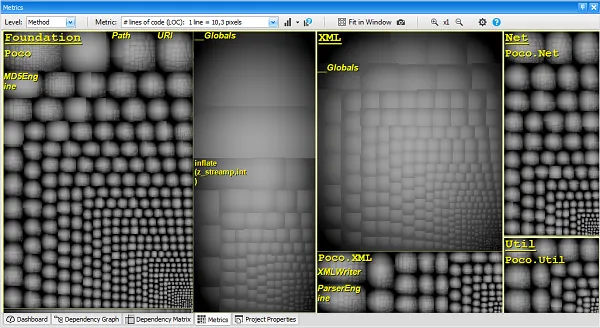
The option 코드 메트릭 of the treemap determines the size of rectangles. For example if level is set to type 메트릭이 다음으로 설정됨: number of Lines of Code, each unit rectangle represents a type, and the size of a unit rectangle is proportional to the number of Lines of Code of the corresponding type.
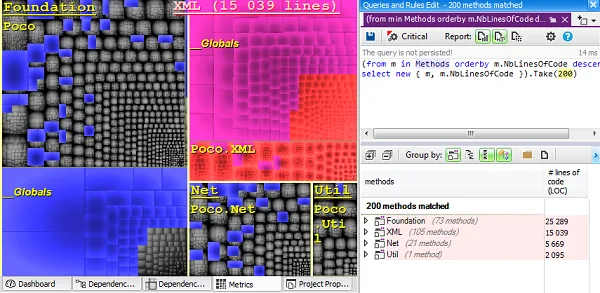
If a PRQL query is currently edited, the set of code elements matched by the query is shown on the treemap as a set of blue rectangles. In the screenshot below, a PRQL query matches the 200 largest methods. Here the treemap level is method and the metric is number of lines of code. As expected, we can see that blue rectangles represent the 200 largest unit rectangles of the treemap.
The screenshot below also shows that the currently pointed code element (here the project XML) is shown as a red rectangle on the treemap.
Common Scenarios
By choosing an appropriate combination of metric 및 level values, the Metric View helps see patterns that would be hard to spot with other means.
너무 크고 복잡함
CppDepend provides many code metrics to spot too big and too complex code. Methods with too many parameters, too many variables, too many lines of code, too high cyclomatic complexity etc... should be banished. The same way types with too many lines of code should be banished too.
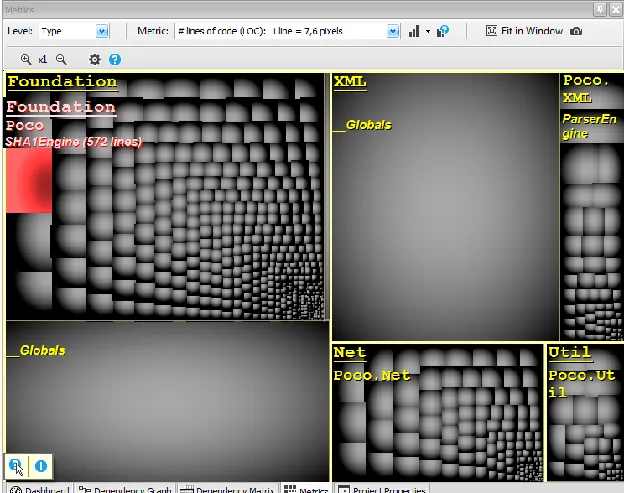
On the screenshot below, the treemap level is set to type and the metric is number of lines of code. Large rectangles represent large types of the code base. Hovering a rectangle with the mouse indicates the type metric values, here the type number of lines of code. Clearly, code treemapping helps not only spotting too large and too complex code elements, but also, it helps comparing their respective size and complexity.
Flaws Localization
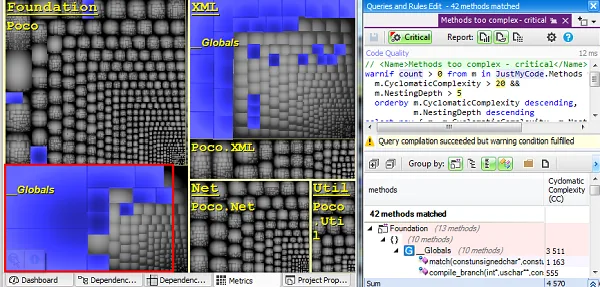
In the screenshot below we are asking with a PRQL query, for methods with too many parameters and too many variables. Blue rectangles show matched methods on the treemap. Here the interesting point is that some matched methods seem to be grouped. Because treemap is a hierarchical view, if a set of code elements is grouped, it means that the code elements belong to the same parent. And indeed, here the 12 methods grouped belong to the same type.
Spotting the parent types of these 12 methods would have been hard without treemapping. Now the code quality reviewer can focus his attention on this region that seems to contain more flaws than other part of the code base.
하향식 코드 탐색
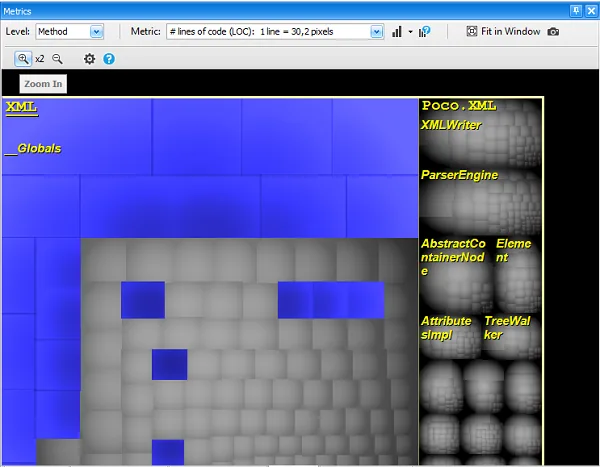
The CppDepend treemap metric view supports zoom-in and zoom-out. This makes it easy to zoom on a particular project, namespace or class. This can be especially useful to explore and compare the volume of components in terms of lines of code.
By no means productivity should be measured in terms of lines of code. However counting lines of code has been proven to be a useful metric to accurately estimate software, given a certain context of an organization. The code base features are somehow partitioned into assemblies, namespaces and types. With treemapping, these artifacts become rectangles that sit side-by-side. Rectangles areas, hence features weight, can be compared visually. Being able to periodically explore code size through treemapping is a unique way to build an accurate sense of feature weight and feature cost.
Do the experiment to visualize treemap on a code base you know well, and you'll be surprised to discover unexpected feature size.
Code Structure Observations
Choosing to use the Metric View with a metric different than volume (lines of code, number of parameters for methods...) or complexity, can reveal interesting observations.
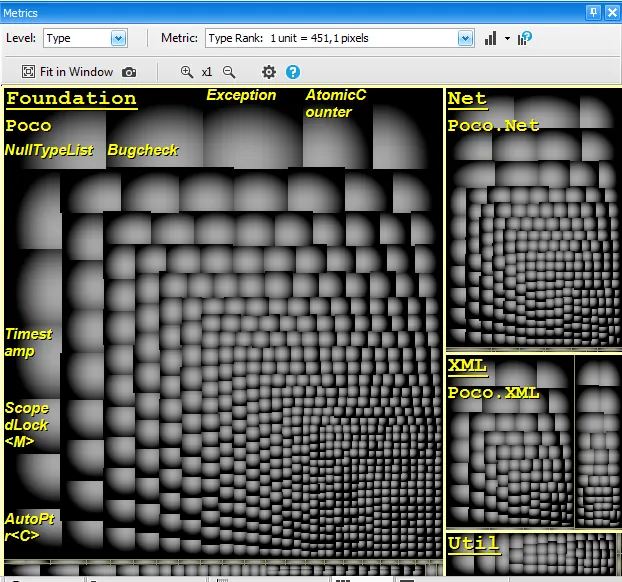
ranking metric is a code metric that measures the popularity of a type or a method in a code base. Using treemapping with the ranking metric gives a clear view of where popular types are declared. This quickly gives information about what is important in the code base.
The screenshot below shows types of the Microsoft DLR (Dynamic Language Runtime) code base treemaped with the ranking metric. The treemap indicates that CallSite 및 표현식 are popular concepts of the DLR, and this is indeed the case.
The same kind of interesting Code Structure Observations can be made with code metrics such as Afferent/Efferent 결합 또는 Level.
Try CppDepend Today
Start your 14-day free trial with full access to all documentation features. No credit card required.