
외부 도구 통합
통합 품질 대시보드
외부 도구 통합
CppDepend provides many interesting features to exploit all data extracted from the analysis phase, and it's very interesting to use these features to exploit the analysis data of the other static analysis tools like:
You can import the XML files of these tools from CppDepend.

Query External Tool Data with Code Quest
CppDepend supports Code Query Linq (Code Quest) for maximum flexibility. It will help you answer in seconds your questions about your code base. And it's very interesting to use it to query the data extracted from external static analysis tools.
CppDepend provides many useful Code Quest queries to query the plugins data:
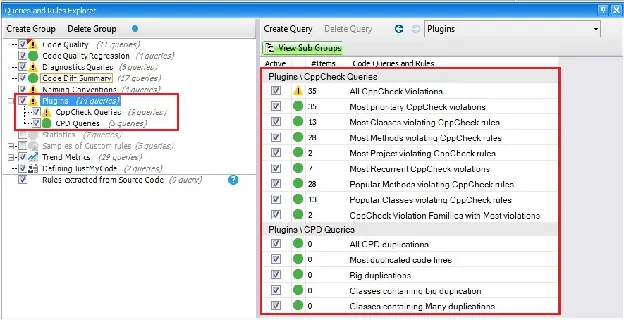
And you can create your custom Code Quest queries to query the data extracted from the analysis of CppDepend and the other tools.
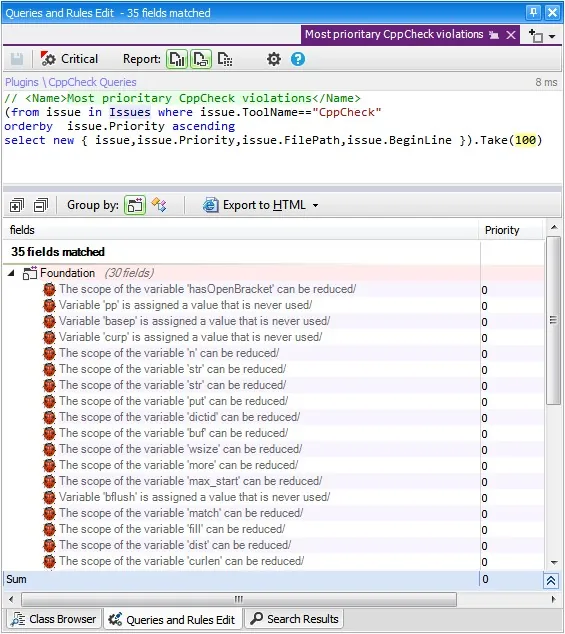
우선순위 높은 이슈 찾기
For example we can search for popular methods containing CppCheck problems — these methods could have high priority because these issues could impact many other methods.
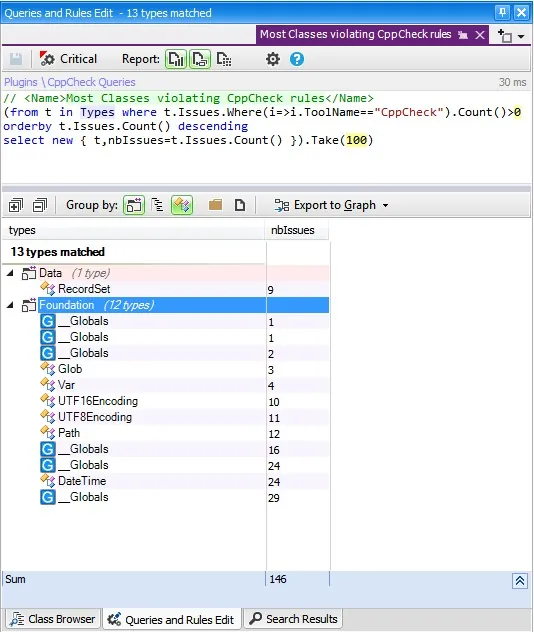
Or search for most classes violating the CppCheck rules:
Trend Monitoring for External Tools
Another interesting feature that can be useful to exploit the external tools data is the trend monitoring. The goal is to have a chart of the CppCheck violations evolution. It's very useful for a manager to follow the projects quality between versions.
CppDepend is also open to the other static analysis tools. Discover how you can plug another tool.
Key Benefits
- ✓SonarQube 결과 가져오기
- ✓커버리지 도구 통합
- ✓정적 분석기 결과 집계
- ✓통합 품질 대시보드
시도 외부 도구 통합 with CppDepend
Start your 14-day free trial with full access to all features. No credit card required.