
Improved Visual Studio Projects Analysis

With 2017.3, launching the analysis from within Visual Studio gets the build specification using the Visual Studio API for more reliable results.
Exclude Files from the Analysis

It's now possible to exclude some files from the analysis for more targeted code quality assessment.
More Resources and Videos

Many resources and videos are available to help you learn about a wide range of CppDepend capabilities.
Interactive Abstractness vs. Instability Diagram

The Abstractness vs Instability diagram in the report is now a JavaScript interactive control.
Hovering over a dot shows the corresponding project name and values.
A search textbox lets you filter a subset of projects by name.
Custom CQLinq Extensions
Develop your custom CQLinq extensions using the API for more flexibility.
Easily define new metrics by adding extension methods for Application, Project, Type, Method, and Field.
Define extensions to reuse query logic or entire rules.
New Licensing and Release Scheme
CppDepend licensing moved to a yearly subscription model.
3 to 4 important releases per year instead of one major release every 18 months.
Perpetual fallback license for the exact version available at the time of purchase.
Up to 40% discount for continuous subscription.
Smart Technical Debt Estimation

Rules can assign technical debt and annual interest values to issues.
Technical debt = estimated man-time to fix the issue.
Annual interest = estimated man-time consumed per year if left unfixed.
Issues have severity levels: blocker, critical, major, minor, info.
Dashboard shows estimated Debt values and evolution since baseline.
Quality Gates
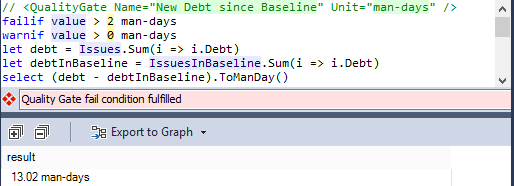
CQLinq can now write quality gates to fail builds when thresholds are violated.
Monitor any fact concerning code, technical-debt, rules and issues.
Quality gates can rely on differences since the baseline (diff).
11 quality gates provided by default.
Better Issues Management

New Issues menu offers actionable options to list issues by priority.
Browse debt and issues per rule or per code element.
Quality gates, rules and issues numbers shown on the dashboard — all clickable.
List issues with particular severity, added or fixed since the baseline.
Hovering over an issue displays a complete description.
Support for Visual Studio 2017

CppDepend 2017.1 supports Visual Studio 2017.
Also supports Visual Studio 2015, 2013, 2012 and 2010.
Code Querying Improvements

New queryable domains: QualityGates, Issues, IssuesInBaseline, Rules.
New syntax to write quality gates.
Run the currently edited code query against the baseline.
Queries can return code elements of various kinds: projects, namespaces, types, methods, fields.
Return technical debt values: Debt, AnnualInterest, DebtRating, Severity, TrendIcon.
Colour scale on query result metric values for easy comparison.
Simplified queries like Methods or JustMyCode.CodeElements.
Default Rules-Set Improvements
All default rules include debt/interest estimation formulas.
CWE rules added to the default rules.
New rules for Memory Management, STL, and IO usage.
Dashboard Improvements
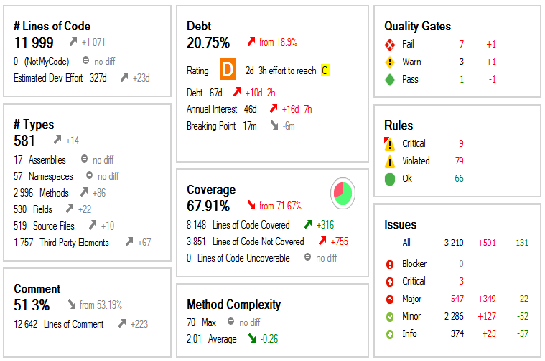
Dashboards improved in CppDepend UI, Visual Studio, and generated reports.
Contains technical debt estimations, quality gates, rules and issues data.
Visual indicator shows progression since baseline.
Red and green coloured values pinpoint progress or regression.
Enhanced Baseline Experience

Any stored baseline can be applied from the dashboard with a single click.
New projects have baseline settings set to 30 days ago by default.
Rules and Quality Gates executed against both current and baseline analysis results.
Search panel matches code elements added, refactored or removed since baseline.
Report Improvements
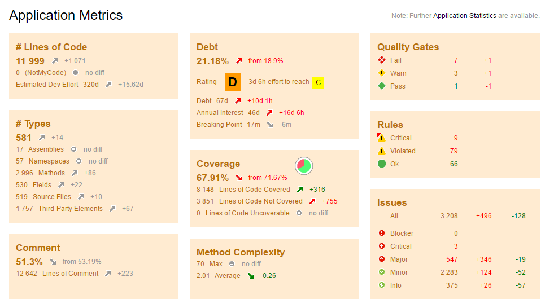
Report dashboard contains information on debt and issues.
Main section shows Quality Gates status summary.
Rules Summary shows issues added and fixed per rule.
Green/red colour scale on code coverage values.
Ready to try CppDepend?
Start your 14-day free trial with full access to all features. No credit card required.
Download Free Trial