
Dependency Graph Completely Rebuilt
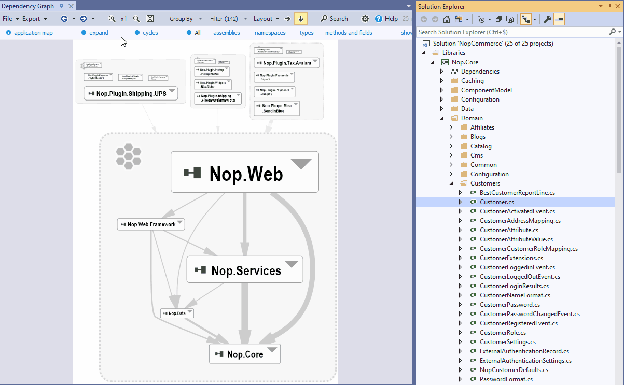
New navigation system: Drag and drop from Visual Studio solution explorer, Expand/Collapse parent elements, Search elements by name, Call/Coupling/Inheritance graphs generated with a single-click, Center selected elements, Undo/Redo.
New layout options: Group-By Assemblies/Namespaces/Types/Clusters, Filters for third-party assemblies, code generated, non-public elements.
Box size proportional to element size, Edge width proportional to coupling strength.
Color conventions instantly identify caller/callee elements.
Graph can be saved/loaded as a list of actions (refreshed when code changes).
Export to SVG vector or PNG bitmap format.
Dependency Graph Scales on Very Large Applications

The architecture of large applications can be explored and navigated live.
Handles graphs made of 15,000+ classes with smooth zoom and navigation.
Search in Graph

Search for elements by name on large graphs in real-time.
Keep or remove matched elements.
Regex supported.
Search all namespaces containing a string, select them, then expand to show children classes.
Graph of Entangled Code
The cycles link edits a code query matching cycles between namespaces.
A cycle of 30 namespaces exported to the graph — all depending on each other forming a super-component.
Graph of Changes since Baseline

If a baseline is available, the changes map link opens the search panel.
Search classes, methods and fields added or modified since the baseline.
Export these elements to the graph for visual comparison.
Source File Store Out Of The Box
Parsed source files are now zipped at analysis time — transparent, no configuration needed.
Enables comparison of source file modifications against baseline version.
When opening a source file declaration, if not found locally it is fetched from the analysis result zip store.
Code Diffs are now Easier to Browse

Double-clicking a code element changed since the baseline compares older and newer source.
In Visual Studio 2019/2017/2015/2013/2012, the diff panel opens in the current VS instance.
New menu Visual Studio CppDepend Code Diff since Baseline opens the Search Code Elements by Change panel.
CppDepend on Linux Completely Rebuilt

The Linux GUI is completely rebuilt using the GTK framework for better user experience.
Analyse out of the box Eclipse and QtCreator projects.
SonarQube plugin now available on Linux.
Color Conventions to Highlight Dependents

Green for direct callers, dark-green for callers of callers (recursive).
Blue for direct callees, dark-blue for callees of callees (recursive).
Red for mutual dependents, dark-red for non-direct mutual dependents (recursive).
A help panel explains the color convention and can be dismissed.
Obtain a Call Graph with a Single-Click

Click a code element, then click callers and callees, callers or callees.
Use a combo-box to select the call depth.
A call graph can be obtained from several elements selected.
A code query is generated in the background to match elements shown.
Obtain a Coupling Graph with a Single-Click

Click an edge between 2 elements, then click coupling graph.
Shows children elements involved in the coupling (e.g., all classes involved in dependency between two projects).
A code query is generated in the background to match elements shown.
Export to SVG Vector or PNG Bitmap Format

Export dependency graphs to SVG vector or PNG bitmap format.
SVG exports can be opened directly in the browser for high-quality viewing.
Complex Graph Simplified with Clusters
Complex graphs are simplified with Cluster grouping.
Group-By Assemblies, Namespaces, Types, or Clusters for cleaner visualization.
The graph shown in reports has been improved with the new Cluster feature.
CUDA Support
CppDepend fully supports the analysis of CUDA-based applications.
Improved Physical Structure Analysis

Choose between logical view (code grouped by namespaces) or physical view (code grouped per file).
The new dependency graph explores dependencies between folders and files.
CQLinq queries can query folders and files with many metrics for advanced custom rules.
The Dependency Matrix explores dependencies between folders and files in depth.
Bamboo and AppVeyor Integration
CppDepend can now be integrated with Bamboo and AppVeyor CI/CD platforms.
Ready to try CppDepend?
Start your 14-day free trial with full access to all features. No credit card required.
Download Free Trial