

Keep control over your AI generated code
AI coding assistants generate code at incredible speed, but without proper oversight, that code can become a maintenance nightmare. CppDepend gives you the visibility and control you need: inspect every detail, visualize hidden dependencies, and write custom queries to validate AI output against your architecture rules. As highlighted in our recent release, CppDepend 2026.1 is built to help you gain clarity and control over both human and AI-generated code.
Code Insight: Deep Dive into Every AI generated Code Element
Code Insight provides a unified, interactive view of each code element, giving developers all the relevant information in one place through dedicated tabs. For every project, namespace, type, or method Code Insight gathers structural data, metrics, and analysis results into a single, coherent view.
Summary Tab: Is this code healthy?
The Summary tab provides a concise overview: size metrics (lines of code), technical debt estimation, maintainability rating, issue counts by severity, and coverage availability.
Insight Tab: Why is it problematic?
The Insight tab allows you to go deeper into internal characteristics: detailed metrics and thresholds, detected issues and rule violations, complexity and maintainability contributors, and actionable indicators to guide refactoring.
Dependencies Tab: Who depends on this AI code?
The Dependencies tab exposes how the code element interacts with others. It shows afferent and efferent dependencies, coupling indicators, and allows navigation across dependency chains, helping you reason about change impact and architectural stability.
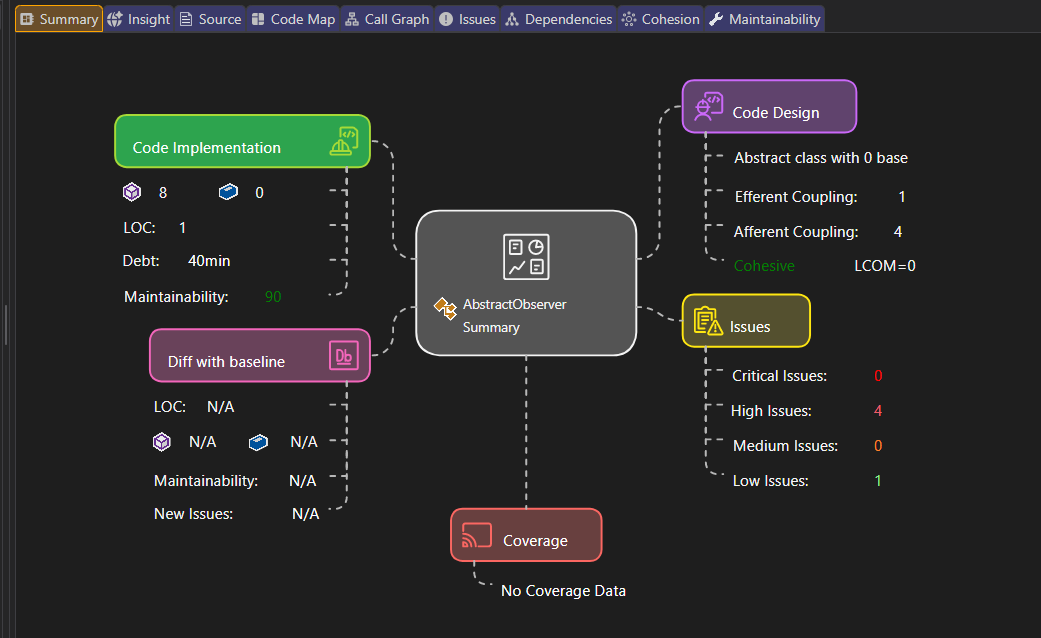
Code Insight reveals complexity, coupling, and rule violations in AI‑generated code at a glance.
Cohesion Tab: Splitting overgrown AI classes
For classes, the Cohesion tab provides a unique view of internal structure. It identifies cohesive clusters within a class, detects classes with multiple responsibilities, and provides objective cohesion metrics such as LCOM (Lack of Cohesion of Methods). This makes it easier to decide when and how to split complex classes that AI might have bloated with too many responsibilities.
Maintainability Tab: Long term health of AI contributions
The Maintainability tab focuses on long-term code health: maintainability score and trends, contribution of size, complexity, and coupling, and technical debt estimation. Developers can immediately understand what impacts maintainability and where to act first.
Dependency Graph & Call Graph : Trace AI Execution Paths
By default, the CppDepend dependency graph panel displays the graph of dependencies between projects. You can choose a project, right-click, and explore the graph of dependencies between namespaces, types, or members (methods + fields).
Call Graph : Two step generation
CppDepend can generate any call graph you might need with a two-step procedure:
- Ask for direct and indirect callers/callees of a type, field, method, namespace, or project.
- Export the result to the Dependency Graph to show the call graph wished.
In the background, a CQLinq query is generated to match the elements shown within the call graph.
Coupling Graph : Understanding impact
When you need to know exactly which code elements are involved in a particular dependency, left-click a matrix cell to show the coupling graph. You can adjust the Edge Thickness to visualize coupling strength in terms of types, methods, or members.
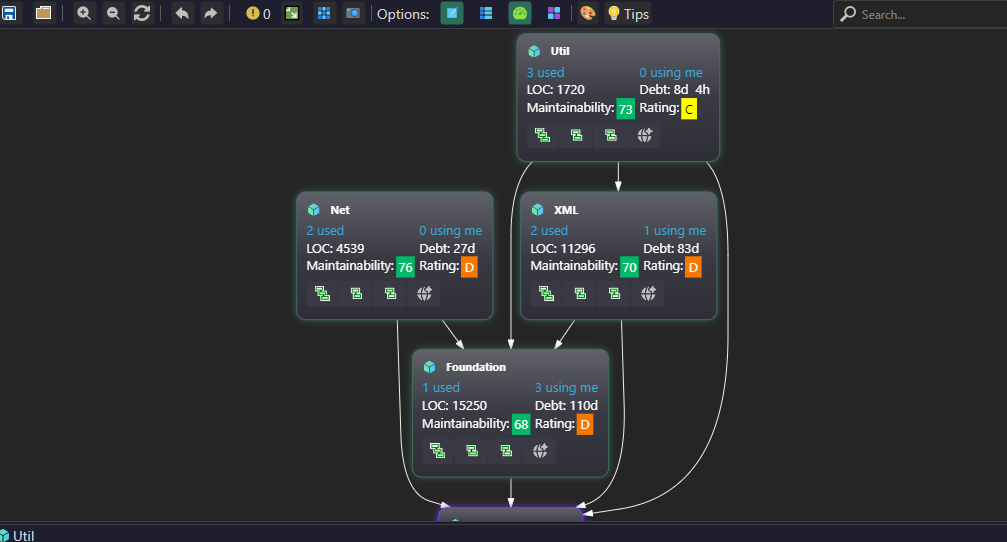
Call Graph reveals how AI‑generated functions interact and helps detect unexpected circular calls.
Path Graph & Cycle Graph : Deep dependency analysis
To dig into a path or dependency cycle between two code elements, show the dependency matrix with the option "Weight on Cells: Direct & Indirect depth of use.":
- Path Graph: Left-clicking a cell shows the path graph. The Info panel tells you the minimal path length between the two types involved.
- Cycle Graph: Black cells in the matrix represent cycles. Left-clicking shows the cycle graph with minimal cycle length.
Dependency Structure Matrix (DSM) : Scale Free Dependency Visualization
The DSM (Dependency Structure Matrix) is a compact way to represent and navigate across dependencies between components. DSM is used to represent the same information as a graph, but it scales much better: graphs become unreadable with dozens of nodes, while DSM remains efficient.
DSM Coloring Scheme
CppDepend's DSM relies on a simple 3‑coloring scheme for DSM cells:
- Blue cells : Dependencies from row element (uses) to column element (used by)
- Green cells : Dependencies from column element to row element
- Black cells : Mutual direct usage (A uses B and B uses A)
- Red squares : Dependency cycles
Structural Patterns at a Glance
DSM makes it easy to identify popular code structure patterns:
- Layered (acyclic) structure: Matrix is triangular with blue cells in lower-left, green in upper-right.
- Dependency cycles: Displayed as red squares where green and blue cells mix across the diagonal.
- High cohesion: Obvious squared aggregates around the diagonal.
- Too many responsibilities (God components): Columns with many blue cells and rows with many green cells.
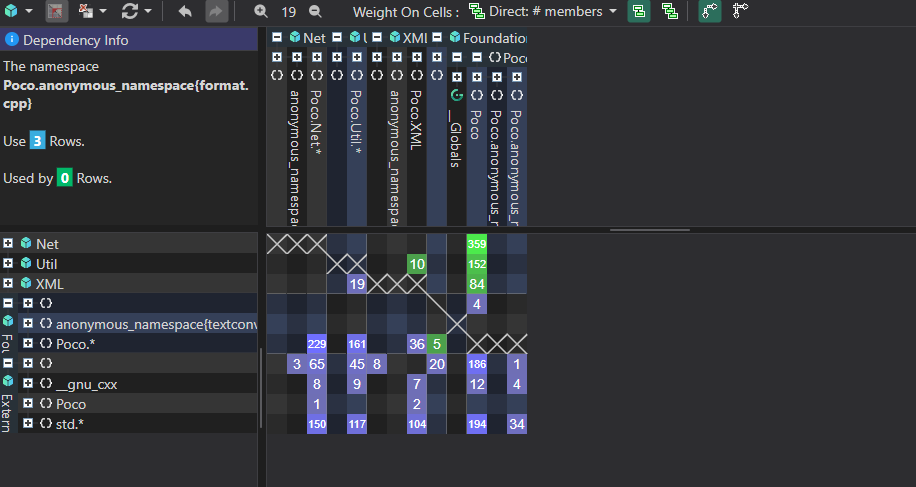
DSM reveals layered structures, cycles, and God components in AI generated code at a glance.
Indirect Dependencies & Cycle Detection
CppDepend's DSM comes with the unique Indirect Dependency option. An indirect dependency between A and B means A uses something that uses something that eventually uses B. When cycles are present in indirect mode, the red square is filled entirely with red cells meaning that given any elements A and B in the cycle, they are indirectly and mutually dependent.
PRQL: Automate Control Over AI Code
PRQL (Pragmatic Query Language) is the ultimate weapon against AI‑induced entropy. It allows you to write LINQ queries to validate every aspect of generated code. CppDepend comes with over 80 built-in code metrics (cyclomatic complexity, afferent/efferent coupling, relational cohesion, test coverage, etc.) and lets you define custom metrics through CQLinq.
Example 1: Find AI generated methods that are too complex
Example 2: Detect dependency cycles introduced by AI
Example 3: Flag AI code using blacklisted APIs
Example 4: Track coupling of AI components
AI Prompt Builder : From analysis to action
CppDepend now includes an AI Prompt Builder that turns analysis data into answers and actions. You can ask questions, build prompts, and prioritize the next best fix directly from CQLinq results. Combine CQLinq queries with AI to generate fix plans for detected issues.
Take full command of your AI generated C++ code
CppDepend doesn't just show you what AI wrote, it gives you a complete control panel to inspect, visualize, and automatically enforce rules on your codebase. From a single function's Code Insight to a full Dependency Matrix scan, you stay in charge.
