

Harnessing the Power of PRQL Features in CppDepend
|
This document assumes that you are familiar with the LINQ syntax. Before reading the current document, it is preferable that you've read the PRQL syntax document, but it is not mandatory, because when needed some links to the PRQL syntax document are proposed. |
Once you've analyzed your first C/C++ code base with CppDepend, you'll see that the CppDepend project created contains around 120 default PRQL queries and rules, categorized in different groups.
This set of default queries and rules cover the various PRQL features in terms of code querying.
This document is a quick list of these features and informs the reader about what is possible with PRQL.
- Querying Debt, Issues, Rules and Quality Gates
- Querying the Code Object Model
- Querying the Code Dependencies and Design
- Querying the Code Quality and Code Metrics
- Querying the Code Diff
- Querying the Naming of Code Elements
- Querying the States Mutability
- Querying Source Files Paths
Querying Debt, Issues, Rules and Quality Gates
Introduction
From the introduction of CppDepend v2017.1 PRQL is not just about code querying but also about querying Debt, Issues, Rules and Quality Gates.
This feature is useful for in-depth exploration of the technical-debt. In the technical debt documentation we demonstrate how a few clicks from the Dashboard can generate queries to explore the debt and the issues.
This feature is also useful to define :
- Trend Metrics based on Debt, Issues, Rules and Quality Gates numbers.
- Quality Gates based on Debt, Issues and Rules numbers.
For example a Quality Gate that would define thresholds concerning the percentage of technical-debt could look like:
// <QualityGate Name="Percentage Debt" Unit="%" />
failif value > 30%
warnif value > 20%
let timeToDev = codeBase.EffortToDevelop()
let debt = Issues.Sum(i => i.Debt)
select 100d * debt.ToManDay() / timeToDev.ToManDay()
A Trend Metric that would count the number of critical rules violated could look like:
// <TrendMetric Name="# Critical Rules Violated" Unit="rules"/>
from rule in Rules
where rule.IsViolated() && rule.IsCritical
select new {
   rule,
   issues = rule.Issues(),
   debt = rule.Debt(),
   annualInterest = rule.AnnualInterest(),
   maxSeverity = rule.Issues().Max(i => i.Severity)
}
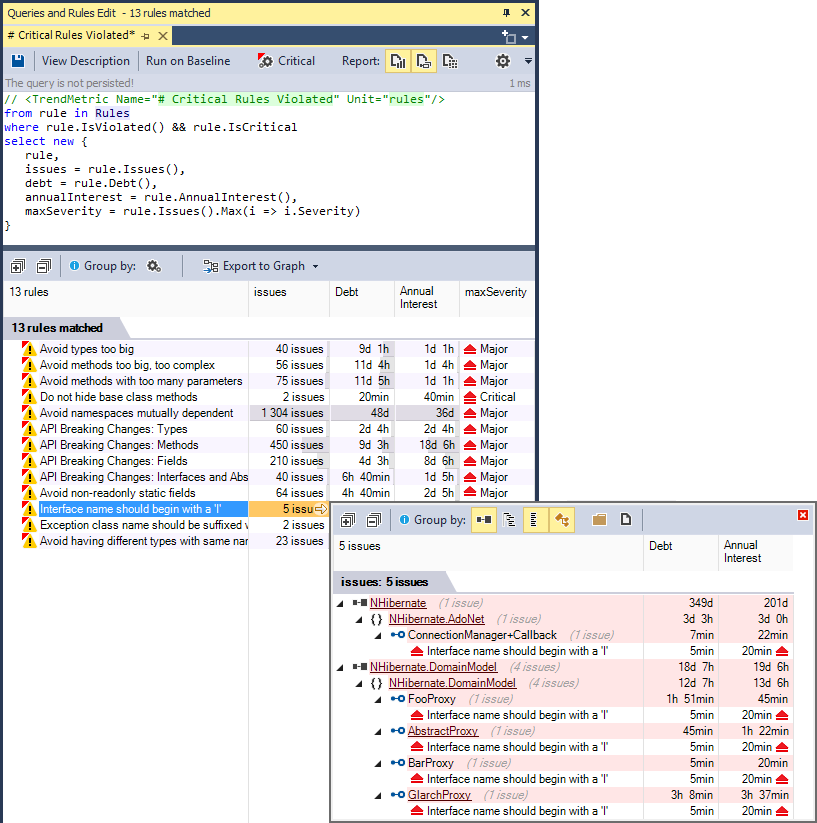
Not only this Trend Metric is useful to follow the trend, but its result is also browsable for in-depth exploration:
Querying diff since the Baseline
When a baseline is available, rules are passed against the baseline in addition to being passed against the actual code base snapshot. As a result CppDepend can compare both issues sets: the issues set obtained by passing rules on the baseline and the issues set obtained by passing rules on the actual code base snapshot.
PRQL can then be used to query the Debt, Issues, Rules and Quality Gates diff. For example a Trend Metric that counts the new issues since baseline could look like:
// <TrendMetric Name="# New Issues since Baseline" Unit="issues"/>
from issue in Issues
where issue.WasAdded()
select new { issue, issue.Debt, issue.AnnualInterest, issue.Severity }
A Quality Gate that would forbid more than 2 man-days of technical debt since the baseline could look like:
// <QualityGate Name="New Debt since Baseline" Unit="man-days" />
failif value > 2 man-days
warnif value > 0 man-days
let debt = Issues.Sum(i => i.Debt)
let debtInBaseline = IssuesInBaseline.Sum(i => i.Debt)
select (debt - debtInBaseline).ToManDay()
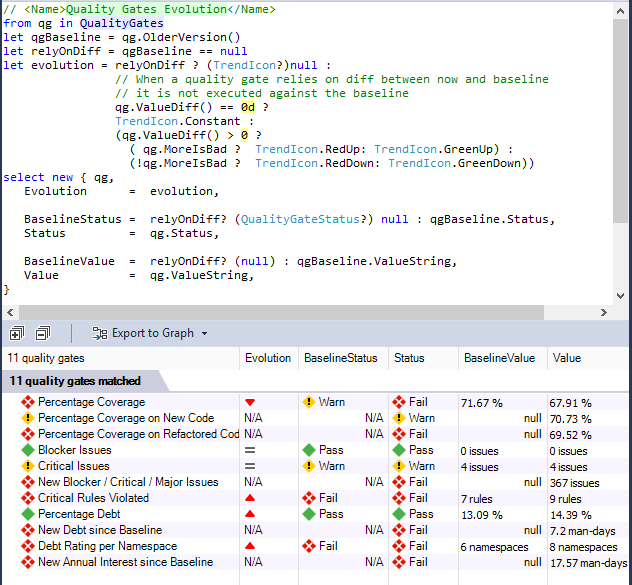
A dozen of Quality Gates are defined by default, and it is easy to customize them and to create new ones. In the screenshot below, this query (generated by a single click on the Dashboard) shows not only the Quality Gates actual status, but also the Quality Gates status on baseline. Quality Gates that rely on diff cannot be passed against the baseline and this is why they have a Not Available N/A value.
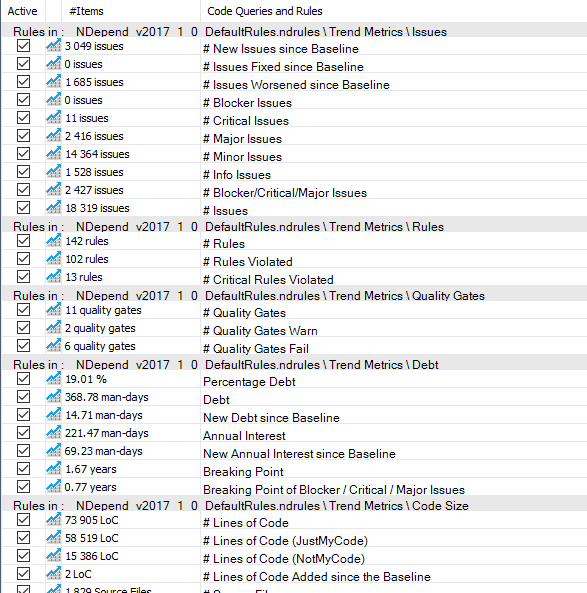
In the same way, many Trend Metrics related to Debt, Issues, Rules and Quality Gates are defined by default and it is easy to customize them and create new ones.
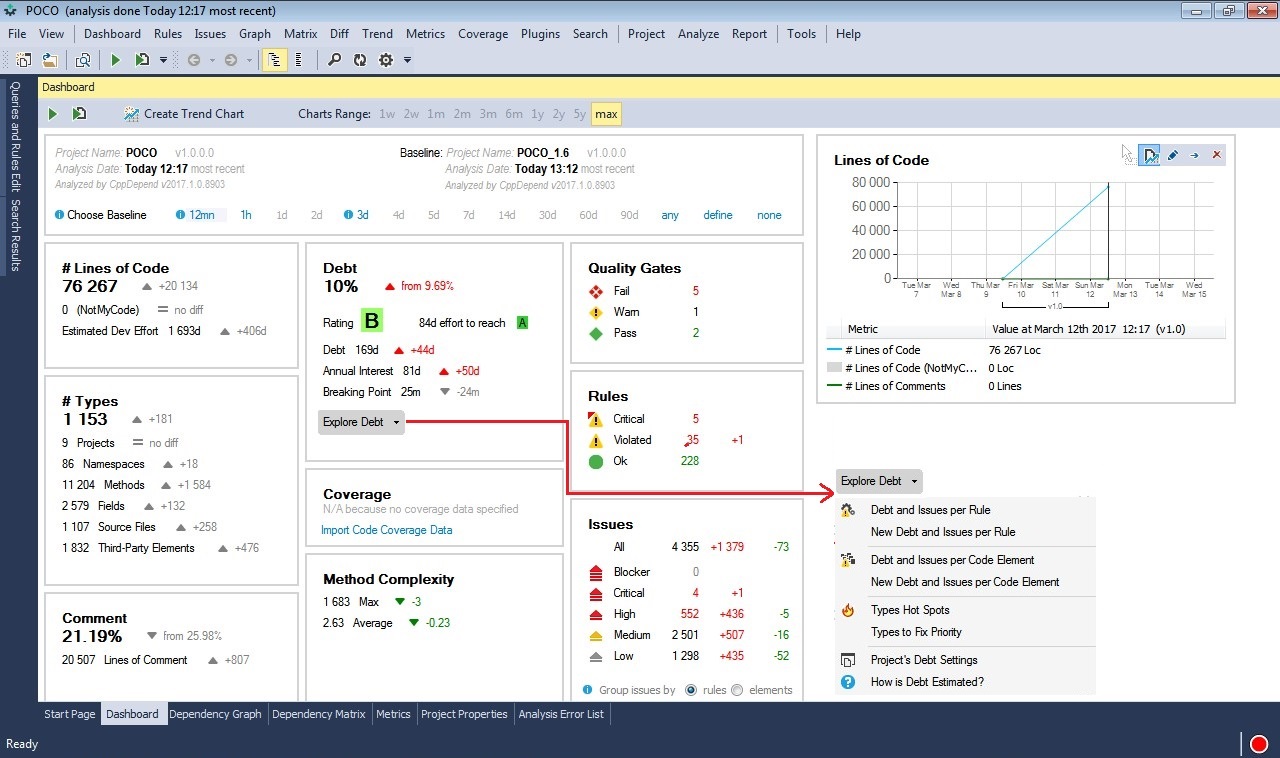
The dashboard proposes several menus to generate queries to explore the Debt, Issues, Rules and Quality Gates status Any number is clickable too to generate a query that lists the counted items.
How it works
Specialized types are defined by the CppDepend.API to specify the debt model, including Debt ; IIssue ; IRule ; IQualityGate ; QualityGateStatus.
However the two key types are: IIssuesSet ; IIssuesSetDiff.
- First CppDepend runs the activated rules both on the actual snapshot and on the baseline.
- It computes issues, debt numbers and diff.
- Then it populates these issues-set and issues-set-diff objects.
- Queries that rely on issues-set and issues-set-diff are executed only once these sets are filled. As a consequence a Rule cannot rely on these sets, but a Quality Gate can.
Instead of writing a query like...
from i in context.IssuesSet.AllIssues select i
...or like...
from i in context.IssuesSetDiff.OlderIssuesSet.AllIssues select i
...4 domains are proposed by PRQL: Issues, IssuesOnBaseline, Rules and QualityGates.
These domains are shortcuts for context.IssuesSet.AllIssues, context.IssuesSetDiff.OlderIssuesSet.AllIssues, context.IssuesSet.AllRules and context.IssuesSet.AllQualityGates.
These domains can be seen as range variables of type: IEnumerable<IIssue> ; IEnumerable<IRule> ; IEnumerable<IQualityGate>.
With these domains, simple queries can then be written like...
from i in Issues select i
...or even just:
Issues
The same way instead of constantly referring to issues-set and issues-set-diff to obtain data like for example...
from codeElement in CodeElements
where context.IssuesSet.HasIssue(codeElement)
select new {
   codeElement,
   issues= context.IssuesSet.Issues(codeElement),
   newIssues = context.IssuesSet.Issues(codeElement)
               .Where(i => context.IssuesSetDiff.WasAdded(i))
}
...the types IssuesSet and IssuesSetDiff propose convenient extension methods which are automatically translated by the PRQL compiler to calls on the issues-set and the issues-set-diff objects.
from codeElement in CodeElements
where codeElement.HasIssue()
select new {
   codeElement,
   issues= codeElement.Issues(),
   newIssues = codeElement.Issues()
               .Where(i => i.WasAdded())
}
Debt value can be formatted to convenient values through extension methods proposed by the type DebtFormatter which are translated to calls to members of a IDebtFormatter object, by the PRQL compiler.
This facility offers a convenient way for harnessing Debt-formatting project value defined in the CppDepend Project Settings.
Instead of writing...
from i in Issues
select new { i, manDays = context.DebtFormatter.ToManDay(i.Debt) }
...we can write:
from i in Issues
select new { i, manDays = i.Debt.ToManDay() }
Finally please note that when modifying a code rule, the issues-set and issues-set-diff are automatically recomputed in a few seconds and all numbers on the Dashboard are refreshed. In the same way, after an CppDepend analysis (typically triggered by a Rebuild All in Visual Studio) these sets are automatically recomputed in a few seconds.
Querying the Code Object Model
The Code Elements Hierarchy
For CppDepend, a C/C++ code base is made of Project,Namespace,Type,Method and Field objects. This object model reflects the hierarchical organization of the code where the code base is made of projects that contain namespaces that contain types that contain methods and fields. Notice that if a same namespace is spawned across N projects, the hierarchy is preserved and there are N Namespace objects, one contained in each proejct.
To navigate across this hierarchy, several parent and child properties are proposed like Method.ParentType or Project.ChildMethods. Most of the time, instead of using these properties it is more convenient to use queries like this:
from m in Application.Namespaces.WithNameLike("ProductName.FeatureA").ChildMethods()
where m.CyclomaticComplexity > 10 select m
The Predefined Domains
To access these various kind of code elements, PRQL proposed different predefined domains Projects, Namespaces, Types, Methods, Fields, codeBase, Application, ThirdParty and JustMyCode.
Base and Derived Classes Hierarchy
There are several ways to navigate across the base and derived classes hierarchy:
// Accessing the method ThatDeriveFromAny()
from t in JustMyCode.Types.ThatDeriveFromAny(ThirdParty.Types)

// Accessing the extension methods DeriveFrom()
where !t.DeriveFrom("CWnd")
select new {
 t,
 // Various properties of Type
 t.BaseClass,
 t.BaseClasses,
 t.DerivedTypes, // Include direct and indirect derived types
 t.DirectDerivedTypes }
Methods abstract, virtual and override
The PRQL proposes also facilities to navigate across methods overridden, and overrides:
from m in Application.Methods
where !m.IsAbstract && m.IsVirtual
select new {
  m,
  // Enumerates methods overridden by m
  m.OverriddensBase,
  // Enumerates methods that overrides m directly
  m.OverridesDirectDerived,
  // Enumerates methods that overrides m directly or indirectly
  m.OverridesDerived }
Querying the Code Dependencies and Design
The dependency model is general in the sense that it doesn't rely on the kind of usage (field assignment, method call...). A and B being two code elements, we say that A depends on B if, when B is not available, A cannot be compiled.
Here's a sample of dependency query:
from m in Methods where
m.IsUsing("MyType") &&
m.IsUsedBy("MyProjectName".AllowNoMatch())
select m
Notice how such extension methods are used by rules generated from dependency graph or dependency matrix, to forbid some particular dependency:
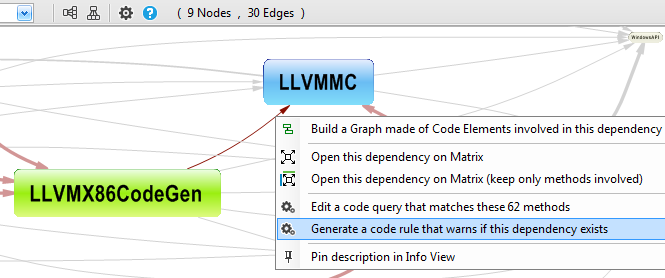
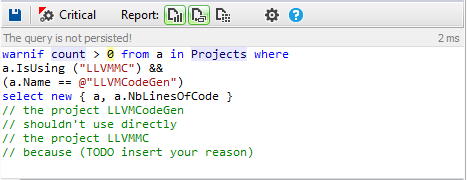
The rule generated is shown below. It could be easily adapted to forbid or enforce any dependency in a code base.
CppDepend provides also a convenient way to query dependencies of a code base (and often a faster way as well):
from t in Types.UsedByAny(Types.Where(t => t.IsStatic)) select t
Indirect Usage
CppDepend provides some methods containing the word Indirect in their names,to deal with indirect dependencies like for example, the method IsIndirectlyUsing().
For example if A is using B that is using C, A is not directly using C but A is indirectly using C (with a depth of 2).
Here is a query that enumerates methods that are directly or indirectly calling the Print method MyClass.Print().
from m in Methods
let depth0 = m.IsIndirectlyUsing("MyClass.Print()")
select m
The method DepthOfIsUsing goes further since it returns the depth of usage.
from m in Methods
let depth0 = m.DepthOfIsUsing("MyClass.Print()")
where depth0  >= 0 orderby depth0 ascending
select new { m, depth0 }
The depth returned is a Nullable<ushort> value.
- It is null if m doesn't call indirectly the target method.
- It is 1 if m calls directly the target method.
- It is greater than 1 if m calls indirectly the target method.
This indirect usage possibility is especially useful to generate
Call Graphs or Class Inheritance Graphs.Some of the methods also contain the word Indirect or the word Depth to work with indirect usage from a sequence to a code element or even any code elements of a target sequence (suffix Any).
For example, the following query matches all methods that are calling, directly or indirectly the static methods, with the depth of call:
let statics = Methods.Where(m => m.IsStatic).ToHashSet()
let depthMetric = Application.Methods.DepthOfIsUsingAny(statics)
from m in depthMetric.DefinitionDomain
let depthValue = depthMetric[m]
orderby depthValue ascending
select new { m, depthValue }
Querying the Code Quality and Code Metrics
CppDepend computes more than 80 code metrics.
// <Name>Quick summary of methods to refactor</Name>
warnif count > 0 from m in JustMyCode.Methods where
  // Code Metrics' definitions
  m.NbLinesOfCode > 30 ||  // http://www.cppdepend.com/documentation/code-metrics#NbLinesOfCode
  m.CyclomaticComplexity > 20 ||  // https://www.cppdepend.com/documentation/code-metrics#CC
  m.NestingDepth > 5 ||  // http://www.cppdepend.com/documentation/code-metrics#ILNestingDepth
  m.NbParameters > 5 ||  // http://www.cppdepend.com/documentation/code-metrics#NbParameters
  m.NbVariables > 8 ||  // http://www.cppdepend.com/documentation/code-metrics#NbVariables
  m.NbOverloads > 6  // http://www.cppdepend.com/documentation/code-metrics#NbOverloads

select new { m, m.NbLinesOfCode, m.CyclomaticComplexity,
             m.ILNestingDepth,
             m.NbParameters, m.NbVariables, m.NbOverloads }
Notes that many of these code metrics returns a nullable numeric value because they are not necessarily defined for all code elements. For example the #Lines of Code is not computed for third-party code elements.
Custom Metrics
Thanks to the LINQ flexibility it is easy to compose the default code metrics to create more elaborated code metrics, like for example:
// <Name>Custom metric</Name>
warnif count > 0
from m in JustMyCode.Methods

// Don't match too short methods
where m.NbLinesOfCode > 10

let CC = m.CyclomaticComplexity
let CustomMetric = (CC * CC )/100
where Custom != null && Custom > 30
orderby Custom descending, m.NbLinesOfCode descending
select new { m, Custom, CC, m.NbLinesOfCode }
A custom code metric object can also be obtained from the method FillIterative(). For example, this possibility is used in the rule to obtain dead types, but also to obtained types only used by dead type (and the depth of usage):
// <Name>Potentially dead Types</Name>
warnif count > 0
// Filter procedure for types that should'nt be considered as dead
let canTypeBeConsideredAsDeadProc = new Func<IType, bool>(
   t => !t.IsPublic && //   Public types might be used by client applications of your projects.
&&
        !t.IsGeneratedByCompiler

// Select types unused
let typesUnused =
   from t in JustMyCode.Types where
   t.NbTypesUsingMe == 0 && canTypeBeConsideredAsDeadProc(t)
   select t

// Dead types = types used only by unused types (recursive)
let deadTypesMetric = typesUnused.FillIterative(
types => from t in codeBase.Application.Types.UsedByAny(types).Except(types)
         where canTypeBeConsideredAsDeadProc(t) &&
               t.TypesUsingMe.Intersect(types).Count() == t.NbTypesUsingMe
         select t)

from t in deadTypesMetric.DefinitionDomain
select new { t, t.TypesUsingMe, depth = deadTypesMetric[t] }
Querying the Code Diff
CppDepend comes with the unique feature to compare two different snapshots of a code base to see what was changed/added/removed.
For example, the following query enumerates methods where code has been changed:
from m in Application.Methods
where context.CompareContext.CodeWasChanged(m)
select m
Actually you can just write the shortest query below, and the PRQL compiler will take care to transform it into the query above:
from m in Application.Methods
where m.CodeWasChanged()
select m
Once such query is written, the CppDepend UI offers the capability to compare the two source files versions of the method changed.
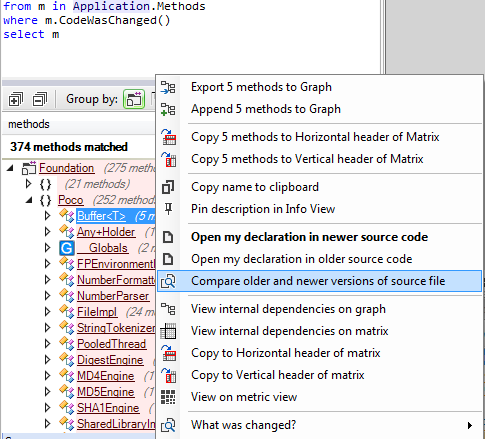
Notice the two methods OlderVersion() and NewerVersion() . As their names suggest, these methods returns the older or newer version of a code element, or null if the code element has been added (hence no older version) or removed (hence no newer version). These methods can be useful for example to write the query below that tracks the evolution in terms of method complexity:
// <Name>Methods that became more complex</Name>
from m in codeBase.OlderVersion().Methods
where m.IsPresentInBothBuilds()
let oldCC = m.CyclomaticComplexity
let newCC = m.NewerVersion().CyclomaticComplexity
where oldCC != null && newCC > oldCC
select new { m, oldCC, newCC }
Notice the call to
IsPresentInBothBuilds
to ensure that we only deal with methods that are both in the older and newer code base snapshot, to prevent any NullReferenceException while running the query!
As this last query shows, mixing the diff feature with others PRQL features like code quality metrics or dependencies, can lead to powerful code queries and rules to track the evolution of a code base.
Querying the Naming of Code Elements
PRQL proposes several facilities to query the name of the code elements. This is especially useful to write simple code naming conventions (based on regular expressions)...
// <Name>Abstract base class should be suffixed with 'Base'</Name>
warnif count > 0 from t in Application.Types where
  t.IsAbstract &&
  t.IsClass &&

  t.DepthOfInheritance == 1 &&

  ((!t.IsGeneric && !t.NameLike (@"Base$")) ||
   ( t.IsGeneric && !t.NameLike (@"Base<")))
select new { t, t.DepthOfInheritance }
...or smart code naming conventions:
// <Name>Avoid naming types and namespaces with the same identifier</Name>

// Not only this can provoke compiler resolution collision,
// but also, this makes code less maintainable because
// concepts are not concisely identified.

warnif count > 0
let hashsetShortNames = Namespaces.Where(n => n.Name.Length > 0).Select(n => n.SimpleName).ToHashSet()

from t in JustMyCode.Types
where hashsetShortNames.Contains(t.Name)
select new { t, namespaces = Namespaces.Where(n => n.SimpleName == t.Name) }
The code elements naming feature is summarized in the PRQL syntax document, in the section Matching code elements by name string.
Querying the States Mutability
The concept of immutability is becoming more and more popular. Immutability is especially useful when dealing with concurrent accesses into multi-threaded environment.
A type is considered as immutable if its instance fields cannot be modified once an instance has been built by a constructor. A static field is considered as immutable if it is private and if it is only assigned by the static constructor. An instance field is considered as immutable if it is private and if it is only assigned by its type’s constructor(s) or its type’s static constructor. Notes that a field declared as readonly is necessarily immutable, but a field can be immutable without being declared as readonly. In this last case, the keyword readonly can be added to the field declaration, without provoking any compilation error.
At analysis time, CppDepend computes the mutability of types and fields. The result is available through the properties Type.IsImmutable and Field.IsImmutable.
It is then easy to write such rule for example:
// <Name>Structures should be immutable</Name>
warnif count > 0 from t in Application.Types where
   t.IsStructure &&
  !t.IsImmutable
let mutableFields = t.Fields.Where(f => !f.IsImmutable)
select new { t, t.NbLinesOfCode, mutableFields }
The two properties ChangesObjectState and ChangesTypeState can be use to enforce or check that a method is pure. A pure method is a method that doesn't assign any instance or static fields.
Also, to control the write access to a particular field, you can use the extension method AssignField():
from m in Methods where m.AssignField("MyClass.myfield")
select new { m, m.NbLinesOfCode }
In addition, CppDepend provides for fields the 3 properties MethodsAssigningMe , MethodsReadingMeButNotAssigningMe and MethodsUsingMe and for methods it provides the AssignField() method.
Querying Source Files Paths
For each code element you can access to their SourceDecls. Having access to source file declarations opens a range of interesting applications. For example the default query matching methods to discard from the JustMyCode code base view, relies on some patterns on source file name, and can be easily adapted to any situation:
// <Name>Discard generated and designer Methods from JustMyCode</Name>
// --- Make sure to make this query richer to discard generated methods from CppDepend rules results ---
notmycode

//
// First define source files paths to discard
//
from a in Application.Projects

let projectSourceFilesPaths = a.SourceDecls.Select(s => s.SourceFile.FilePath)

let sourceFilesPathsToDiscard = (
    from filePath in projectSourceFilesPaths
    let filePathLower= filePath.ToString().ToLower()
    where
       filePathLower.Contains("generated")
  select filePath
).ToHashSet()

//
// Second: discard methods in sourceFilesPathsToDiscard
//
from m in a.ChildMethods
where (sourceFilesPathsToDiscard.Contains(m.SourceDecls.First().SourceFile.FilePath))
select new { m, m.NbLinesOfCode }
Several default rules concerning source files organization are proposed when you create a new CppDepend project.
