

Every compiler can report numerous warnings after a build. These warnings won’t keep your code from compiling unless you decide to treat them as errors. Take the time to review these warnings rather than ignoring them. Compiler warnings are often indicators of potential bugs that might otherwise surface only at runtime.
Clang is a C/C++/Objective-C compiler with many useful features. Here are some of its major end-user features:
- Fast compilation and low memory usage.
- Expressive diagnostics.
- GCC compatibility.
In this post, we will focus on Clang’s expressive diagnostics and how to obtain them for Visual C++ projects.
The Clang team aims to provide error messages that are as clear and informative as possible. They strive to make them as user-friendly as possible for a command-line compiler. To do so, Clang pinpoints exactly what is wrong in the code. This is done through a diagnostics engine that processes the error information into a user-friendly message.
To see the benefits of Clang diagnostics, let’s compile a minimal C++ source file with both Visual C++ and Clang and compare the warnings they report. All warnings will be enabled for both compilers.
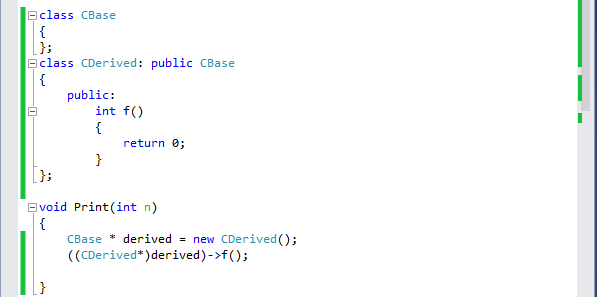
The Microsoft C++ compiler reports the following warning:
- warning C4100: ‘n’: unreferenced formal parameter
Clang reports three warnings:
- no previous prototype for function ‘Print’
- use of old-style cast
- unused parameter ‘n’
What’s interesting about Clang is that it also reports diagnostics related to coding best practices. For example, the warning “no previous prototype for function Print” is reported because Print is not declared as a static function, so it could be used from another source file—in which case, it is recommended that the declaration be placed in a header file.
To get a more concrete idea of Clang’s diagnostics, let’s compile an open-source C++ project with both Clang and the Microsoft compiler and compare the types of warnings they report.
We’ll use the “7-Zip” project as an example and compile only the Gui.vcproj module. We will focus only on warnings related to the project’s source code, not the external include files.
The Microsoft compiler reports these kinds of warnings:
- Bytes padding added after data member.
- Conversion issues.
- Function not inlined.
- Class has virtual functions, but destructor is not virtual.
- Catch(…) semantics changed since Visual C++ 7.1; structured exceptions (SEH) are no longer caught.
- Cast issues.
- Enumerator ‘kInfo’ in switch of enum ‘NCommandType::EEnum’ is not explicitly handled by a case label.
- ‘GetVersionExA’: was declared deprecated.
- Use of old-style cast
- Missing field ‘MinLen’ initializer
- Macro is not used
- Declaration requires a global constructor
- Declaration requires an exit-time destructor
- Conversion issues
- Cast issues
- enumeration values ‘kWithoutPrompt’, ‘kAutoRename’, and ‘kAutoRenameExisting’ not handled in switch
- Operand of ?: changes signedness: ‘const int’ to ‘unsigned int’
- Declaration shadows a local variable
- ISO C++11 does not allow conversion from string literal to ‘LPSTR’ (aka ‘char *’)
- No previous prototype for function
- Comparison issues
- ‘GetVersionExA’: was declared deprecated
- dynamic exception specifications are deprecated
- ‘&&’ within ‘||’
- ‘CBenchRandomGenerator’ has no out-of-line virtual method definitions; its vtable will be emitted in every translation unit
- Delete called on ‘CBenchmarkInStream’ that has virtual functions but non-virtual destructor
- ‘CBenchmarkInStream’ has virtual functions but non-virtual destructor
- Equality comparison result unused
- Explicitly assigning value of variable of type ‘INT_PTR’ (aka ‘int’) to itself
- Add explicit braces to avoid dangling else
As we can see, Clang reports more useful warnings than the Microsoft compiler; some of them are usually reported only by static analysis tools. It’s worth taking these warnings seriously, as they could reveal many bugs.
How to get the Clang diagnostics for your Visual C++ projects?
Clang diagnostics help developers improve the quality of their C/C++ source code, so it is useful to have access to them for Visual C++ projects.
The first option is to compile your projects using Clang; here’s an MSDN post showing you how to use Clang as the compiler in VS.
The second option is to analyze your Visual Studio projects using CppDepend, which uses Clang as its front-end parser and reports all its diagnostics. CppDepend is free for the open source community.
The following query returns all Clang diagnostics:
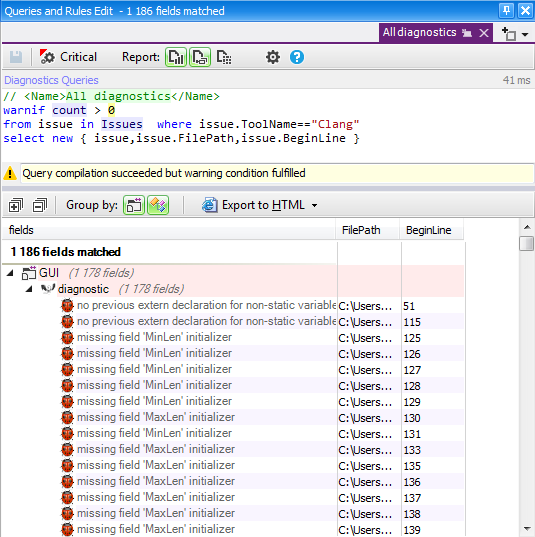
The Gui project from the 7-Zip application has only 10k lines of code and 1,186 diagnostics. For medium and large projects, you could have thousands of diagnostics. In that case, it is useful to filter them and retrieve only specific types of warnings.
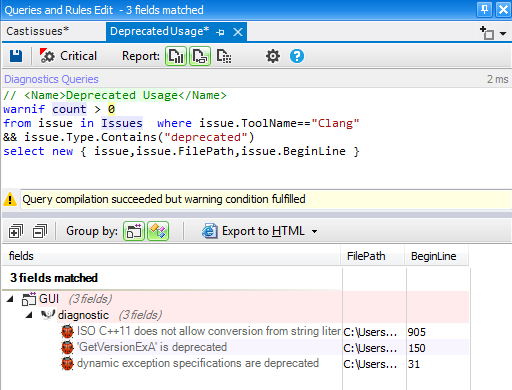
For example, we can modify the previous query to get only the warnings related to deprecated usage.
Conclusion:
Warnings are often indicators of potential bugs, so they should not be ignored. Clang reports many useful diagnostics, including some related to coding best practices, and addressing these warnings can help improve the quality of your project’s source code.