CARLA (Car Learning Adaptation) is an open-source, highly realistic digital simulator built specifically for autonomous driving research, development, and validation. In this article we dissect its C++ client engine with CppDepend: architecture, quality metrics, and what makes it the benchmark for industrial ADAS simulation.
1. What is CARLA?
Because real-world testing for autonomous vehicles (AVs) and Advanced Driver-Assistance Systems (ADAS) is dangerous, expensive, and limited by rare edge cases, CARLA has become an industry and academic standard used across several domains:
- Autonomous Vehicle (AV) & ADAS Development: Engineers use CARLA to test perception, path-planning, and control algorithms in a controlled, repeatable virtual environment before deploying them to physical prototype vehicles.
- Training & Validating Machine Learning Models: AI models (such as End-to-End Imitation Learning or Reinforcement Learning networks) require millions of frames of driving data. CARLA generates synthetic datasets complete with ground-truth semantic segmentation, depth maps, and bounding boxes.
- Safety-Critical & Edge Case Simulation: Simulating dangerous scenarios that are impossible or too risky to test on real public roads — such as a pedestrian suddenly jumping into traffic, heavy fog blinding sensors, or a lead vehicle slamming on its brakes at highway speeds.
- Robotics & Autonomous Research Labs: Academic and industrial robotics labs integrate CARLA with frameworks like ROS/ROS 2 (Robot Operating System) using official bridges, allowing them to test full autonomous software stacks seamlessly.
2. Why is CARLA based on Unreal Engine?
Simulating Autonomous Driving (AD) and Advanced Driver-Assistance Systems (ADAS) requires pushing software stacks to their absolute limits under every conceivable physical and environmental condition. Real-world road testing cannot safely replicate critical edge cases — such as blinding downpours, sudden wind gusts on icy highways, or a lead vehicle slamming on its brakes at night. This is where CARLA, powered by Unreal Engine, becomes an indispensable tool.
Unreal Engine acts as the graphical, physical, and atmospheric backbone of CARLA. Without a powerful game engine, rendering complex sensor physics and weather dynamics realistically would be virtually impossible. Unreal Engine helps replicate challenging environments through several core capabilities:
- Volumetric Lighting and Atmospheric Scattering: Simulates low-sun glare, blinding nighttime reflections from wet asphalt, and sudden transitions into shadows or tunnels that stress camera-based perception models.
- Advanced Particle Systems and Material Shaders: Generates dynamic rain drops, surface water accumulation, puddles, and dynamic wind forces that physically alter vehicle traction, tire grip, and wiper performance.
- Ray Tracing & Sensor Interaction: Allows cameras, LiDAR, and radar simulation components to interact directly with material properties, calculating light reflection, refraction through rain, and point-cloud dispersion off wet surfaces.
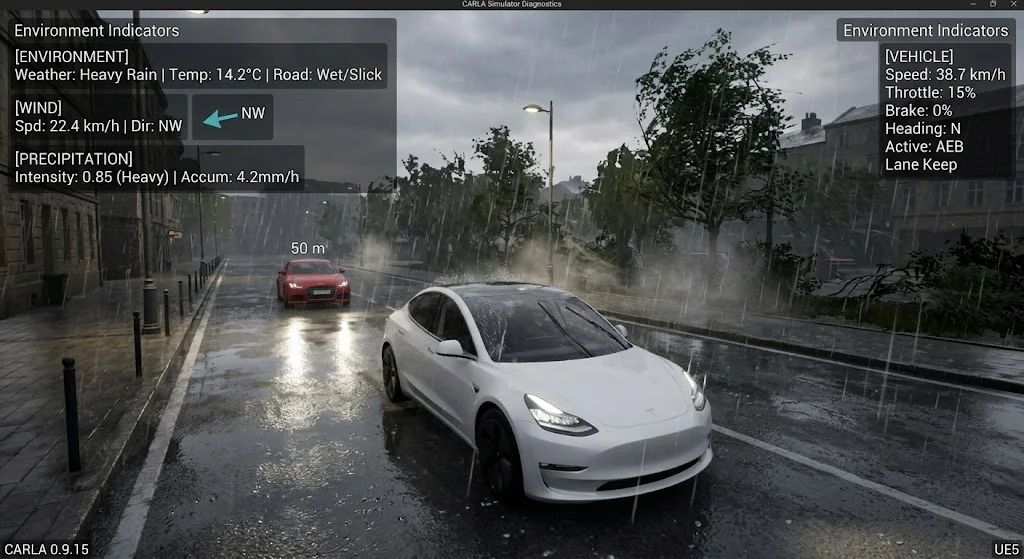
Looking at the simulated scene below, several critical ADAS and environmental factors are at play:
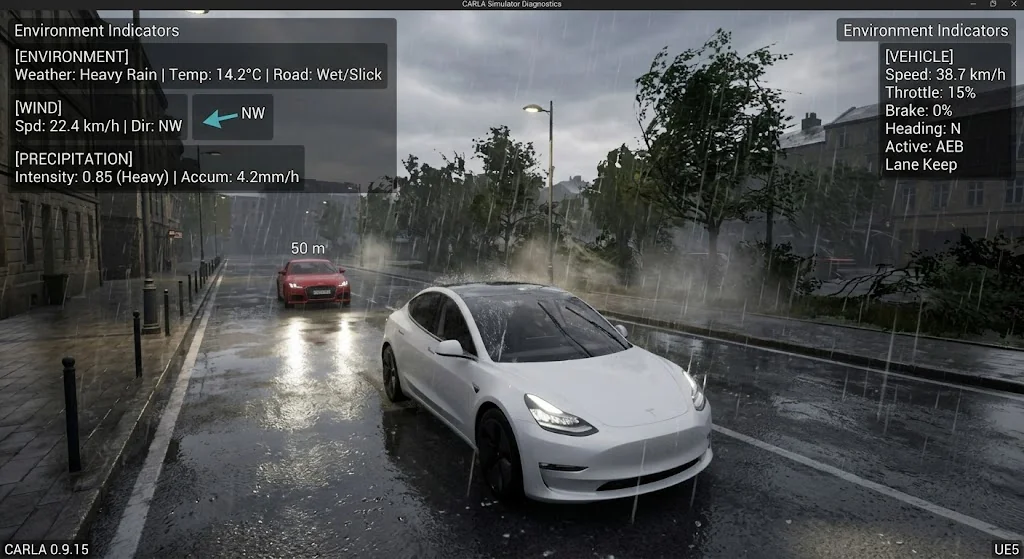
- Adverse Weather & Precipitation: The scene depicts Heavy Rain with high precipitation intensity (0.85 mm/h accumulation). The road surface is rendered as slick and wet, which dramatically lowers tire-to-road friction coefficients — a vital stress test for automatic emergency braking (AEB) algorithms.
- Wind Dynamics: An active directional wind indicator shows a North-Westerly crosswind (22.4 km/h), applying lateral force vectors to the ego vehicle that test lane-keep assist and steering correction loops.
- Sensor & Perception Challenge: Rainwater streaming across the windshield and reduced visibility test optical cameras and forward-facing tracking sensors as they lock onto the lead vehicle 50 meters ahead.
- Active ADAS Telemetry: The real-time diagnostic overlay confirms system states — showing vehicle speed, throttle position, and active safety protocols (such as AEB and Lane Keep) reacting instantaneously to the degrading environmental telemetry.
3. CARLA Client Under the Hood using CppDepend
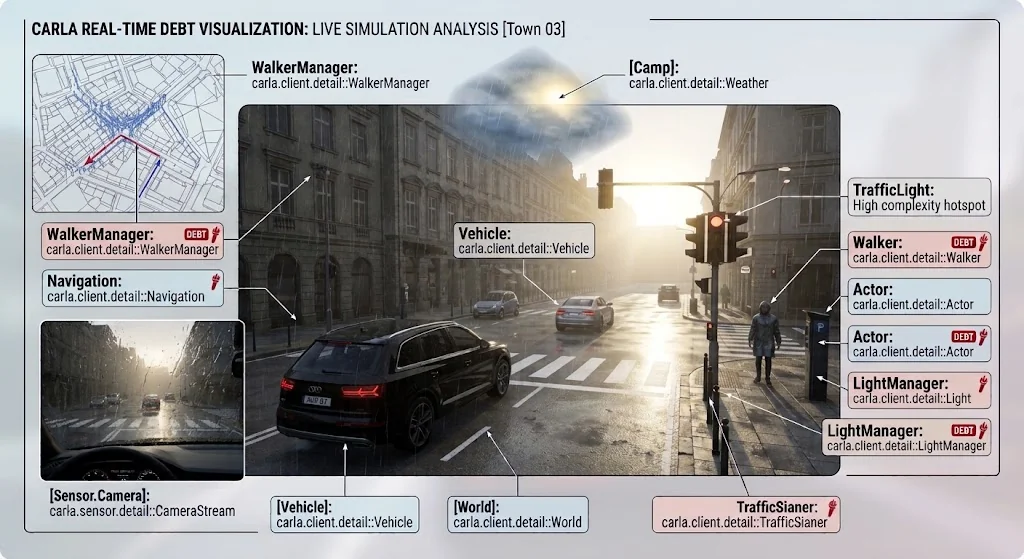
Let's dive into the CARLA source code by analyzing it with CppDepend and specifically focusing on the client module. When dealing with a massive, multi-threaded C++ codebase spanning over 4,000 methods, architectural debt and high coupling are typical risks. However, running automated static analysis and visualizing the architecture through a 3D code city reveals a surprisingly clean and well-governed structure.
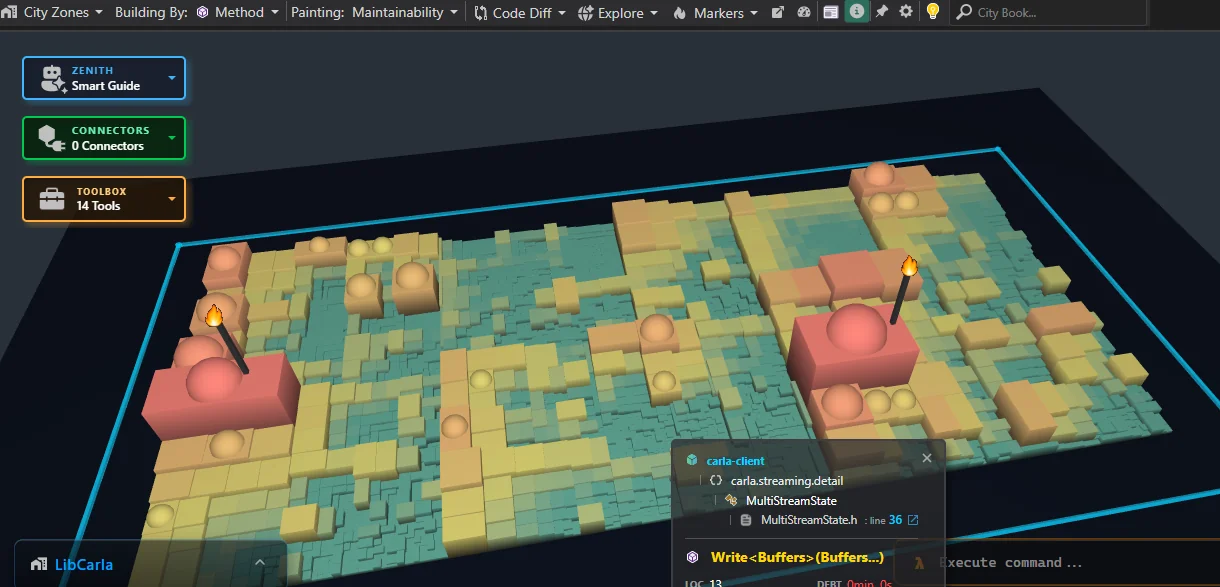
Out of thousands of methods across the entire codebase, only two hotspots (highlighted by the torch icons in the visualization) emerge.
3.1 The CARLA Client Dependencies and Their Core Roles
Analyzing the CARLA client's external dependencies reveals a lean, high-performance architecture built on standard cross-platform foundations, robust networking libraries, and lightweight serialization tools. Based on the dependency breakdown, here are the major external libraries and their core roles:
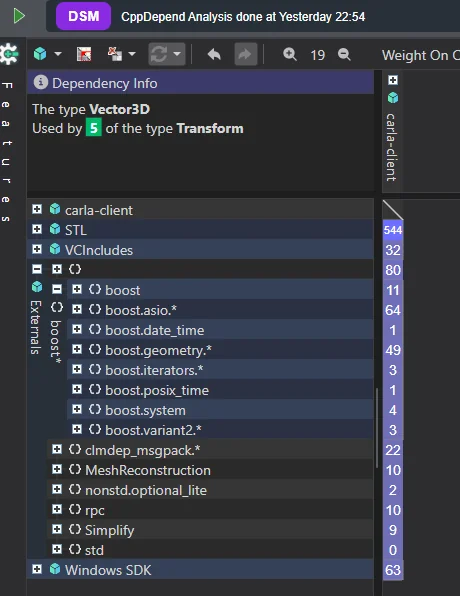
- Boost (
boost.asio,boost.geometry,boost.system, etc.)- Role: The backbone of LibCarla's network communication and asynchronous input/output. Specifically,
boost.asiopowers the dual-port TCP socket connections and asynchronous buffer streaming between the client and the Unreal Engine server, whileboost.geometryhandles spatial transformations and bounding calculations.
- Role: The backbone of LibCarla's network communication and asynchronous input/output. Specifically,
- MessagePack (
clmdep_msgpack)- Role: High-performance object serialization. It packs complex RPC payloads (such as actor transforms, sensor data packets, and vehicle control commands) into compact binary formats for lightning-fast network transmission across process boundaries.
- RPC Library (
rpc)- Role: Powers the Remote Procedure Call (RPC) mechanism underlying the client-server architecture, enabling seamless method invocation from client code down to the simulation server.
- Standard Template Library (STL) &
nonstd.optional_lite- Role: Provides fundamental data structures, iterators, and lightweight vocabulary types (such as optional values) to keep memory management safe and predictable without heavy runtime overhead.
BTW, if you ever need a robust, high-performance client/server communication framework using C++, CARLA stands out as an exceptional reference implementation.
3.2 Is CARLA Well Implemented?
When analyzing CARLA's codebase through deep architectural tooling, the results provide a realistic picture of a massive, high-performance simulation project: CARLA achieves an overall quality rating of "B".
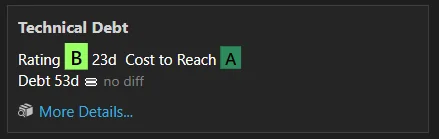
While this underscores a robust and highly functional engineering foundation, several areas remain prime for refinement:
1. MISRA C++ Compliance
Static analysis reveals approximately 35 MISRA C++ rule violations across the codebase. While some appear critical on paper, their real-world impact must be contextualized:
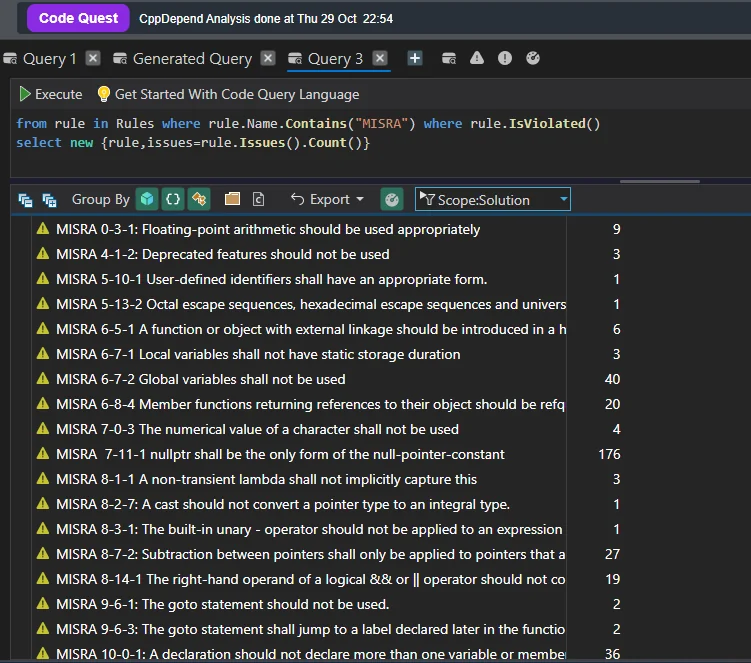
- The Precision Warning Example: A classic instance occurs in expressions like
const int nbx = static_cast<int>((nvx * kCell) / kBin) + 1;, where mixed integer-to-float operations trigger precision warnings. - Why It's Low Risk: While strict compliance rules flag potential floating-point truncation, the operational domain makes this benign — since
nvxbounds remain small in grid calculations, massive number overflow or catastrophic precision loss is practically non-existent.
2. Architectural Coupling & Dependency Cycles
As shown in the dependency matrix, managing a massive C++ client-server architecture containing hundreds of thousands of lines introduces structural challenges:
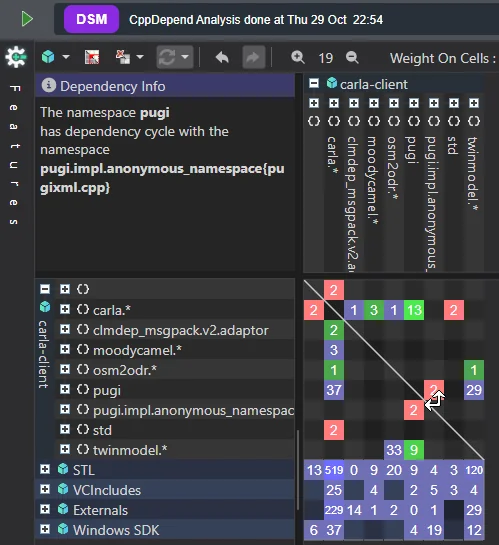
While the matrix highlights circular dependencies and coupling hotspots between core modules — such as carla.* and the global namespace — a deeper inspection reveals that these cycles are confined strictly to data structures rather than behavioral logic.
In summary, while the analysis uncovers structural findings like MISRA compliance warnings and data-level dependency cycles, none pose critical operational risks. CARLA's core logic remains resilient, well-governed, and fully capable of driving high-performance simulation.
4. CARLA Client Internal Classes
Now, let's step into the CARLA client implementation and take a closer look at a few of its core classes.
User-Facing Classes and Their Configuration Targets in CARLA
To control the CARLA simulation from a user application (C++ or Python), developers interact with a layered hierarchy of public classes. Each class exposes dedicated configuration structs or methods to tune simulation physics, networking, environmental conditions, and actor behavior.
Here are the most frequently used classes when simulating:
1. carla::World & carla::WorldSettings (Simulation Physics & Environment)
World represents the active simulation instance. Its behavior is governed by passing a carla::WorldSettings object to world.apply_settings().
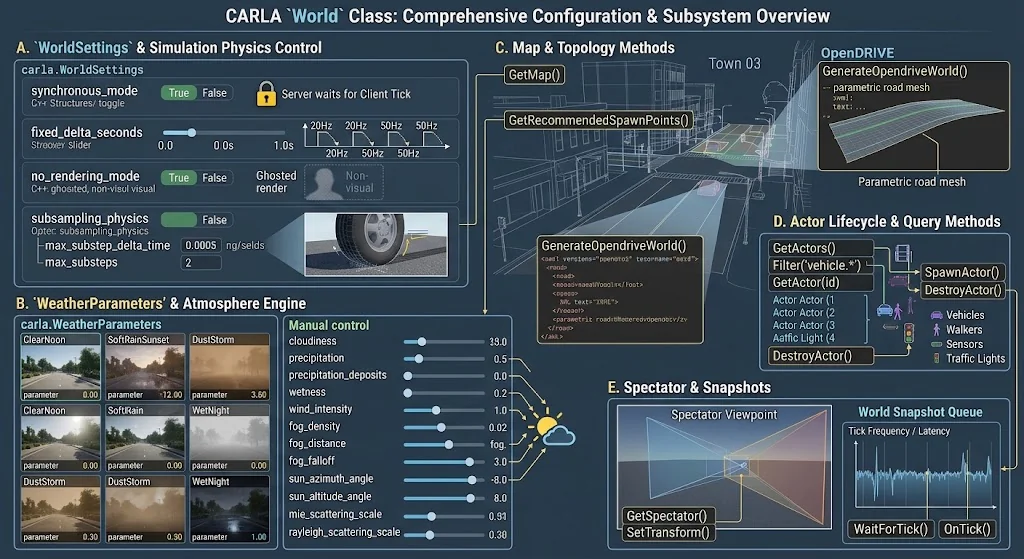
- Key Configurations (
carla::WorldSettings): - Synchronous Mode:
settings.synchronous_mode = Truelocks step execution to user ticks. - Fixed Time-Step:
settings.fixed_delta_seconds = 0.05(e.g., 20 Hz physics lockstep execution). - No-Rendering Mode:
settings.no_rendering_mode = Truedisables UE4 graphic rendering to run headless benchmarking. - Deterministic Physics:
settings.subsampling_physics = True/max_substep_delta_timecontrols physics sub-stepping accuracy. - Environment Configuration (
carla::WeatherParameters):world.set_weather(carla.WeatherParameters)modifies atmospheric conditions directly (e.g.,cloudiness,precipitation,precipitation_deposits,wind_intensity,sun_azimuth_angle).
2. carla::Vehicle (Vehicle Control & Dynamics Physics)
Inheriting from Actor, Vehicle represents drivable entities and exposes low-level vehicle physics parameters.
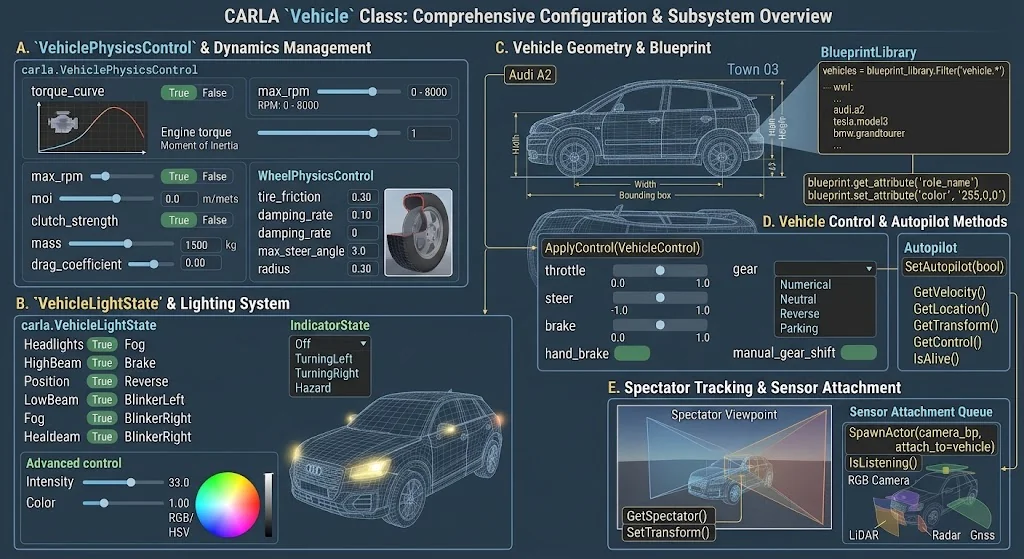
- Control Signals (
carla::VehicleControl):throttle,steer,brake,handbrake,reverse,manual_gear_shift. - Vehicle Physics (
carla::VehiclePhysicsControl):- Engine parameters:
torque_curve,max_rpm,moi(moment of inertia). - Transmission:
clutch_strength,gear_switch_time. - Mass & Center of Gravity:
mass,center_of_mass.
- Engine parameters:
- Wheel Physics (
carla::WheelPhysicsControl): Applied per wheel (wheelsarray):tire_friction,damping_rate,max_steer_angle,radius.
3. carla::Sensor (Data Pipeline & Streams)
Specialized actors attached to vehicles or static points to retrieve environmental data.
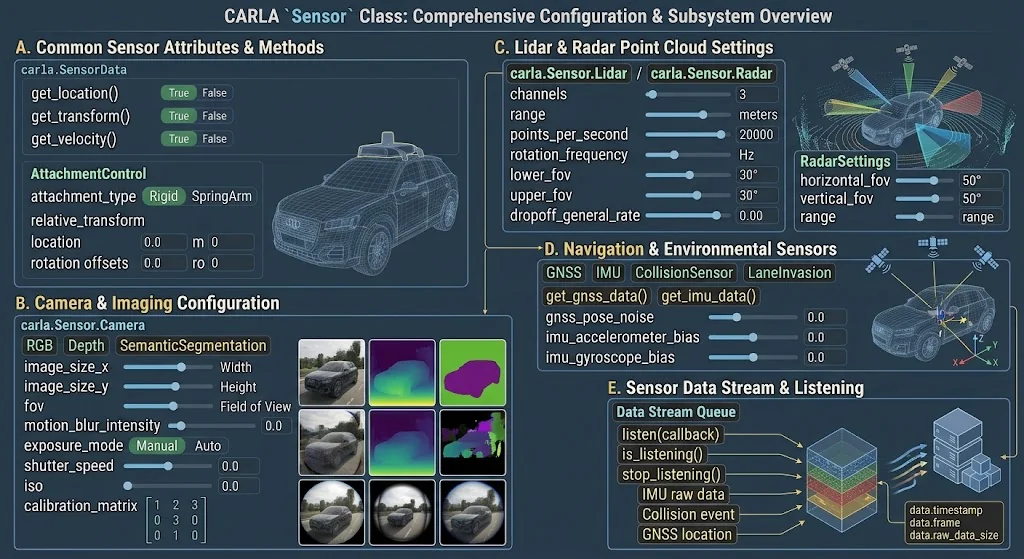
- Attachment Configuration:
world.spawn_actor(sensor_bp, transform, attach_to=vehicle, attachment_type)whereattachment_typecan beRigidorSpringArm. - Stream Callback:
sensor.listen(lambda data: process_sensor_data(data))binds asynchronous C++/Python callbacks to incoming network buffer queues.
4. The Walker Class & Subsystem Overview
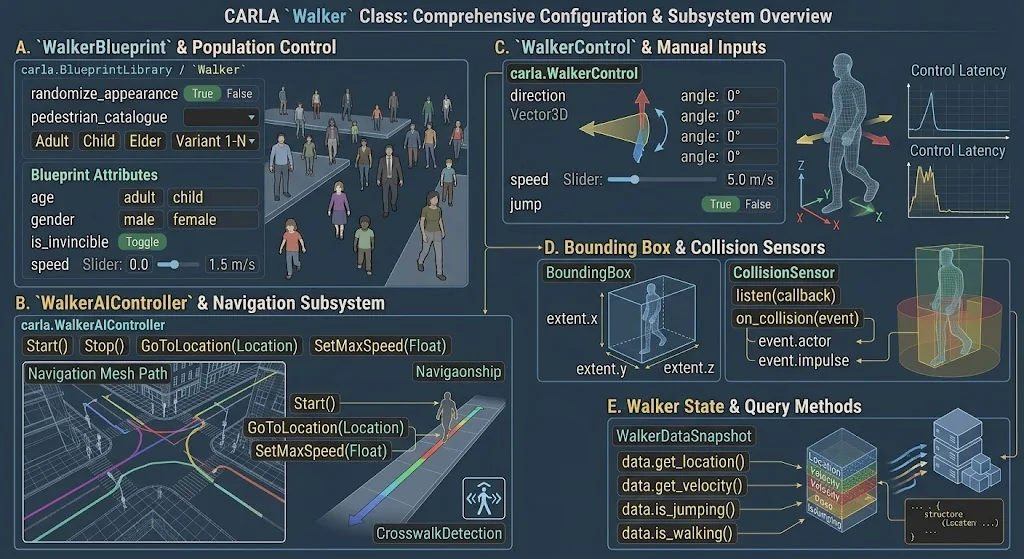
In CARLA, the Walker class (carla.Walker / carla::client::Walker) represents pedestrian entities within the simulation environment. Unlike vehicles, which rely on wheel dynamics and internal drive trains, walkers operate via a specialized character controller and an optional AI navigation controller (carla.WalkerAIController).
Key Subsystems & Configurable Parameters
1. Blueprint Attributes & Population Control
Walkers are instantiated from the blueprint library (blueprint_library.filter("walker.pedestrian.*")).
- Appearance & Demographic Attributes: Configurable attributes like
age(adult, child),gender(male, female),generation, and specific visual mesh variants. - Invincibility Flag (
is_invincible): When set toTrue, disables ragdoll physics and collision impulses on impact. - Speed Limits: Defines default maximum walking and running speeds for population generation.
2. Navigation & AI Control (carla.WalkerAIController)
Pedestrian movement is typically driven by attaching an AI controller actor to the walker instance.
- Path Finding & Route Planning: Uses the underlying OpenDRIVE navigation mesh (NavMesh) to navigate toward target coordinates.
- GoToLocation(location): Assigns target world coordinates for autonomous pathing.
- SetMaxSpeed(speed): Dynamically scales pedestrian locomotion velocity (m/s).
- Crosswalk & Traffic Light Compliance: Native awareness for pedestrian crosswalks and traffic light signals.
3. Direct Control Inputs (carla.WalkerControl)
For manual or custom behavioral overrides, control signals are applied directly via carla.WalkerControl:
- direction (
carla.Vector3D): Sets the 3D direction vector for the walker's movement. - speed (float): Target movement speed in meters per second.
- jump (bool): Triggers a vertical jump action.
Behind the Scenes: The Critical Internal Engine Classes in LibCarla
While public classes like carla::Client and carla::Vehicle handle the developer API, LibCarla relies on a set of internal abstractions under carla::client::detail and carla::streaming to handle high-throughput networking, state synchronization, and thread management.
The CARLA Client (carla::Client) serves as the primary programmatic gateway for developers to connect, orchestrate, and control the simulation server. Acting as the bridge between external user code (written in Python or C++) and the Unreal Engine physics server, it manages world states, actor spawning, sensor streams, and synchronous simulation ticks over a robust TCP/RPC connection.
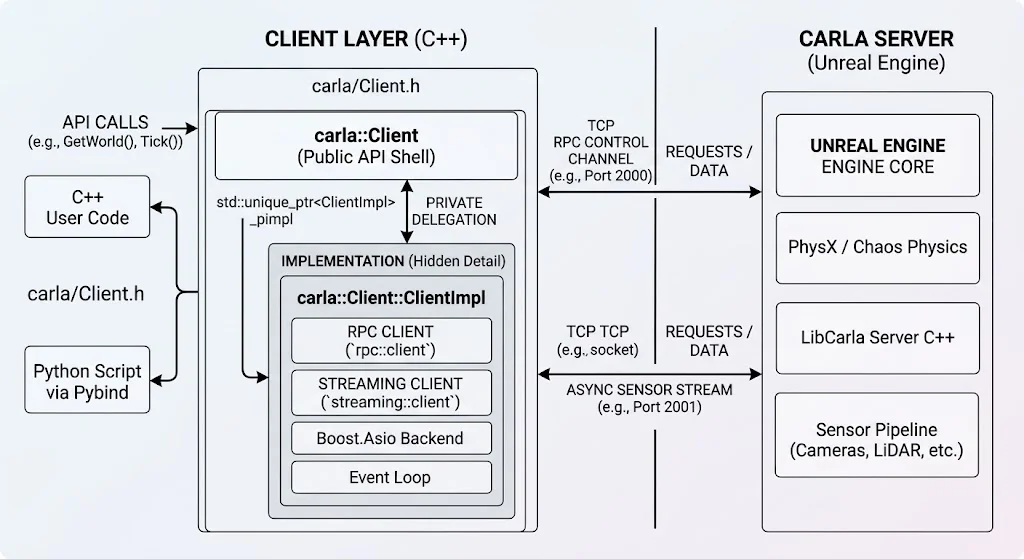
To maintain a clean public API and shield user code from heavy, low-level networking dependencies (such as Boost.Asio and rpc), CARLA implements the Pimpl (Pointer to Implementation) design pattern. Under this architecture:
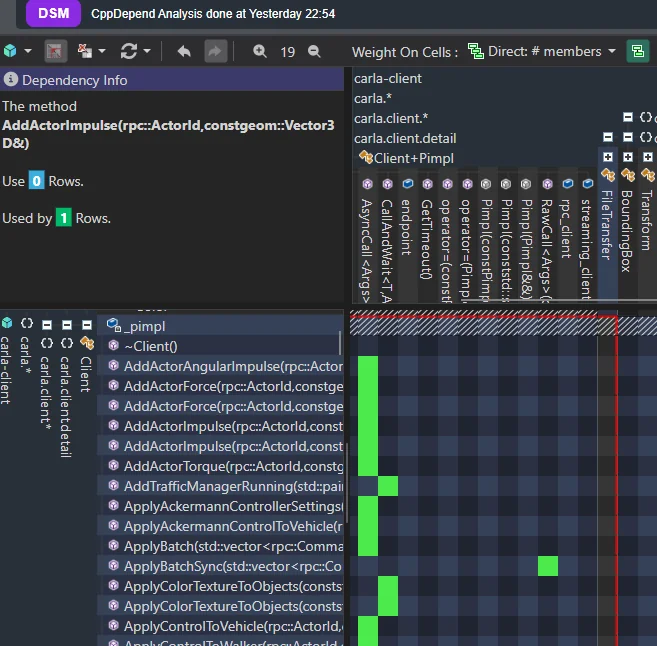
- The Public Shell (
Client.h) exposes only the clean interface methods while keeping networking headers entirely hidden. - The Opaque Pointer (
std::unique_ptr<ClientImpl>) delegates all internal data and network states to a private implementation struct inside the compilation unit. - Direct Redirection ensures that every public-facing method simply forwards its execution straight to
ClientImpl, successfully preventing compilation cascades and keeping the interface modular, fast to compile, and easy to maintain.
2. Networking & RPC Backbone
carla::rpc::Client(Internal RPC Proxy)- Role: Wraps rpclib to execute low-level Remote Procedure Calls over TCP Port 2000.
- Mechanism: Converts high-level requests (e.g.,
spawn_actor,apply_control) into serialized MessagePack byte arrays, waits for the server's transactional response, and throws internal C++ exceptions if the server returns runtime errors.
carla::streaming::Client(Streaming Transport Engine)- Role: Manages the secondary TCP socket (Port 2001) dedicated exclusively to high-bandwidth sensor payloads.
- Mechanism: Uses non-blocking, asynchronous socket routines (via Boost.Asio) to receive multi-megabyte raw sensor buffers (camera frames, LiDAR point clouds) without stalling the primary RPC control channel.
3. State Synchronization & Frame Management
carla::client::detail::EpisodeProxy&Episode- Role: Manages simulation lifetime ("episodes") and guards against dangling references.
- Mechanism: Every time a map reloads or the world resets, a new Episode ID is assigned.
EpisodeProxywraps actor operations with a weak reference, preventing memory access crashes if a client script attempts to manipulate an actor that was destroyed in a prior frame or episode reset.
carla::client::WorldState&ActorState- Role: Local client-side cache of actor positions and simulation states.
- Mechanism: To avoid making blocking network round-trips every time user code queries an actor's transform or velocity,
WorldStatestores frame-stamped state snapshots returned by server ticks, allowing instant zero-copy client lookups.
4. Buffer Management & Async Streams
carla::Buffer&carla::BufferPool- Role: Zero-allocation memory stream management for sensor streams.
- Mechanism: High-resolution sensor data (such as 4K cameras at 60 FPS) can cause extreme memory fragmentation if allocated on the heap every frame.
BufferPoolrecycles contiguous raw memory chunks, ensuring incoming TCP frames write directly into pre-allocated memory buffers.
carla::streaming::detail::MultiStreamState- Role: Coordinates dynamic sensor stream subscriptions.
- Mechanism: Acts as a dispatcher when multiple subscribers (or clients) listen to the same sensor feed (e.g., a shared front-facing camera). It routes single incoming network buffers to multiple listening callbacks without duplicate memory copies.
5. Challenges Resolved by CARLA in Realistic Road & Environment Simulation
Testing Autonomous Driving (AD) and Advanced Driver Assistance Systems (ADAS) under ideal highway conditions is insufficient for safety-critical deployment. Autonomous perception models and vehicle controllers frequently fail when encountering edge-case road anomalies, severe environmental disruptions, and real-world infrastructure degradation.
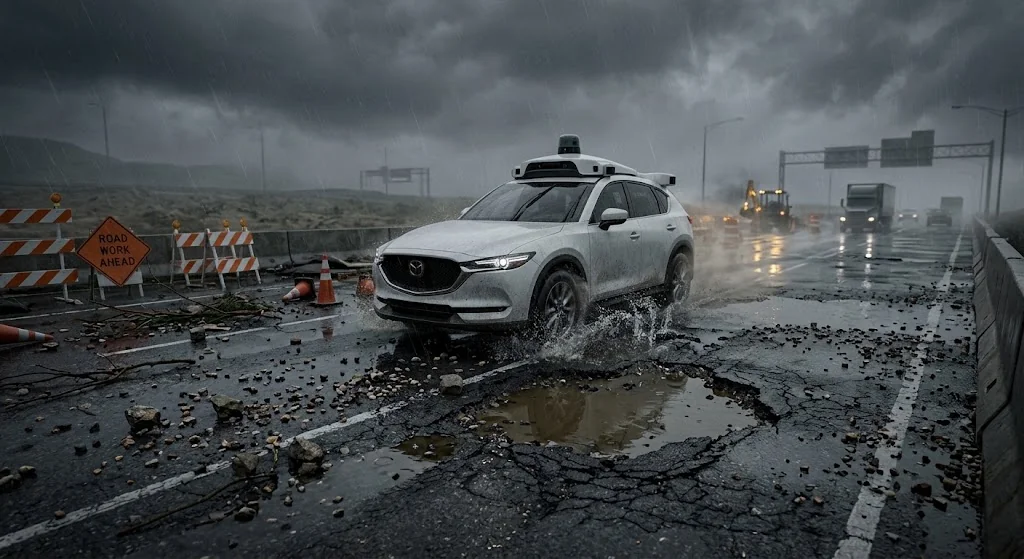
CARLA resolves these challenges by combining Unreal Engine's physical materials and rendering pipeline with OpenDRIVE (.xodr) road network definitions, allowing engineers to model complex, degraded operational design domains (ODDs).
1. Low-Traction & Dynamic Road Surface Degradation
- The Challenge: Real-world roads suffer from surface wear, loose gravel, oil slicks, localized ice patches, wet mud, and broken pavement, causing unpredictable tire slip, hydroplaning, and sudden loss of dynamic control.
- CARLA's Resolution:
- Custom Physical Materials: CARLA allows developers to assign variable friction coefficients (μ) directly to distinct road surface meshes inside Unreal Engine (μ < 0.3 for ice or severe wear, dynamic friction for gravel/mud).
- Layered Material Painting & Decals: Developers can apply surface cracks, potholes, and standing water layers using Unreal Engine's landscape materials. CARLA's multi-point tire physics engine dynamically evaluates surface material properties at each tire contact patch to calculate precise longitudinal and lateral grip loss.
2. Structural Road Geometry Anomalies & Potholes
- The Challenge: Structural defects like deep potholes, rutting, sunken manhole covers, and uneven elevation dips subject vehicle suspension systems to sudden vertical impacts, threatening sensor calibration and vehicle trajectory stability.
- CARLA's Resolution:
- OpenDRIVE (
.xodr) Elevation Modeling: Engineers can inject customized height maps, micro-elevation variations, and superelevation shifts directly into the OpenDRIVE XML schema to deform the underlying road topology. - 3D Mesh Displacements: Complex structural defects (e.g., deep potholes) can be baked into custom 3D road meshes, allowing high-frequency wheel physics to respond accurately to rim drops and suspension compression.
- OpenDRIVE (
3. Adverse Weather & Environmental Perception Degradation
- The Challenge: Heavy rain, dense fog, direct glare, and night driving severely degrade camera visibility, LiDAR point-cloud density, and radar return signals.
- CARLA's Resolution:
- Dynamic Weather & Sensor Physics: CARLA provides real-time control over fog density, precipitation levels, road puddle formation, and solar angles.
- Sensor Noise Simulation: Simulated sensors (RGB, LiDAR, Radar, Depth) dynamically reflect weather distortion — such as rain drop artifacts on camera lenses, water spray behind moving vehicles, and laser signal attenuation in heavy fog.
4. Temporary Obstacles & Debris-Littered Lane Hazards
- The Challenge: Road construction zones, tire debris, fallen cargo, and temporary barriers require real-time trajectory re-planning and sharp evasive maneuvering.
- CARLA's Resolution: Programmatic Asset Spawning: Using the CARLA Python or C++ APIs, safety engineers can programmatically spawn static or dynamic hazards (e.g., loose rocks, construction cones, fallen trees) with custom collision hulls at exact coordinates to automate edge-case regression testing.
When You Need to Modify Core libcarla and Client Code
While CARLA provides a robust high-level Python API for standard simulation tasks, advanced research, custom sensors, and proprietary hardware-in-the-loop (HIL) integrations frequently push past out-of-the-box boundaries. When your pipeline requires low-level optimization or custom communication channels, diving directly into the core libcarla and client codebase becomes essential.
1. Extending RPC Protocols for Custom Commands
- The Limitation: The default rpclib implementation in
carla::rpc::Clientsupports a fixed set of remote procedure calls exposed by the server (e.g., spawning actors, applying vehicle controls, loading maps). If you introduce a custom sensor or specialized server subsystem, standard client methods won't recognize it. - When to Modify libcarla: You alter libcarla's RPC definitions when you need to bind entirely new transactional operations between client and server — such as requesting custom runtime simulation metrics, modifying map properties dynamically over network hooks, or triggering server-side fault injections.
- Implementation Target: Extending message definitions in
LibCarla/source/carla/rpc/and adding corresponding proxy functions insidecarla::client::detail::Simulator.
2. Customizing Sensor Stream Pipelines & Zero-Copy Buffers
- The Limitation: CARLA streams high-bandwidth sensor data (such as LiDAR point clouds and high-resolution camera streams) asynchronously over a secondary port (
carla::streaming::Client). By default, data is packed into genericcarla::Bufferinstances. - When to Modify libcarla: If you are streaming custom raw binary formats (e.g., multi-modal sensor fusion packets, intermediate neural network features, or hardware-in-the-loop telemetry) and want to avoid memory overhead or bottlenecks during deserialization, modifying the streaming client layer allows you to optimize buffer unpacking directly.
- Implementation Target: Adjusting
carla::streaming::client::Streamand buffer pool allocation routines inLibCarla/source/carla/streaming/.
3. Overriding Client-Side State Caching and Snapshot Synchronization
- The Limitation: To prevent network latency from choking simulation execution, libcarla relies on local caches (
WorldStateandActorState) updated via frame snapshots sent by the server. - When to Modify libcarla: If you are running high-frequency control loops (e.g., 100 Hz+ vehicle dynamics or hardware-in-the-loop validation) and find that the client-side snapshot interpolation introduces unacceptable jitter or stale states, modifying the synchronization logic gives you precise control over state interpolation, extrapolation, and thread locking.
- Implementation Target: Tweaking
EpisodeProxyand world state handling insideLibCarla/source/carla/client/detail/.
4. Lightweight Headless Deployment (Stripping Unused Modules)
- The Limitation: The full libcarla repository includes bindings and headers for every feature (walkers, traffic managers, complex blueprints), which increases compilation times and binary footprints if you only need a minimal driving loop.
- When to Modify libcarla: When building a lean, standalone C++ client runner for edge deployment, embedded testing, or high-throughput multi-agent parallel benchmarking, stripping unused client sub-modules optimizes compilation speed and memory footprint.
Summary: Why CARLA Has Become the Benchmark Choice for ADAS & AV Engineering
Over the past few years, CARLA has cemented itself as an industry-standard, go-to simulation engine across autonomous driving systems (ADS) research, Tier-1 automotive development, and commercial robotics. Beyond its academic origins, CARLA's rapid adoption hinges on three primary pillars:
1. Architectural Rigor & High-Performance Implementation
- Unreal Engine Core Foundation: Built natively on Unreal Engine, CARLA offloads physical dynamics (steering, multi-point tire friction, multi-body kinematics) and photorealistic rendering to a proven 3D engine framework.
- Clean Subsystem Modularization: The engine decouples its heavy RPC server execution from the client API layer (libcarla), isolating high-frequency rendering and physics calculation from client-side script orchestration.
- Scalable Data-Structure Design: Although structural static analysis surfaces minor trade-offs (e.g., domain-bounded MISRA C++ warnings and data-structure coupling), the underlying execution logic remains robust, highly optimized, and memory-safe for intensive real-time workloads.
2. Exceptional Flexibility & Open Extensibility
- OpenDRIVE (
.xodr) & Physics Customization: Engineers are not locked into static environments. CARLA allows deep customization of road elevation, surface friction coefficients (μ), dynamic physical material layers (potholes, ice, standing water), and environmental weather matrices. - Custom Sensor Suite Pipeline: Supports native configuration and data capture across RGB, Semantic Segmentation, Depth, LiDAR, and Radar sensors — including noise modeling and raw signal customization.
- Low-Level Protocol Modification: Because libcarla and rpclib protocols are fully open and extensible, developers can inject proprietary C++ client calls, hardware-in-the-loop (HIL) adapters, or custom co-simulation layers (ROS2, MATLAB/Simulink, Autoware) without rewriting the core simulation loop.
3. Industry-Wide Validation & Real-World Utility
- Proven across top-tier OEMs, tech giants, and defense leaders (e.g., Toyota Research Institute, NVIDIA, Applied Intuition, Caterpillar, HavocAI).
- Bridges the gap between synthetic edge-case scenario generation and real-world safety regression testing, providing a production-ready simulation stack that balances execution throughput with software flexibility.