CppDepend

Subscription Options and Pricing

Discover how CppDepend helps you write cleaner, maintainable code at any scale.

1 seatfull price
2–5 seats5% off
6+ seats10% off
1

Choose the number of seats

Developer Edition

for developers

$599/year
  • Smart City View (3D architecture)
  • Dependency Graph & Dependency Matrix
  • TreeMap
  • Prompt Builder
  • Code metrics & complexity
  • C/C++, Java & Rust support
  • MISRA, CERT, OWASP rules
  • IDE plugins (Visual Studio, CLion, VS Code, Eclipse, IntelliJ)
  • Free Technical Support within the subscription period

DevOps Edition

for teams & CI/CD

$999/year
  • Does not include Graphs
  • Code metrics & complexity
  • C/C++, Java & Rust support
  • MISRA, CERT, OWASP rules
  • CI/CD Integration (Jenkins, TeamCity, Bamboo, AppVeyor,...)
  • Quality gates
  • Free Technical Support within the subscription period

Need a custom plan?

Enterprise pricing & volume discounts.

Frequently Asked Questions

Can I mix Developer and DevOps licenses?

Yes! Add any number of seats for each edition. Volume discounts apply to your combined total automatically.

How do volume discounts work?

Buy 2-5 total licenses and get 5% off. Buy 6+ and get 10% off. The discount applies to your entire order.

Is there a free trial?

Yes! All plans include a 14-day free trial with full access to all features. No credit card required.

Can I switch editions later?

Yes, you can upgrade from Developer to DevOps at any time. The price difference will be prorated.

2

Choose the subscription years

3

Checkout

Order Summary

Secure checkout powered by Paddle
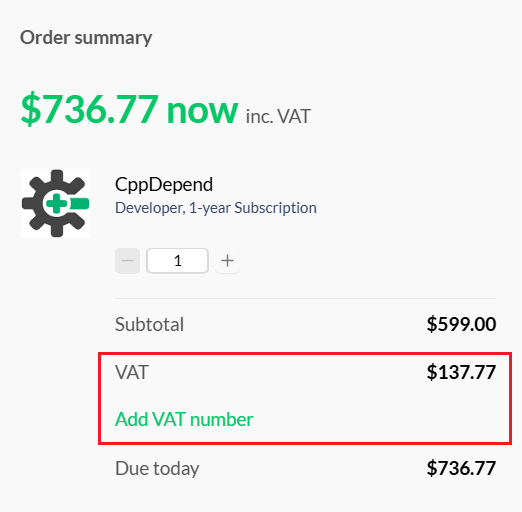
Where to add your VAT number

Add VAT number in Paddle checkout

How seat licensing works

Developer Edition — each developer using the CppDepend interactive UI (in Visual Studio or the standalone VisualCppDepend) counts as one license seat.

DevOps Edition — each physical machine and each virtual machine (VM) that runs a build process integrating CppDepend (SonarQube, Jenkins, TeamCity, Bamboo, AppVeyor, Azure DevOps) counts as one license seat.

Volume discounts apply on the total number of seats: 5% off for 2–5 seats, 10% off for 6+ seats.

Renewal: All Developer and Build Machine license holders qualify for a flat annual rate at 20% discount while on continuous subscription.

Editions Comparison

Feature Developer Edition DevOps Edition
Integration in Visual Studio
Dashboard in VisualCppDepend and Visual Studio
Interactive Dependency Graph
Interactive Dependency Matrix
Interactive Metrics Visualization through Treemapping
Integration into the Build Process with Jenkins, TeamCity, Bamboo, AppVeyor and Azure DevOps
Automatic HTML report production through CppDepend.Console.exe
Dashboard in reports
C/C++ SonarQube Plugin
Fail the build upon Quality Gate failure
Analysis of Visual Studio solutions, Eclipse projects, Qt projects, embedded projects and CMake files
More than 450 CppDepend rules, MISRA, CWE, HICPP, CERT…
Write custom rules and queries and edit default ones
Smart Technical Debt estimation
Quality Gates validation
Comparison against a baseline
Import of test coverage data from Visual Studio Coverage, Cobertura and Bullseye
Rich code search by generating code queries
Trend metrics and trend charts
Usage of Power Tools and CppDepend.API (except running an analysis)

Need more details? See the full editions comparison page.