
Advanced PRQL Features
Advanced PRQL Features
This section details advanced capabilities of PRQL (Code Query LINQ), CppDepend's query language for analyzing C/C++ code. From querying debt and quality gates to exploring code dependencies and naming conventions, PRQL provides powerful facilities for deep code analysis.
Querying Debt, Issues, Rules and Quality Gates
Introduction
From the introduction of CppDepend v2017.1 PRQL is not just about code querying but also about querying Debt, Issues, Rules and Quality Gates.
This feature is useful for in-depth exploration of the technical-debt. In the technical debt documentation we demonstrate how a few clicks from the Dashboard can generate queries to explore the debt and the issues.
This feature is also useful to define custom Trend Metrics, Quality Gates and Rules.
For example a Quality Gate that would define thresholds concerning the percentage of technical-debt could look like:
1// <QualityGate Name="Percentage Debt" Unit="%" />23failif value > 30%45warnif value > 20%67let timeToDev = codeBase.EffortToDevelop()89let debt = Issues.Sum(i => i.Debt)1011select 100d * debt.ToManDay() / timeToDev.ToManDay()
A Trend Metric that would count the number of critical rules violated could look like:
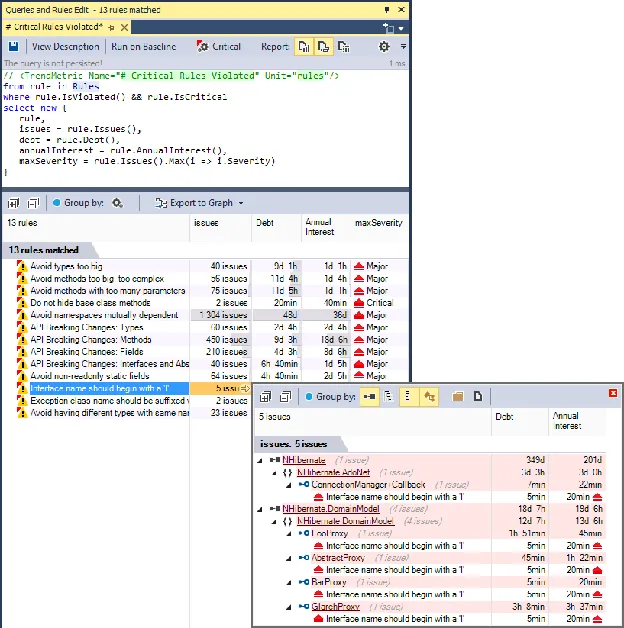
1// <TrendMetric Name="# Critical Rules Violated" Unit="rules"/>23from rule in Rules45where rule.IsViolated() && rule.IsCritical67select new {89 rule,1011 issues = rule.Issues(),1213 debt = rule.Debt(),1415 annualInterest = rule.AnnualInterest(),1617 maxSeverity = rule.Issues().Max(i => i.Severity)1819}
Not only this Trend Metric is useful to follow the trend, but its result is also browsable for in-depth exploration:
Querying diff since the Baseline
When a baseline is available, rules are passed against the baseline in addition to being passed against the actual code base snapshot. As a result CppDepend can compare both issues sets: the issues set obtained by passing rules on the baseline and the issues set obtained by passing rules on the actual code base snapshot.
PRQL can then be used to query the Debt, Issues, Rules and Quality Gates diff. For example a Trend Metric that counts the new issues since baseline could look like:
1// <TrendMetric Name="# New Issues since Baseline" Unit="issues"/>23from issue in Issues45where issue.WasAdded()67select new { issue, issue.Debt, issue.AnnualInterest, issue.Severity }
A Quality Gate that would forbid more than 2 man-days of technical debt since the baseline could look like:
1// <QualityGate Name="New Debt since Baseline" Unit="man-days" />23failif value > 2 man-days45warnif value > 0 man-days67let debt = Issues.Sum(i => i.Debt)89let debtInBaseline = IssuesInBaseline.Sum(i => i.Debt)1011select (debt - debtInBaseline).ToManDay()
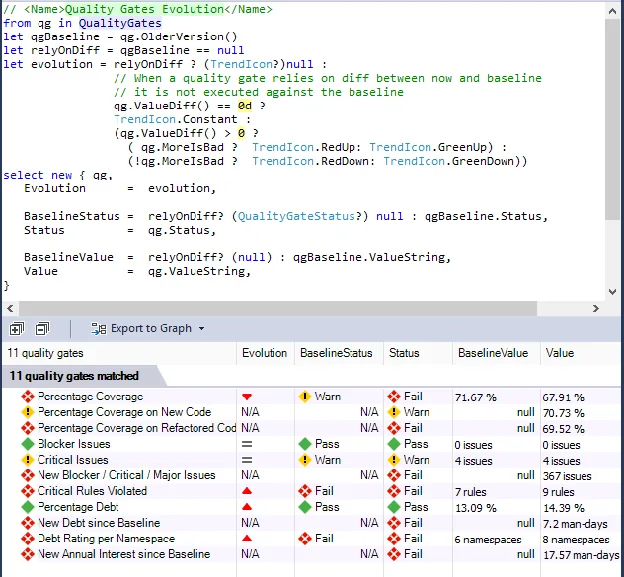
A dozen of Quality Gates are defined by default, and it is easy to customize them and to create new ones. In the screenshot below, this query (generated by a single click on the Dashboard) shows not only the Quality Gates actual status, but also the Quality Gates status on baseline. Quality Gates that rely on diff cannot be passed against the baseline and this is why they have a Not Available N/A value.
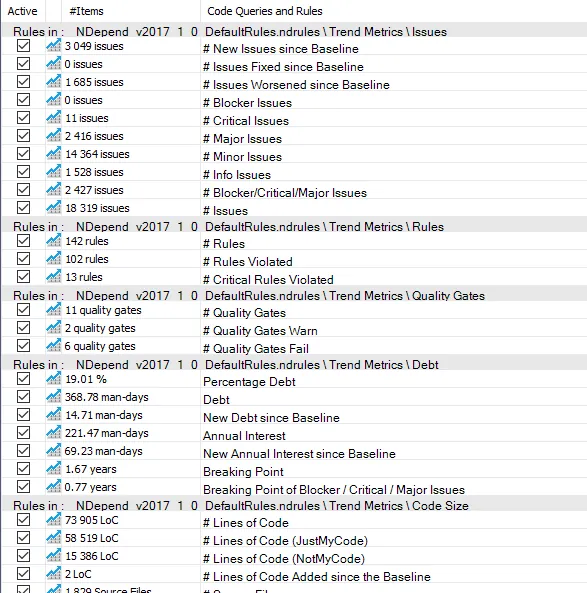
In the same way, many Trend Metrics related to Debt, Issues, Rules and Quality Gates are defined by default and it is easy to customize them and create new ones.
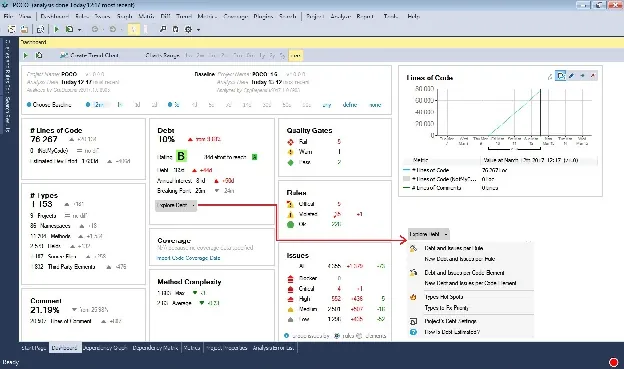
The dashboard proposes several menus to generate queries to explore the Debt, Issues, Rules and Quality Gates status Any number is clickable too to generate a query that lists the counted items.
How it works
Specialized types are defined by the CppDepend.API to specify the debt model, including Debt ; IIssue ; IRule ; IQualityGate ; QualityGateStatus.
However the two key types are: IIssuesSet ; IIssuesSetDiff.
- First CppDepend runs the activated rules both on the actual snapshot and on the baseline.
- It computes issues, debt numbers and diff.
- Then it populates these issues-set and issues-set-diff objects.
- Queries that rely on issues-set and issues-set-diff are executed only once these sets are filled. As a consequence a Rule cannot rely on these sets, but a Quality Gate can.
Instead of writing a query like...
1from i in context.IssuesSet.AllIssues select i
...or like...
1from i in context.IssuesSetDiff.OlderIssuesSet.AllIssues select i
...4 domains are proposed by PRQL: Issues, IssuesOnBaseline, Rules and QualityGates.
These domains are shortcuts for context.IssuesSet.AllIssues, context.IssuesSetDiff.OlderIssuesSet.AllIssues, context.IssuesSet.AllRules and context.IssuesSet.AllQualityGates.
These domains can be seen as range variables of type: IEnumerable
With these domains, simple queries can then be written like...
1from i in Issues select i
...or even just:
Issues
The same way instead of constantly referring to issues-set and issues-set-diff to obtain data like for example...
1from codeElement in CodeElements23where context.IssuesSet.HasIssue(codeElement)45select new {67 codeElement,89 issues = context.IssuesSet.Issues(codeElement),1011 newIssues = context.IssuesSet.Issues(codeElement)1213 .Where(i => context.IssuesSetDiff.WasAdded(i))1415}
...the types IssuesSet and IssuesSetDiff propose convenient extension methods which are automatically translated by the PRQL compiler to calls on context.IssuesSet and context.IssuesSetDiff.
For example the query above can be rewritten:
1from codeElement in CodeElements23where codeElement.HasIssue()45select new {67 codeElement,89 issues = codeElement.Issues(),1011 newIssues = codeElement.NewerIssues()1213}
The full list of extension methods proposed is:
- HasIssue() / HasNewIssue() / HasIssueOnBaseline()
- Debt() / NewDebt() / DebtOnBaseline()
- AnnualInterest() / NewAnnualInterest() / AnnualInterestOnBaseline()
- Issues() / NewerIssues() / IssuesOnBaseline()
- RulesViolated() / RulesViolatedOnBaseline()
- QualityGatesStatus() / QualityGatesStatusOnBaseline()
Note that when working with a property like AnnualInterest, the type Debt returned defines an implicit conversion to TimeSpan (because a debt is a certain number of man-time to fix). Hence the sub-query can be written:
1let annualInterest = Issues.Sum(i => i.AnnualInterest)
Here annualInterest can be of type Debt or TimeSpan. This is also the case for a sub-expression like:
1let debt = codeBase.TechnicalDebt23let annualInterest = debt.AnnualInterest
...which can be rewritten:
1let annualInterest = codeBase.TechnicalDebt.AnnualInterest
Querying the Code Object Model
Each time you write a code query, you are writing a query against the set of types, methods and fields of your code base model. Hence the code elements are central objects.
Here is a simple query that shows how to enumerate the base classes of a class:
1from t in Application.Types where t.NameLike ("MyClass")23select new {45 t,67 baseClasses = t.BaseClasses }
And here is a query that shows how to enumerate methods overridden by a method, and methods that override a method:
1from m in Application.Methods where m.NameLike ("MyMethod")23select new {45 m,67 // Enumerates methods overridden by m89 m.OverriddensBase,1011 // Enumerates methods that overrides m directly1213 m.OverridesDirectDerived,1415 // Enumerates methods that overrides m directly or indirectly1617 m.OverridesDerived }
Querying the Code Dependencies and Design
The dependency model is general in the sense that it doesn't rely on the kind of usage (field assignment, method call...). A and B being two code elements, we say that A depends on B if, when B is not available, A cannot be compiled.
Here's a sample of dependency query:
1from m in Methods where23 m.IsUsing("MyType") &&45 m.IsUsedBy("MyProjectName".AllowNoMatch())67select m
Notice how such extension methods are used by rules generated from dependency graph or dependency matrix, to forbid some particular dependency:
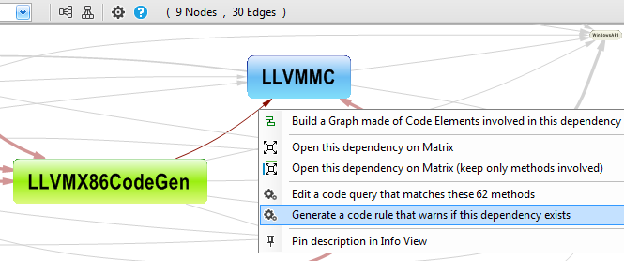
The rule generated is shown below. It could be easily adapted to forbid or enforce any dependency in a code base.
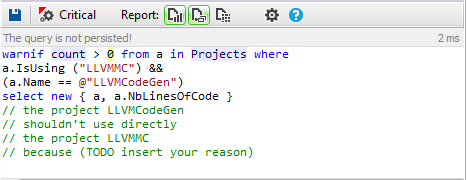
CppDepend provides also a convenient way to query dependencies of a code base (and often a faster way as well):
1from t in Types.UsedByAny(Types.Where(t => t.IsStatic)) select t
Indirect Usage
CppDepend provides some methods containing the word Indirect in their names,to deal with indirect dependencies like for example, the method IsIndirectlyUsing().
For example if A is using B that is using C, A is not directly using C but A is indirectly using C (with a depth of 2).
Here is a query that enumerates methods that are directly or indirectly calling the Print method MyClass.Print().
1from m in Methods23 let depth0 = m.IsIndirectlyUsing("MyClass.Print()")45select m
The method DepthOfIsUsing goes further since it returns the depth of usage.
1from m in Methods23 let depth0 = m.DepthOfIsUsing("MyClass.Print()")45 where depth0 >= 0 orderby depth0 ascending67select new { m, depth0 }
The depth returned is a Nullable
- It is null if m doesn't call indirectly the target method.
- It is 1 if m calls directly the target method.
- It is greater than 1 if m calls indirectly the target method.
This indirect usage possibility is especially useful to generate Call Graphs or Class Inheritance Graphs.
Some of the methods also contain the word Indirect or the word Depth to work with indirect usage from a sequence to a code element or even any code elements of a target sequence (suffix Any).
For example, the following query matches all methods that are calling, directly or indirectly the static methods, with the depth of call:
1let statics = Methods.Where(m => m.IsStatic).ToHashSet()23 let depthMetric = Application.Methods.DepthOfIsUsingAny(statics)45 from m in depthMetric.DefinitionDomain67 let depthValue = depthMetric[m]89 orderby depthValue ascending1011select new { m, depthValue }
Querying the Code Quality and Code Metrics
CppDepend computes more than 80 code metrics.
1// <Name>Quick summary of methods to refactor</Name>23warnif count > 0 from m in JustMyCode.Methods where45 // Code Metrics' definitions67 m.NbLinesOfCode > 30 || // http://www.cppdepend.com/documentation/code-metrics#NbLinesOfCode89 m.CyclomaticComplexity > 20 || // https://www.cppdepend.com/documentation/code-metrics#CC1011 m.NestingDepth > 5 || // http://www.cppdepend.com/documentation/code-metrics#ILNestingDepth1213 m.NbParameters > 5 || // http://www.cppdepend.com/documentation/code-metrics#NbParameters1415 m.NbVariables > 8 || // http://www.cppdepend.com/documentation/code-metrics#NbVariables1617 m.NbOverloads > 6 // http://www.cppdepend.com/documentation/code-metrics#NbOverloads1819select new { m, m.NbLinesOfCode, m.CyclomaticComplexity,2021 m.NbParameters, m.NbVariables, m.NbOverloads }
Notes that many of these code metrics returns a nullable numeric value because they are not necessarily defined for all code elements. For example the #Lines of Code is not computed for third-party code elements.
Custom Metrics
Thanks to the LINQ flexibility it is easy to compose the default code metrics to create more elaborated code metrics, like for example:
1// <Name>Custom metric</Name>23warnif count > 045from m in JustMyCode.Methods67// Don't match too short methods89where m.NbLinesOfCode > 101011let CC = m.CyclomaticComplexity1213let CustomMetric = (CC * CC )/1001415where Custom != null && Custom > 301617orderby Custom descending, m.NbLinesOfCode descending1819select new { m, Custom, CC, m.NbLinesOfCode }
A custom code metric object can also be obtained from the method FillIterative(). For example, this possibility is used in the rule to obtain dead types, but also to obtained types only used by dead type (and the depth of usage):
1// <Name>Potentially dead Types</Name>23warnif count > 045// Filter procedure for types that should'nt be considered as dead67let canTypeBeConsideredAsDeadProc = new Func<IType, bool>(89 t => !t.IsPublic && // Public types might be used by client applications of your projects.1011 !t.IsGeneratedByCompiler)1213// Select types unused1415let typesUnused =1617 from t in JustMyCode.Types where1819 t.NbTypesUsingMe == 0 && canTypeBeConsideredAsDeadProc(t)2021 select t2223// Dead types = types used only by unused types (recursive)2425let deadTypesMetric = typesUnused.FillIterative(2627 types => from t in codeBase.Application.Types.UsedByAny(types).Except(types)2829 where canTypeBeConsideredAsDeadProc(t) &&3031 t.TypesUsingMe.Intersect(types).Count() == t.NbTypesUsingMe3233 select t)3435from t in deadTypesMetric.DefinitionDomain3637select new { t, t.TypesUsingMe, depth = deadTypesMetric[t] }
Querying the Code Diff
CppDepend comes with the unique feature to compare two different snapshots of a code base to see what was changed/added/removed.
For example, the following query enumerates methods where code has been changed:
1from m in Application.Methods23where context.CompareContext.CodeWasChanged(m)45select m
Actually you can just write the shortest query below, and the PRQL compiler will take care to transform it into the query above:
1from m in Application.Methods23where m.CodeWasChanged()45select m
Once such query is written, the CppDepend UI offers the capability to compare the two source files versions of the method changed.
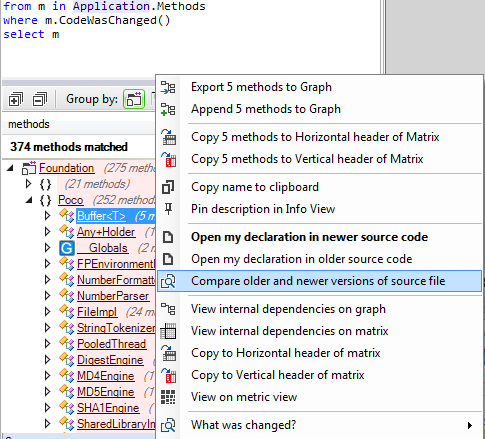
Notice the two methods OlderVersion() and NewerVersion() . As their names suggest, these methods returns the older or newer version of a code element, or null if the code element has been added (hence no older version) or removed (hence no newer version). These methods can be useful for example to write the query below that tracks the evolution in terms of method complexity:
1// <Name>Methods that became more complex</Name>23from m in codeBase.OlderVersion().Methods45where m.IsPresentInBothBuilds()67let oldCC = m.CyclomaticComplexity89let newCC = m.NewerVersion().CyclomaticComplexity1011where oldCC != null && newCC > oldCC1213select new { m, oldCC, newCC }
Notice the call to IsPresentInBothBuilds to ensure that we only deal with methods that are both in the older and newer code base snapshot, to prevent any NullReferenceException while running the query!
As this last query shows, mixing the diff feature with others PRQL features like code quality metrics or dependencies, can lead to powerful code queries and rules to track the evolution of a code base.
Querying the Naming of Code Elements
PRQL proposes several facilities to query the name of the code elements. This is especially useful to write simple code naming conventions (based on regular expressions)...
1// <Name>Abstract base class should be suffixed with 'Base'</Name>23warnif count > 0 from t in Application.Types where45 t.IsAbstract &&67 t.IsClass &&89 t.DepthOfInheritance == 1 &&1011 ((!t.IsGeneric && !t.NameLike (@"Base$")) ||1213 ( t.IsGeneric && !t.NameLike (@"Base<")))1415select new { t, t.DepthOfInheritance }
...or smart code naming conventions:
1// <Name>Avoid naming types and namespaces with the same identifier</Name>23// Not only this can provoke compiler resolution collision,45// but also, this makes code less maintainable because67// concepts are not concisely identified.89warnif count > 01011let hashsetShortNames = Namespaces.Where(n => n.Name.Length > 0).Select(n => n.SimpleName).ToHashSet()1213from t in JustMyCode.Types1415where hashsetShortNames.Contains(t.Name)1617select new { t, namespaces = Namespaces.Where(n => n.SimpleName == t.Name) }
The code elements naming feature is summarized in the PRQL syntax document, in the section Matching code elements by name string.
Querying the States Mutability
The concept of immutability is becoming more and more popular. Immutability is especially useful when dealing with concurrent accesses into multi-threaded environment.
A type is considered as immutable if its instance fields cannot be modified once an instance has been built by a constructor. A static field is considered as immutable if it is private and if it is only assigned by the static constructor. An instance field is considered as immutable if it is private and if it is only assigned by its type's constructor(s) or its type's static constructor. Notes that a field declared as readonly is necessarily immutable, but a field can be immutable without being declared as readonly. In this last case, the keyword readonly can be added to the field declaration, without provoking any compilation error.
At analysis time, CppDepend computes the mutability of types and fields. The result is available through the properties Type.IsImmutable and Field.IsImmutable.
It is then easy to write such rule for example:
1// <Name>Structures should be immutable</Name>23warnif count > 0 from t in Application.Types where45 t.IsStructure &&67 !t.IsImmutable89let mutableFields = t.Fields.Where(f => !f.IsImmutable)1011select new { t, t.NbLinesOfCode, mutableFields }
The two properties ChangesObjectState and ChangesTypeState can be use to enforce or check that a method is pure. A pure method is a method that doesn't assign any instance or static fields.
Also, to control the write access to a particular field, you can use the extension method AssignField():
1from m in Methods where m.AssignField("MyClass.myfield")23select new { m, m.NbLinesOfCode }
In addition, CppDepend provides for fields the 3 properties MethodsAssigningMe , MethodsReadingMeButNotAssigningMe and MethodsUsingMe and for methods it provides the AssignField() method.
Querying Source Files Paths
For each code element you can access to their SourceDecls. Having access to source file declarations opens a range of interesting applications. For example the default query matching methods to discard from the JustMyCode code base view, relies on some patterns on source file name, and can be easily adapted to any situation:
1// <Name>Discard generated and designer Methods from JustMyCode</Name>23// --- Make sure to make this query richer to discard generated methods from CppDepend rules results ---45notmycode67//89// First define source files paths to discard1011//1213from a in Application.Projects141516let projectSourceFilesPaths = a.SourceDecls.Select(s => s.SourceFile.FilePath)1718let sourceFilesPathsToDiscard = (1920 from filePath in projectSourceFilesPaths2122 let filePathLower= filePath.ToString().ToLower()2324 where2526 filePathLower.Contains("generated")2728 select filePath2930).ToHashSet()3132//3334// Second: discard methods in sourceFilesPathsToDiscard3536//3738from m in a.ChildMethods3940where (sourceFilesPathsToDiscard.Contains(m.SourceDecls.First().SourceFile.FilePath))4142select new { m, m.NbLinesOfCode }
Several default rules concerning source files organization are proposed when you create a new CppDepend project.
Try CppDepend Today
Start your 14-day free trial with full access to all documentation features. No credit card required.