
Mastering PRQL Syntax with CppDepend
Mastering PRQL Syntax with CppDepend
This document assumes that you are familiar with the LINQ syntax, and exposes the PRQL syntax peculiarities.
PRQL, Code Query LINQ, is a feature proposed by the tool CppDepend since the version 3, to query C/C++ code through LINQ queries.
Getting Started Video
A short 1:50 minute video introducing PRQL syntax is available on the CppDepend documentation site.
PRQL Query edition
A PRQL query can be edited live in the CppDepend UI (standalone or in Visual Studio).
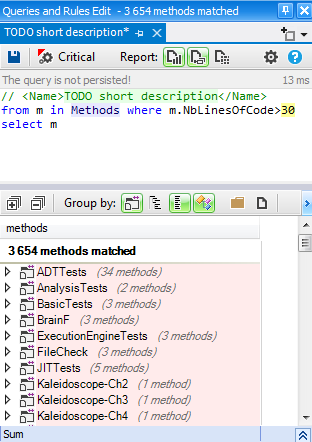
The query is executed automatically as soon as it compiles.
Notice in the screenshot above the 13ms at the top right, that indicates the execution duration of the query.
PRQL is fast and is designed to run hundreds of queries per seconds against a large real-world code base.
PRQL edition comes also with code completion/intellisense, and also tooltip documentation on mouse hovering the query body.
Predefined domains
PRQL defines a few predefined domains to query on including: Types ; Methods ; Fields ; Namespaces ; Projects
These domains enumerate not only all code elements of the code base queried, but also all third-party code elements used by the code base (like for example the type string and all methods and fields of the type string that are used by the code base).
The syntax is as simple as:
1from m in Methods where m.NbLinesOfCode > 30 select m
A PRQL query can rely on one or several domains. Notice in the query above how the domain word Methods is highlighted differently.
There are two convenient predefined domains that are used often: Application and ThirdParty. As their name suggest, these domains are useful to enumerate code elements defined only in application projects, or only defined in third-party projects (like STL, MFC or Boost) and used by the application code. These two domains represent each a partial view of the entire code base.
1from m in Application.Methods where m.NbLinesOfCode > 30 select m
It is easy to refine these predefined domains.
For example the query below matches large methods defined only in the namespace ProductName.FeatureA and its child namespaces:
1from m in Application.Namespaces.WithNameLike("ProductName.FeatureA").ChildMethods()2where m.CyclomaticComplexity > 10 select m
Defining the code base view JustMyCode with notmycode prefix
There is another convenient predefined domain named JustMyCode.
The domain JustMyCode represents a facility of PRQL to eliminate generated code elements from PRQL query results.
For example the following query will only match large methods that are not generated by a tool (like a UI designer):
1from m in JustMyCode.Methods where m.NbLinesOfCode > 30 select m
The set of generated code elements is defined by PRQL queries prefixed with the PRQL keyword notmycode.
For example the query below matches methods defined in source files whose name contains a specific words.
1notmycode from m in Methods where23 m.SourceFileDeclAvailable &&45 m.SourceDecls.First().SourceFile.FileName.ToLower().Contains("generated.cpp")67select m
The PRQL queries runner executes all notmycode queries before queries relying on JustMyCode, hence the domain JustMyCode is defined once for all. Obviously the PRQL compiler emits an error if a notmycode query relies on the JustMyCode domain.
PRQL code rules
A PRQL query can be easily transformed into a rule by prefixing it with a condition defined with the two PRQL keywords warnif count.
The keyword count is an unsigned integer that is equal to the number of code elements matched by the query.
For example the following query warns if some large methods are matched in the code base application methods:
1// <Name>Avoid too large methods</Name>23warnif count > 045from m in Application.Methods67where m.NbLinesOfCode > 3089select m
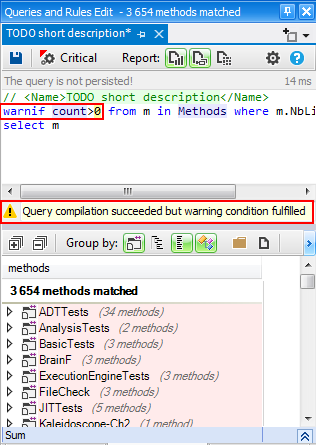
PRQL code rules are useful to define which bad practices the team wants to avoid in the code base.
The team can see code rules violation warning in the CppDepend UI (standalone or in Visual Studio), or in the report.
The team has also the possibility to define some rules as critical rules.
The Query operator and Query expression syntaxes
With PRQL both the query operator syntax and the query expression syntax are allowed.
The query operator syntax is the one with direct calls to methods like Where() and Select()...
1Methods.Where(m => m.NbLinesOfCode > 30)
The query expressions syntax is the keywords like where and select...
1from m in Methods where m.NbLinesOfCode > 30 select m
Often you'll find convenient to mix both syntaxes in one query.
- The query operator syntax is convenient to define sub-set and sub-domains.
- The query expression syntax is convenient to define operations on these sub-sets and sub-domains.
For example the query below defines with the query operator syntax the sub-set of methods defined in static types, and use the query expression syntax to filter and project the large methods from this sub-set.
1from m in Application.Types.Where(t => t.IsNested).ChildMethods()2where m.NbLinesOfCode > 30 select m
Defining range variables with let
The LINQ syntax present the facility to define range variables with the keyword let. In this section, we wanted to underline this possibility because using the let keyword is a common practice when writing PRQL queries.
For example, the following default rule define a custom code metrics thanks to several range variables:
1// <Name>C.R.A.P method code metric</Name>23// Change Risk Analyzer and Predictor (i.e. CRAP) code metric45// This code metric helps in pinpointing overly complex and untested code.67// Formula: CRAP(m) = comp(m)^2 * (1 - cov(m)/100)^3 + comp(m)89warnif count > 01011from m in JustMyCode.Methods1213// Don't match too short methods1415where m.NbLinesOfCode > 101617let CC = m.CyclomaticComplexity1819let uncov = (100 - m.PercentageCoverage) / 100f2021let CRAP = (CC * CC * uncov * uncov * uncov) + CC2223where CRAP != null && CRAP > 302425orderby CRAP descending, m.NbLinesOfCode descending2627select new { m, CRAP, CC, uncoveredPercentage = uncov*100, m.NbLinesOfCode }
Notice that using many let clauses in the main query loop, can significantly decrease performance of the query execution.
Beginning a query with let
The PRQL compiler extends the usage of the LINQ let keyword, because with PRQL, the let keyword can be used to define a variable at the beginning of a PRQL query.
For example, the default PRQL rule below, first tries to match the BaseClass types, and if found, second let the query be executed.
1warnif count > 023let base = ThirdParty.Types.WithFullName("BaseClass").FirstOrDefault()45where base != null // base can be null if the code base doesn't use at all BaseClass67from t in Application.Types where89 !t.DeriveFrom(base) select t
For some others PRQL rules, it can be convenient to define multiple sub-sets through several let keyword expressions, before executing the query itself.
For example, the default PRQL rules below, first define the sub-sets uiTypes and dbTypes before using them in the query code.
1// <Name>UI layer shouldn't use directly DB types</Name>23warnif count > 045// UI layer is made of types in namespaces using a UI framework67let uiTypes = Application.Namespaces.UsingAny(89 Projects.WithNameIn("PresentationFramework", "MFC")1011 ).ChildTypes()1213// You can easily customize this line to define what are DB types.1415let dbTypes = ThirdParty.Assemblies.WithNameIn("Data").ChildTypes()1617 .Except(ThirdParty.Types.WithNameIn("DataSet", "DataTable", "DataRow"))1819from uiType in uiTypes.UsingAny(dbTypes)2021let dbTypesUsed = dbTypes.Intersect(uiType.TypesUsed)2223select new { uiType, dbTypesUsed }
Defining a procedure in a query
With the LINQ syntax it is possible to create a procedure in a query. This is useful if you wish to invoke such procedure from different locations in the query.
This possibility is illustrated in the default rule below where the procedure to check if a type can be considered as a dead type needs to be invoked from two different locations:
1// <Name>Potentially dead Types</Name>23warnif count > 045// Filter procedure for types that shouldn't be considered as dead67let canTypeBeConsideredAsDeadProc = new Func<IType, bool>(89 t => !t.IsPublic && // Public types might be used by client applications of your assemblies.1011 t.Name != "ClassToExclude"1213// Select types unused1415let typesUnused =1617 from t in JustMyCode.Types where1819 t.NbTypesUsingMe == 0 && canTypeBeConsideredAsDeadProc(t)2021 select t2223// Dead types = types used only by unused types (recursive)2425let deadTypesMetric = typesUnused.FillIterative(2627types => from t in codeBase.Application.Types.UsedByAny(types).Except(types)2829 where canTypeBeConsideredAsDeadProc(t) &&3031 t.TypesUsingMe.Intersect(types).Count() == t.NbTypesUsingMe3233 select t)3435from t in deadTypesMetric.DefinitionDomain3637select new { t, t.TypesUsingMe, depth = deadTypesMetric[t] }
Try CppDepend Today
Start your 14-day free trial with full access to all documentation features. No credit card required.