
Compliance Kits
Compliance kits
A compliance kit prepares a project for a standard when you create it: it switches on the right coding rules, sets the level and the coverage policy, and writes the files you need for audits. This page explains the model; each kit has its own page.
The kits
How a kit is chosen
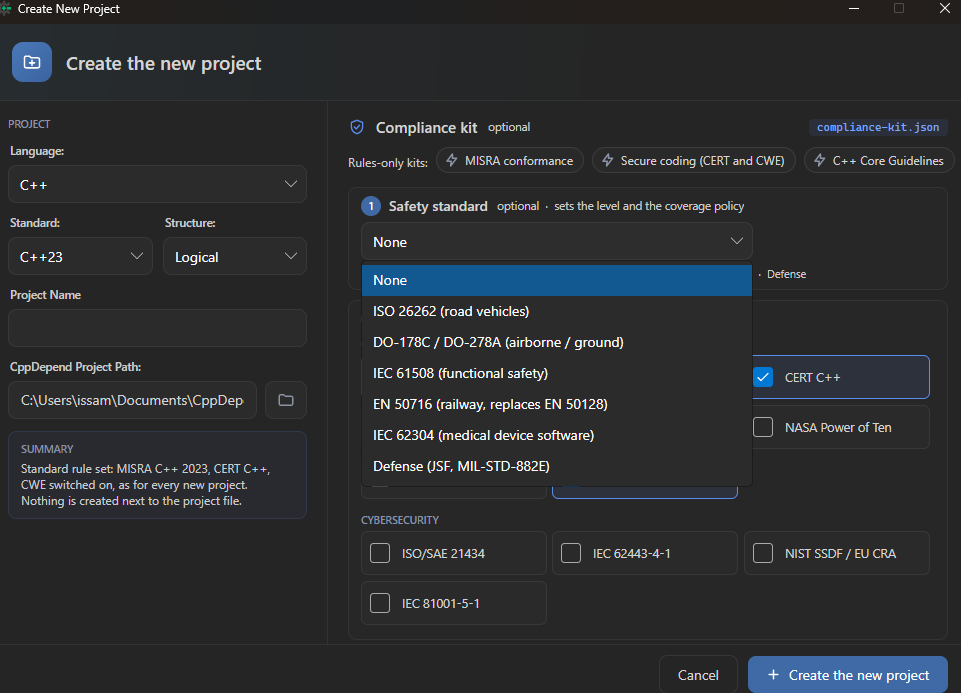
In Create New Project, for C and C++ projects, the Compliance kit block (stored in compliance-kit.json) has two steps and a row of shortcuts.
| Part | What it does |
|---|---|
| Rules-only kits (shortcuts) | MISRA conformance, Secure coding (CERT and CWE), C++ Core Guidelines. One click sets the safety standard to None and ticks the rules of that kit. No level, no coverage policy. |
| 1. Safety standard (optional, one choice) | None, ISO 26262, DO-178C / DO-278A, IEC 61508, EN 50716, IEC 62304, Defense. It sets the level (ASIL, DAL, SIL, class...) and the coverage policy, and ticks the coding standards that belong to it. |
| 2. Coding standards (as many as needed) | Coding rules: MISRA C++ 2023, MISRA C 2025, AUTOSAR C++14, CERT C++ / CERT C, HIS Metrics, JSF AV C++, NASA Power of Ten, C++ Core Guidelines, CWE. Cybersecurity: ISO/SAE 21434, IEC 62443-4-1, NIST SSDF / EU CRA, IEC 81001-5-1. |
| Summary (left) | Live text: rules switched on, level, coverage policy and the files that will be created. With nothing chosen it says Standard rule set and nothing is created next to the project file. |
Rules to know
- The boxes of step 2 are always the final result: the safety standard and the shortcuts only tick them. You can tick more boxes or untick some. A box you tick yourself is marked added; a box ticked by the safety standard shows the standard's name.
- Changing the safety standard unticks the boxes of the previous one but keeps the ones you added.
- The level does not change the boxes. It starts on the strictest level; lowering it is a conscious choice. It only drives the coverage policy.
- Cybersecurity boxes are never ticked automatically. The one suggested by the safety standard is highlighted, with a tooltip, but you tick it.
- Standards that do not apply to the language are hidden: AUTOSAR C++14, JSF AV C++ and C++ Core Guidelines for a C project. CERT and MISRA show their C or C++ version.
- The dialog works from a catalog supplied by the platform, so which standards and kits you see depends on your version.
What each safety standard ticks
| Safety standard | Levels | Ticked for C++ | Ticked for C | Suggested cybersecurity |
|---|---|---|---|---|
| ISO 26262 | ASIL A, B, C, D | MISRA C++ 2023, CERT C++, HIS Metrics | MISRA C 2025, CERT C, HIS Metrics | ISO/SAE 21434 |
| DO-178C / DO-278A | DAL A, B, C, C+coupling, D | MISRA C++ 2023, JSF AV C++, NASA Power of Ten | MISRA C 2025, NASA Power of Ten | none |
| IEC 61508 | SIL 1 to 4 | MISRA C++ 2023, CERT C++ | MISRA C 2025, CERT C | IEC 62443-4-1 |
| EN 50716 | Basic, SIL 1 to 4 | MISRA C++ 2023, CERT C++ | MISRA C 2025, CERT C | IEC 62443-4-1 |
| IEC 62304 | Class A, B, C | MISRA C++ 2023, CERT C++, CWE | MISRA C 2025, CERT C, CWE | IEC 81001-5-1 |
| Defense | MIL-STD-882E categories (to define) | JSF AV C++, MISRA C++ 2023, CERT C++, CWE | MISRA C 2025, CERT C, CWE | NIST SSDF |
This table comes from the product specification of the dialog. The catalog shipped with your version is authoritative.
What is created with the project
| File (next to the project file) | Created when |
|---|---|
<name>.compliance-kit.json | A safety standard, a shortcut or at least one coding standard is chosen. Records the safety standard and level, the shortcut used, and for each coding standard where the choice came from: safety, preset, user. |
<name>.compliance-policy.json | A safety standard with a coverage policy is chosen. Holds the coverage level, for example ISO26262-6:ASIL-D. |
<name>.compliance-waivers.json | Same condition. Holds waivers of the coverage policy. |
deviations.json | At least one coding standard is ticked. Holds the deviation records (see below). |
{
  "version": 2,
  "language": "C++",
  "safetyStandard": { "id": "ISO26262", "level": "ASIL-D" },
  "preset": null,
  "codingStandards": [
    { "id": "MISRA-CPP-2023", "source": "safety" },
    { "id": "CERT-CPP",       "source": "safety" },
    { "id": "HIS",            "source": "safety" },
    { "id": "CWE",            "source": "user" }
  ]
}
With a shortcut, safetyStandard is null and preset holds its name (misra, secure-coding or core-guidelines). A project created with the first version of the dialog (version 1) opens normally and shows the same state. Re-creating a project over an existing one keeps its deviations and waivers. The command line and covcheck read the coverage policy, not compliance-kit.json, so CI is not affected by the choice of a kit.
After the analysis: three pages
Compliance Summary
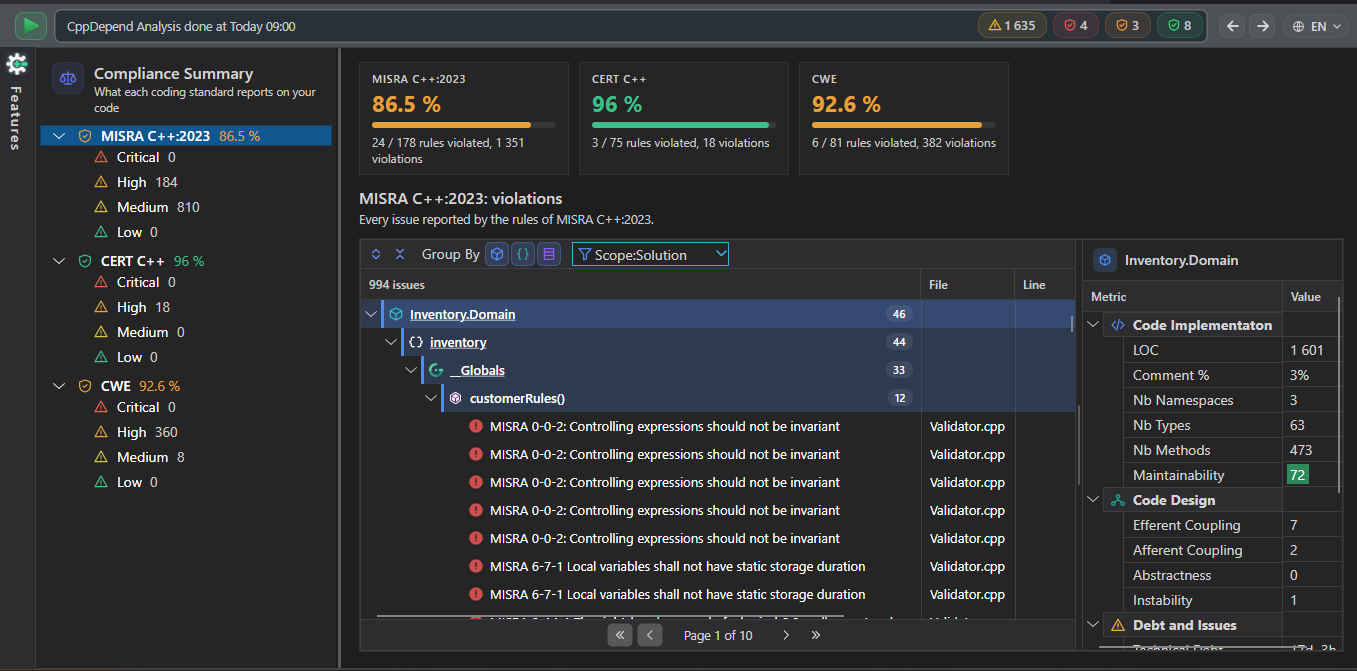
One card per ticked standard. The percentage is the share of the standard's rules that are not violated: MISRA C++:2023 86.5% means 24 of 178 rules are violated, with 1,351 violations in total. The left tree gives, for each standard, the violations by severity (Critical, High, Medium, Low). Select a standard to list every issue reported by its rules, grouped by project, namespace, type and method, with the file and line; a side panel shows the metrics of the selected element.
Standards Coverage
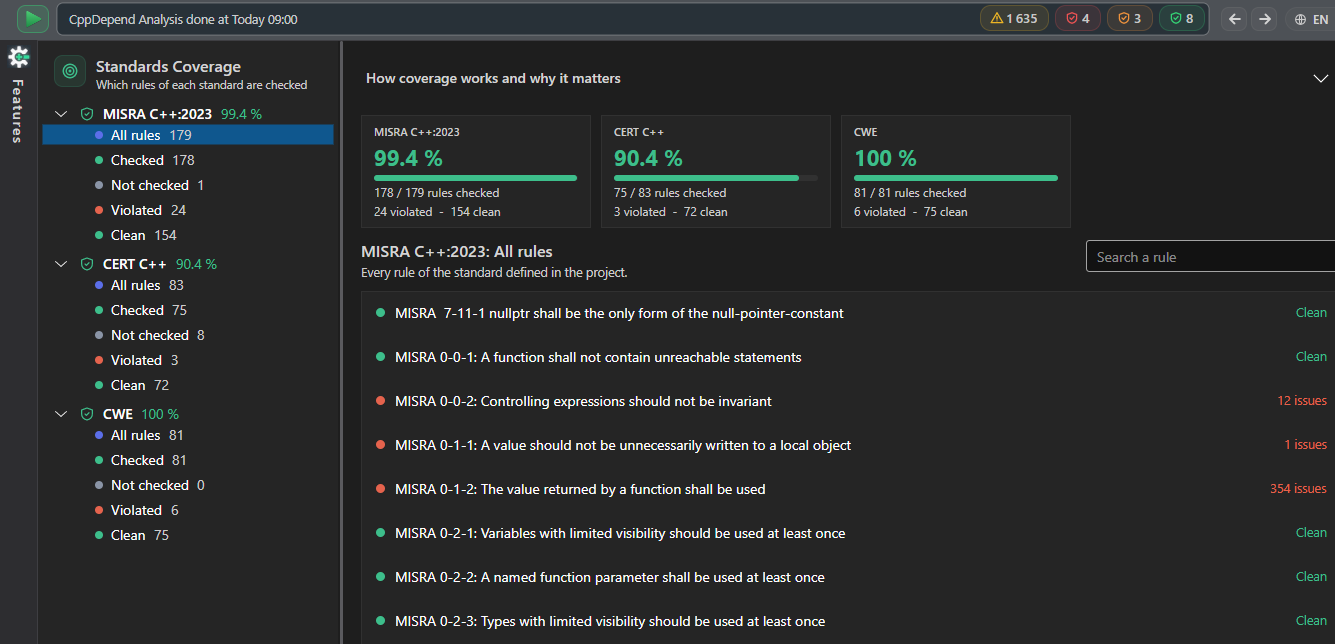
Answers "does the analysis really check this standard?". For each standard: All rules, Checked, Not checked, Violated and Clean. The card shows the share checked (for example 178 of 179 MISRA C++:2023 rules) and the number of violated and clean rules. The list shows each rule with Clean or its number of issues, and a search box finds a rule. A rule that is not checked is a gap to explain in your compliance plan.
Deviations
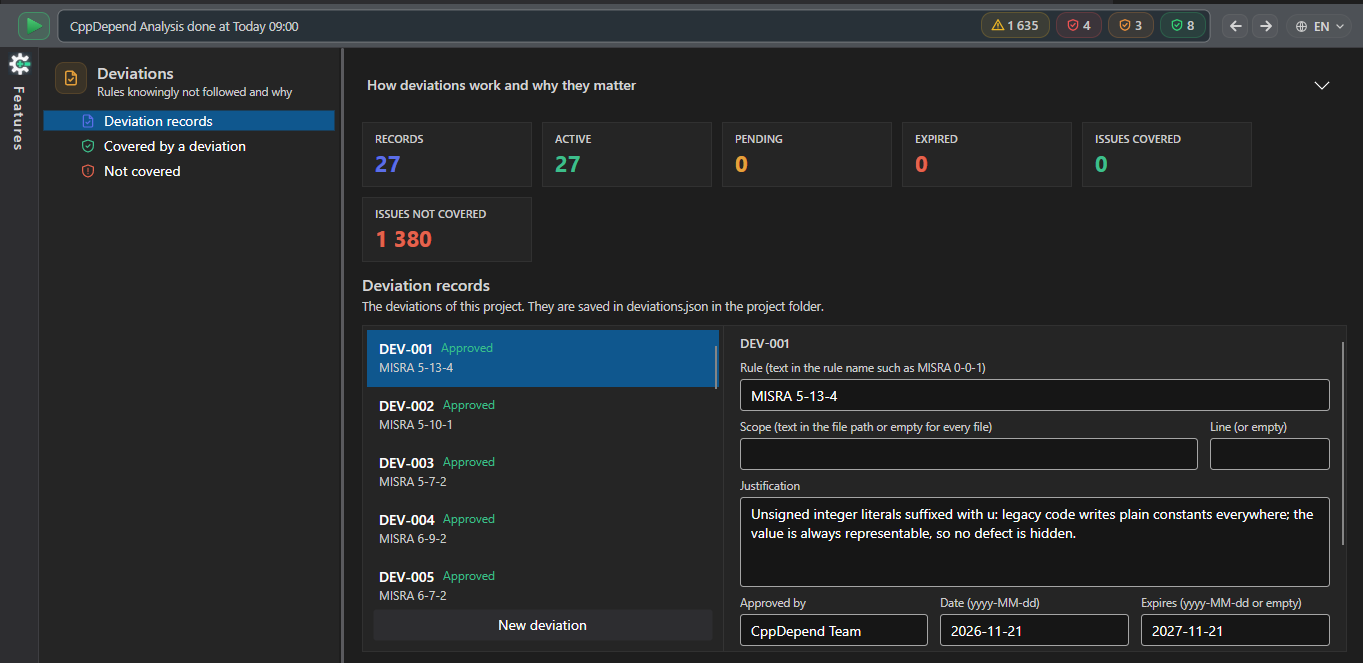
A deviation is a documented decision not to follow a rule. The page counts Records, Active, Pending, Expired, Issues covered and Issues not covered, and has three views: Deviation records, Covered by a deviation and Not covered. A record has an id (DEV-001), the rule (a text found in the rule name such as MISRA 5-13-4), an optional scope (text in the file path, empty for every file) and line, a justification, who approved it, the approval date and an optional expiry date. Deviations are saved in deviations.json in the project folder. Issues matched by an active deviation are listed as covered; the rest must be fixed or justified.
Typical use
- Create the project with the kit of your standard and the strictest level you must meet.
- Run the analysis, then open Standards Coverage to confirm the rules are checked.
- Open Compliance Summary and fix the Critical and High violations first.
- For rules you deliberately do not follow, add a justified deviation with an approver and an expiry date.
- Keep the project files (
compliance-kit.json, policy, waivers, deviations) in source control as audit evidence.
The kits help you prepare and evidence compliance with the coding rules. They do not replace the safety process, the assessment or the certification required by each standard.