
User Guides
Safety & Security: user guide
The Safety & Security pages
The Safety & Security menu groups four pages that look at the code from an attacker's and a failure's point of view. Each page is built on the results of the analysis (the rules of your coding standards, plus call-graph queries), so it needs no extra tool.
| Page | Question it answers |
|---|---|
| Taint & Attack Surface | Where does untrusted input enter my program, and which dangerous operations can it reach? |
| Undefined Behavior | Which code has no defined meaning in C++ (null dereference, uninitialized reads, overflow, out of bounds...)? |
| Exception Safety | Where can an exception terminate the program, hide a failure or leak resources? |
| Dependencies & SBOM | Which third-party components do I ship, under which licences, with which known vulnerabilities? |
What the pages have in common
- Every page opens with a collapsible block How this page works and why it matters, with the same explanation as in this guide.
- A tree on the left chooses the view. A row of cards on top gives the counts. The grid below lists the elements, grouped by project, namespace and type (use Group By), and a side panel shows the metrics of the selected element. Double-click a row to open the code.
- Counts in the tree and the cards are the same numbers; click a card to open the matching view.
- The findings of the Undefined Behavior and Exception Safety pages come from the rules that are active in the project. If a page is empty, either the code is clean or the rules are not active: activate the coding standards (cppcheck, Clang analyzer, MISRA, CERT, CWE; see the compliance kits guide) and run the analysis again.
- Views called Critical and High and Added since the baseline exist on the Undefined Behavior and Exception Safety pages. Start there: fix the Critical and High findings first, and use the baseline view to see what the latest changes introduced (it needs a baseline analysis).
- Java projects get the Java version of the same pages, with causes and groups that fit Java (see each section).
Taint & Attack Surface
Where untrusted input enters and what it can reach.
The idea
- The attack surface is the set of places where untrusted data enters your program: command line, network, files, environment, console.
- A source is a function that reads untrusted input (
getline,recv,fopen,getenv...). A sink is a dangerous operation (run a command, copy into a buffer, format a string, open a file). A sanitiser is a validation function. - Most security flaws are untrusted data reaching a dangerous operation without being checked. Knowing which entry points can reach the most sinks tells you where to review, fuzz and harden first.
Header and cards
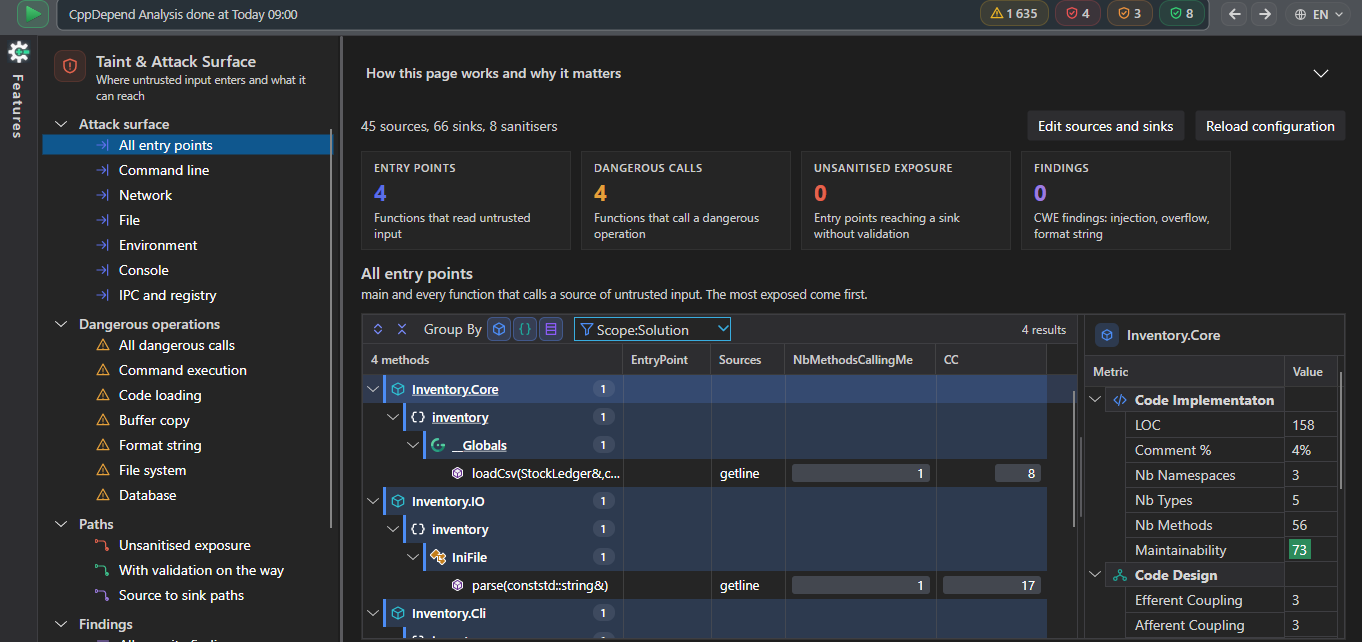
The header shows the size of the configuration (in the screenshot: 45 sources, 66 sinks, 8 sanitisers). Two buttons: Edit sources and sinks opens the configuration (Settings > Taint Sources and Sinks, saved in taint.json in the project file, created with defaults), and Reload configuration applies your changes.
| Card | Meaning |
|---|---|
| Entry points | Functions that read untrusted input: main and every function that calls a source. The most exposed come first. |
| Dangerous calls | Functions of your code that call a dangerous operation directly. |
| Unsanitised exposure | Entry points from which a dangerous operation is reachable and no validation function is on the way. Review these first. |
| Findings | CWE findings of cppcheck and the Clang analyzer: injection, buffer and integer overflow, format string, tainted data. |
The tree
| Group | Views |
|---|---|
| Attack surface | All entry points, then by origin: Command line, Network, File, Environment, Console, IPC and registry. |
| Dangerous operations | All dangerous calls, then by kind: Command execution, Code loading, Buffer copy, Format string, File system, Database. |
| Paths | Unsanitised exposure (a sink is reachable and no validation on the way), With validation on the way (check the validation is really applied), Source to sink paths (one row per entry point and reachable sink, with the length of the shortest call path). |
| Findings | All security findings, then by kind: command and code injection, format string, integer overflow, buffer overflow, tainted data. |
Reading the grid
In the screenshot each row is an entry point (loadCsv reads input with getline; parse too). The columns give the entry point flag (main), the Sources it calls, the number of methods calling it and its cyclomatic complexity. In the paths views the columns give the sinks reached, the shortest depth and Sanitised yes or NO.
How it works and its limit
- The queries follow the call graph from each entry point (
main,wmain,WinMainor a function calling a source) to the sinks it can reach. - A path is flagged as sanitised when a validation function (a name containing validate, sanitize, escape...) is reachable on the way.
- The lists of sources, sinks and sanitisers are function names. Add your own wrappers (for example your own
readNetworkorrunShell) in Edit sources and sinks, then Reload configuration.
Important: this is a map of exposure by name and reachability, not a data-flow analysis. It shows where to look; it does not prove that data reaches a sink, and a sanitised path is not proof that the data is really checked.
If no entry point is found, the functions of the sources list must appear as called functions in the code model: check that the analysis includes the system headers and the list in taint.json. The Java version of the page uses Java defaults (HTTP parameters, Maven and class loading sinks, SQL, deserialization) and the findings of Find Security Bugs, SpotBugs and PMD; the libraries must be in the code model.
Undefined Behavior
Findings that can lead to undefined behavior.
The idea
In C and C++ some code has no defined meaning: the standard does not say what happens, so the compiler may do anything. Examples: dereferencing a null pointer, reading an uninitialized variable, a signed overflow, a shift that is too large, an out-of-bounds access. It is the worst kind of bug: the program may work for years and then fail after a compiler update, a new optimization level or a change of platform. It is also the source of many vulnerabilities, and it cannot be tested away: it must be removed at the source.
The nine causes
| Cause | Meaning |
|---|---|
| Null dereference | A null or invalid pointer is dereferenced. |
| Uninitialized | A variable or member is read before it is assigned. |
| Lifetime | An object is used after its lifetime ended: dangling pointer or reference, use after free. |
| Shifts | A shift by a negative amount or by at least the width of the type. |
| Out of bounds | An array or buffer is accessed outside its bounds. |
| Overflow and division | Signed overflow, unintended wrap-around, or division by zero. |
| Aliasing and casts | Strict aliasing, type punning, invalid pointer casts or misaligned access. |
| Evaluation order | An object is modified twice, or modified and read, without a sequence point. |
| Other undefined behavior | Any other rule reporting undefined, unspecified or implementation-defined behavior. |
The tree
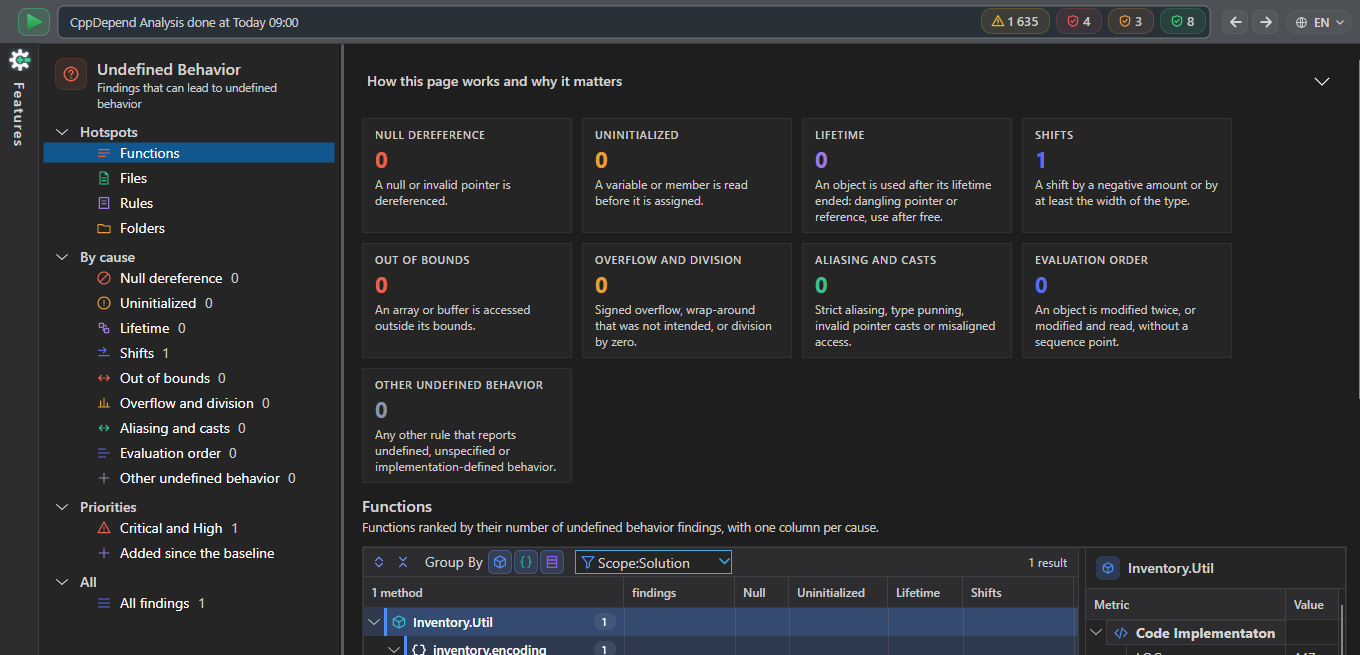
- Hotspots: rankings of Functions, Files, Rules and Folders by number of findings. Functions have one column per cause, as in the screenshot. Rules shows where the rule set is most active.
- By cause: the nine causes with their counts.
- Priorities: Critical and High findings (fix first) and Added since the baseline.
- All: every finding.
How the findings are sorted
The findings come from the active rules of cppcheck, the Clang analyzer, MISRA, CERT and CWE. A rule is placed in a cause when its name mentions it (null, uninit, shift, out of bounds, overflow...); the first matching cause wins. Each row shows the rule that reports the finding, with its file and line.
In the screenshot there is one finding, a shift, in Inventory.Util: every other cause is 0. For Java, which has no undefined behavior, the page is called Runtime Safety and groups the failures that Java does have: null reference, concurrency, integer overflow, unsafe casts, native code, resource leaks, other.
Exception Safety
Throwing, catching and noexcept problems.
The idea
Exception safety is the guarantee that your code stays correct when an exception is thrown: nothing leaks, nothing is left half changed, and the program does not terminate by surprise. An exception that leaves a destructor or a noexcept function calls terminate and kills the program. A catch-all handler hides a real failure, and an exception caught by value is sliced. These defects only show when something goes wrong, which is exactly when the program must behave correctly.
The eight problems
| Problem | Meaning |
|---|---|
| Throw in destructor or noexcept | An exception can leave a destructor or a noexcept function: the program terminates. |
| Catch by value | An exception is caught by value instead of by reference: slicing and extra copies. |
| Catch-all handlers | A catch (...) handler hides the cause of a failure and may swallow errors that must propagate. |
| Uncaught exceptions | An exception can escape unhandled and call terminate. |
| Throwing unsuitable objects | A pointer, a generic type or a type whose copy can throw is thrown. |
| Exception specifications | Dynamic exception specifications, or specifications that do not match the code. |
| Special members and cleanup | Copy, move and assignment that are not exception safe: self-assignment, throwing move. |
| Other exception handling | Any other rule about throwing or catching exceptions. |
The tree and the sorting
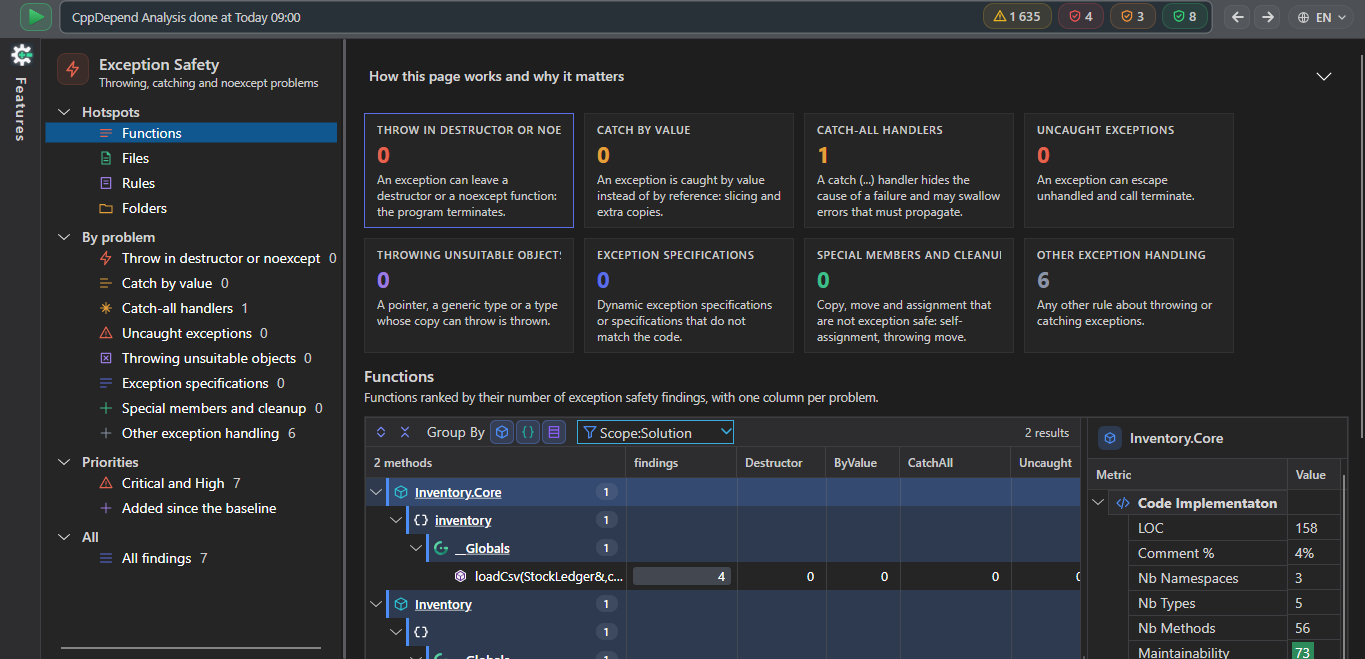
Same structure as Undefined Behavior: Hotspots (Functions with one column per problem, Files, Rules, Folders as a summary per module), By problem, Priorities (Critical and High, Added since the baseline) and All. Findings come from the active rules of cppcheck, the Clang analyzer, MISRA C++ and CERT; a rule goes to the group its name mentions (destructor, noexcept, catch by value, catch-all, uncaught...), the first match winning.
In the screenshot there are 7 findings: one catch-all handler and six in "other exception handling", mostly in loadCsv. In the Java version the groups fit Java: ignored exceptions, generic exceptions, stack traces and sensitive data, finally blocks, resources not released (use try-with-resources), uncaught exceptions.
Dependencies & SBOM
Third-party components of your code.
The idea
An SBOM (Software Bill Of Materials) is the list of the third-party components your software is built with: name, version, licence and origin. Most of the code you ship is not yours: a vulnerability in a library is a vulnerability in your product, and you can only react if you know where the library is used. Licences matter too: a copyleft library can force you to publish your own code. Customers and regulations (Cyber Resilience Act, NIS2, US executive order 14028) increasingly ask for an SBOM in CycloneDX or SPDX format.
How the inventory is built
- The analysis reads the dependencies from the package manifests of the scanned folders: for C and C++
vcpkg.json,conanfile.txtandconanfile.py, CMake (find_package,FetchContent,ExternalProject,CPMAddPackage), git submodules and meson wraps. (Java: Mavenpom.xmlwith properties and dependencyManagement resolved, Gradle build files,libs.versions.tomland the jar files.) - The folders to scan are set in Settings > Dependency Manifests (the button Folders to scan opens it) and saved in the project file (
.cdproj, elementDependencySettings), together with the folder names to skip. Each configured folder is scanned with its sub folders. When none is configured, the analysis reads only the folders of the project's own source files, without sub folders and without looking in parent folders: put the folder that holdsvcpkg.json,conanfileorCMakeLists.txtin the settings if it is not one of them. - The scan runs during the analysis, not when the page opens. After you change the folders, relaunch the analysis: the page shows a notice when the folders changed since the last analysis, and Refresh only re-reads the result of the last one. The analysis also writes
sbom-last-run.txtin its output folder: it lists the project file read, the folders scanned and the number of dependencies found, which is the first place to look when the list is empty. - The licence comes from a table of well-known libraries. Unknown means the licence must be checked by hand.
- The analysis asks OSV.dev for known vulnerabilities (internet access needed; otherwise the result of the last check is used, with its date). OSV has no vcpkg or Conan catalogue, so a dependency is looked up by its git repository and tag, its commit, or its OSS-Fuzz name.
- A dependency without version or repository is shown as not checked: this is not the same as no vulnerability.
- The findings (vulnerabilities, licences, dependencies without a version) are issues of the tool SBOM: the rules and quality gates of the group SBOM and Dependencies, and the report, use them.
The page
| Part | What it shows |
|---|---|
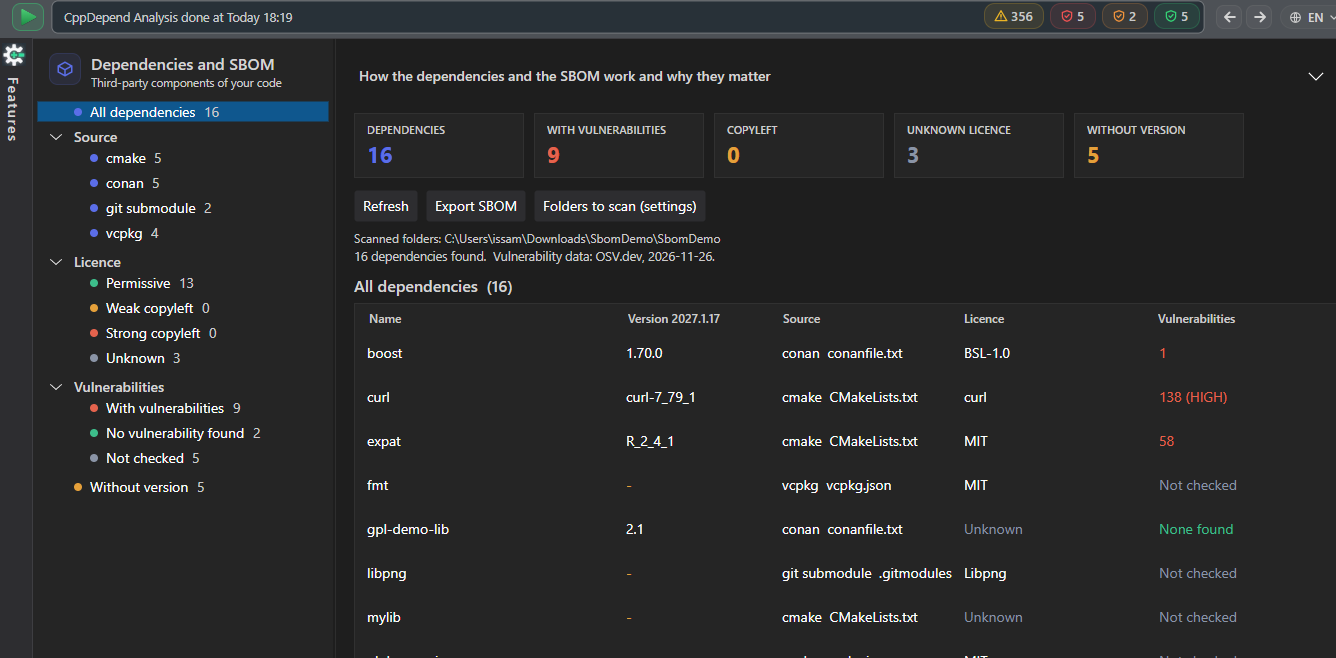
| Cards | Dependencies (total), With vulnerabilities, Copyleft (strong or weak), Unknown licence, Without version. Click a card to filter the list. |
| Tree | Filters by ecosystem (Source: cmake, conan, git submodule, vcpkg...), by licence kind (Permissive, Weak copyleft, Strong copyleft, Unknown) and by vulnerabilities (With vulnerabilities, No vulnerability found, Not checked), plus Without version, each with its count and a color (red for strong copyleft, amber for weak copyleft, gray for unknown). |
| List | Columns Name, Version, Source (the ecosystem and the manifest file), Licence, Vulnerabilities (count and highest severity, None found or Not checked). |
| Details | For the selected dependency: ecosystem, manifest, package URL (purl), licence and its kind, and the known vulnerabilities from OSV.dev with their id, CVE alias, severity and summary; or "no known vulnerability found by OSV.dev for this version". The line under the list says where the vulnerability data comes from and its date. |
| Refresh | Reads the result of the last analysis again. It does not scan: relaunch the analysis after changing the folders. |
| Folders to scan | Opens Settings > Dependency Manifests. |
| Export SBOM | CycloneDX 1.5 (JSON) (<project>.cdx.json), SPDX 2.3 (JSON) (<project>.spdx.json) or CSV (<project>-dependencies.csv). |
What to do with it
- Open the page after an analysis and read the cards: any With vulnerabilities first, then Without version (pin them, otherwise they cannot be checked), then Copyleft and Unknown licence.
- For each vulnerable dependency, open the details, follow the CVE and upgrade or patch.
- Resolve unknown licences by hand and note the decision.
- Enable the SBOM rules in your quality gate so a new vulnerable or unlicensed dependency fails the build.
- Export the SBOM in CycloneDX or SPDX for your customers and keep it with the release.
Security standards and rules
Besides the four pages above, CppDepend ships the rules of the main secure coding, functional safety and cybersecurity standards. They are ordinary CQLinq rules (and mappings of the findings of Clang, Clang-Tidy and CppCheck), so they appear in the Rules page, in the quality gates and in the report, like any other rule. A rule group shows the number of violations, and each violation points to the line of code.
Secure coding standards
| Standard | What it is | Rules shipped |
|---|---|---|
| SEI CERT C | Secure coding rules for C, by area: preprocessor (PRE), declarations (DCL), expressions (EXP), floating point (FLP), arrays (ARR), characters and strings (STR), memory (MEM), input/output (FIO), environment (ENV), signals (SIG), error handling (ERR), concurrency (CON). | 36 |
| SEI CERT C++ | Secure coding rules for C++: declarations, expressions, memory management (MEM), exceptions and error handling (ERR), object-oriented programming (OOP), containers, miscellaneous. | 37 |
| CWE | The most common weakness types of MITRE's Common Weakness Enumeration, such as the classic buffer overflow, double free, NULL pointer dereference, use of uninitialized variable, memory leak and use of dangerous functions. | 19 |
| C++ Core Guidelines | The guidelines of Stroustrup and Sutter, as a rules-only preset of the compliance kits. | preset |
Coding standards for critical software
| Standard | What it is | Rules shipped |
|---|---|---|
| MISRA C++ 2023 | The reference standard for safety-related C++ (automotive, aerospace, medical, railway). Groups follow the document: language independent issues, general principles, lexical conventions, basic concepts, standard conversions, expressions, statements, declarations, declarators, classes, derived classes, member access control and more. | 179 |
| MISRA C | The same for C: unnecessary constructs, comments, identifiers, declarations, pointer type conversions, expressions, statements, declarators, preprocessor, standard library. | 83 |
| NASA / JPL Power of Ten | Ten simple rules by Gerard Holzmann for safety-critical code (no recursion, bounded loops, no dynamic allocation after initialization, short functions, assertions, check every return value, restricted preprocessor and pointers, all warnings on). | 13 |
Functional safety and cybersecurity standards
These standards do not list coding rules: they ask for evidence that the code was built and verified with security in mind. CppDepend maps their requirements to groups of findings, so you can show which analysis results support each requirement.
| Standard | What the mapping covers |
|---|---|
| EU Cyber Resilience Act (CRA) | Annex I Part I: (2)(a) no known exploitable vulnerabilities, memory and initialization defects; (2)(j) limit attack surfaces, unsafe functions; (2)(k) reduce the impact of an incident, error handling and arithmetic. The SBOM requirement is covered by the Dependencies & SBOM page. |
| IEC 62443-4-1 | Secure development lifecycle for industrial control systems: practice SI-2 (secure coding standards: memory safety, initialization and null handling; robustness, errors and unsafe functions) and practice SI-1 (security implementation review: logic defects). |
| IEC 81001-5-1 | Security of health software: secure implementation (memory safety, initialization and null handling; robustness, errors and unsafe functions) and verification by static analysis (logic defects). |
| ISO 26262, DO-178C / DO-278A, IEC 61508, EN 50716, IEC 62304 and Defense | The safety standards of the compliance kits (automotive, avionics, industrial, railway, medical devices, defence). Each kit selects the coding standards and the checks that fit the level of the standard. See the compliance kits documentation. |
Interesting rules
A selection of rules that find real security defects. The name is the title shown in the Rules page.
| Area | Rules |
|---|---|
| Memory safety | CERT MEM30-C: Do not access freed memory; CERT MEM31-C: Free dynamically allocated memory when no longer needed; CERT C++ MEM50-CPP and MEM51-CPP (freed memory, properly deallocate resources); CERT C++ MEM56-CPP: Do not store an already-owned pointer value in an unrelated smart pointer; CWE Double Free, Improper Release of Memory (Memory Leak). |
| Buffers and arrays | CERT ARR30-C: Do not form or use out-of-bounds pointers or array subscripts; ARR36-C and ARR39-C (pointer arithmetic); CWE Buffer Copy without Checking Size of Input (Classic Buffer Overflow); MISRA C Rule 18-0-5: the unbounded functions of cstring shall not be used. |
| Dangerous functions | CERT ENV33-C: Do not call system(); CWE Use of Potentially Dangerous Function and Use of Obsolete Functions; MISRA Rule 18-0-2 (atof, atoi, atol) and Rule 18-0-3 (abort, exit, getenv, system); CERT ERR34-C: Detect errors when converting a string to a number. |
| Initialization and null | CWE Use of Uninitialized Variable and NULL Pointer Dereferenced; CERT DCL30-C: Declare objects with appropriate storage durations; MISRA C++ 0-2-1 (variables used at least once) and 0-1-2 (the value returned by a function shall be used). |
| Errors and exceptions | CERT C++ ERR51-CPP: Handle all exceptions; ERR58-CPP: Handle all exceptions thrown before main(); ERR61-CPP: Catch exceptions by lvalue reference; DCL57-CPP: Do not let exceptions escape from destructors or deallocation functions; CWE Unchecked Error Condition and Declaration of Catch for Generic Exception; CERT C++ ERR52-CPP and MISRA 17-0-5: no setjmp or longjmp. |
| Concurrency and signals | CERT SIG30-C: Call only asynchronous-safe functions within signal handlers; CERT CON36-C: Wrap functions that can spuriously wake up in a loop; CERT FIO42-C: Close files when they are no longer needed. |
| Logic errors | CWE Comparing instead of Assigning, Omitted Break Statement in Switch, Operator Precedence Logic Error, Expression is Always True and Always False; CERT EXP30-C and EXP50-CPP: Do not depend on the order of evaluation for side effects. |
| Robust, analysable code | NASA Rule 1 (no goto, setjmp, longjmp or recursion, direct or indirect); Rule 2 (loops with a fixed upper bound); Rule 3 (no dynamic allocation after initialization); Rule 7 (check the return value of every non-void function); Rule 9 (limit pointer use); MISRA Rule 18-4-1 (no dynamic heap allocation). |
| Supply chain | The group SBOM and Dependencies: a dependency with a known vulnerability (by severity from critical to low), a strong or weak copyleft licence, an unknown licence, no version, or vulnerability data that is missing or older than seven days. |
How to use them
- Choose the standards for the project in the compliance kit wizard (a safety standard plus coding standards, or the presets MISRA conformance, Secure coding (CERT and CWE) and C++ Core Guidelines). The standards are added under Coding Standards in the rules.
- Run the analysis, then open Rules and the groups of the standard. Start with the rules marked critical, then the memory and input rules.
- Open Standards Coverage to see which rules of the standard are active and which are missing, and Compliance Summary for the status per standard.
- A rule that does not apply in one place is recorded as a deviation with a reason, a scope and an expiry date, instead of being switched off.
- Add the rules you cannot accept to a quality gate, so a new violation fails the build.
A suggested review order
- Dependencies & SBOM: known vulnerabilities and licences, the fastest wins.
- Taint & Attack Surface: Unsanitised exposure first; add your own wrappers to the configuration to make the map accurate.
- Undefined Behavior: Critical and High, then the causes with the most findings.
- Exception Safety: throws in destructors and noexcept functions, then catch-all handlers.
- Re-run after fixes and watch the Added since the baseline views to avoid regressions; add the matching rules to the quality gate.