
User Guides
Analyze your first project
From an empty start page to a full quality dashboard in five steps. The screenshots follow a real run of CppDepend 2027.1 on the open-source Cppcheck 2.22 code base (about 69,000 lines of C++).
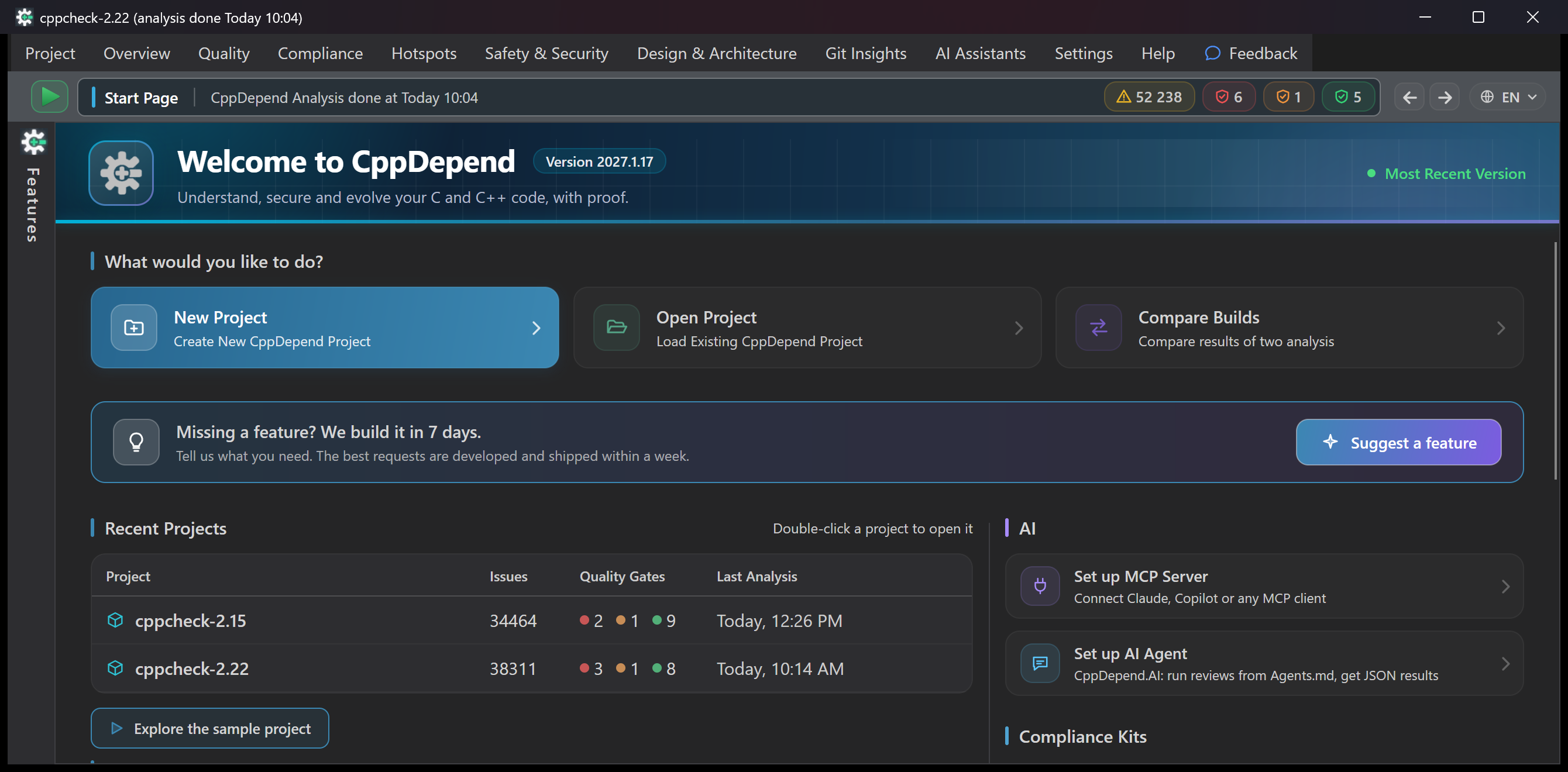
1. Start from the Start Page
When no project is loaded, CppDepend opens on the Start Page. It gathers the three entry points you need on day one:
| Card | Use it to |
|---|---|
| New Project | Create a CppDepend project (.cdproj) that points to your sources. This guide follows this path. |
| Open Project | Reload a project created earlier. Recent projects are also listed below, with their issue count and quality gates; double-click one to open it. |
| Compare Builds | Compare two analysis results, for example two releases of the same product. |
Not ready to analyze your own code yet? Explore a sample project loads a ready-made analysis so you can discover the dashboard and the rules first.
2. Create the project
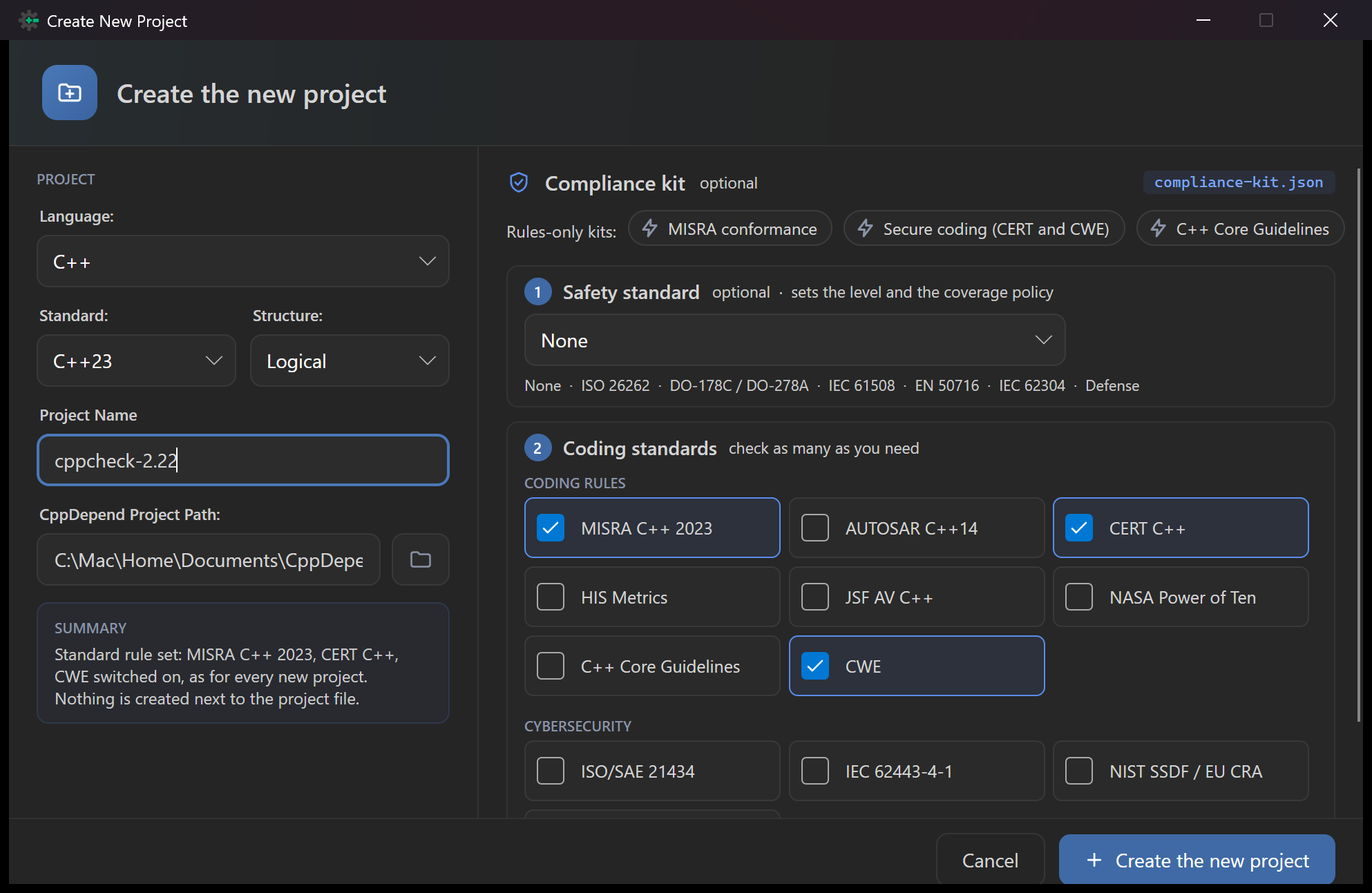
Click New Project. The Create New Project dialog asks for a few settings:
| Field | What to enter |
|---|---|
| Language / Standard | C or C++, and the language standard the parser should assume (C++23 by default). |
| Structure | Logical groups code by namespaces and types; the physical layout follows folders. |
| Project Name | A short name shown in the title bar and in reports, here cppcheck-2.22. |
| CppDepend Project Path | Where the .cdproj file should be saved. Known issue in 2027.1: the typed path is ignored; the project file and its analysis results are always saved under Documents\CppDepend Projects. Look there if you cannot find your project. |
| Compliance kit (optional) | Pick a safety standard (ISO 26262, DO-178C, IEC 61508...) to apply its rules, level and coverage policy in one go. See Compliance Kits. |
| Coding standards | Tick the rule sets to switch on. MISRA C++ 2023, CERT C++ and CWE are on by default. |
The Summary box restates what will be enabled; with the defaults it reads that MISRA C++ 2023, CERT C++ and CWE are switched on, and that nothing is created next to the project file. Click Create the new project.
3. Tell CppDepend what to scan
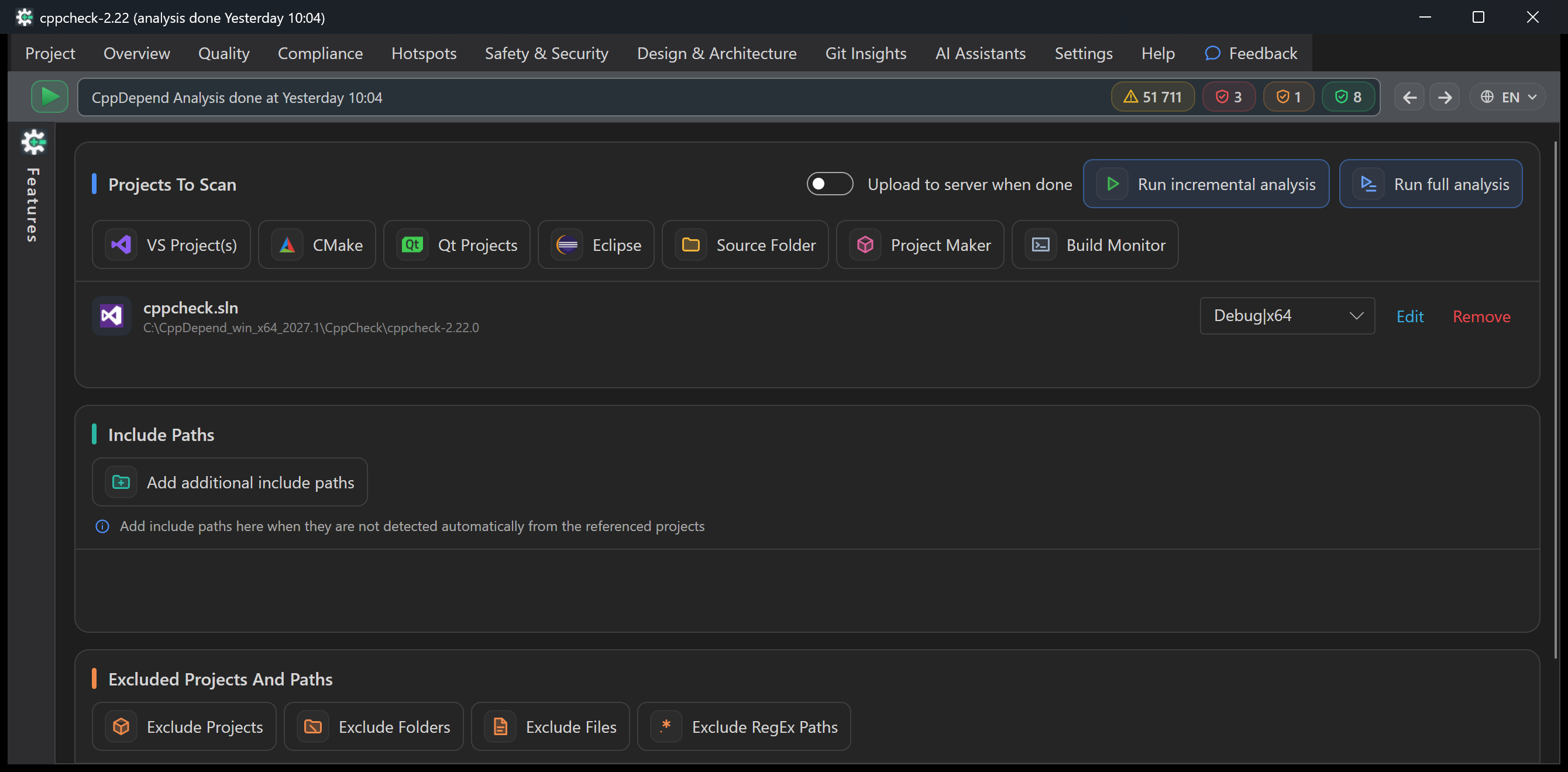
The new project opens on Projects To Scan. Choose how your code is built:
| Source | When to use it |
|---|---|
| VS Project(s) | Visual Studio solutions (.sln) or projects (.vcxproj). Include paths, defines and configurations are read from the projects. |
| CMake | A CMake build (CppDepend uses its compilation database). |
| Qt Projects, Eclipse | Qt .pro files and Eclipse CDT projects. |
| Source Folder | Any folder of sources, when there is no build description. |
| Project Maker, Build Monitor | Describe a project by hand, or record the compiler calls of any build system. |
For Cppcheck we click VS Project(s), then Choose Solution or Project... and select cppcheck.sln. CppDepend lists the projects of the solution; untick the ones you do not want (here the testrunner test project) and click Ok. Select All and Unselect All tick or untick every project at once; Cancel closes the dialog without changing the project.
Cppcheck 2.22 has three projects: cli\cli.vcxproj (the command line), lib\cppcheck.vcxproj (the analysis engine) and test\testrunner.vcxproj (the unit tests). Only the first two are analyzed here. Note: in 2027.1 the list drops the first underscore of each path (CppDependwin_x64_2027.1 instead of CppDepend_win_x64_2027.1); the real path is used for the analysis.
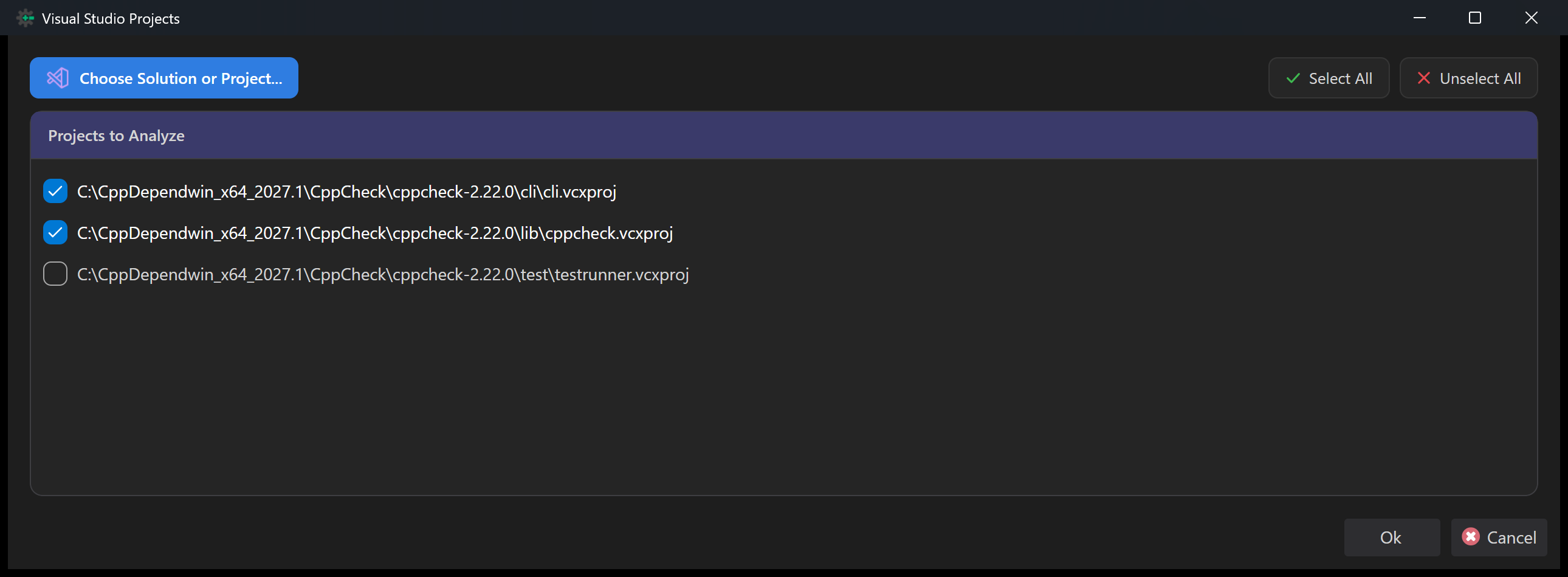
cppcheck.sln: testrunner is unticked.Back on Projects To Scan (also reachable later from Settings > Code To Analyze), the solution is listed with its folder and its build configuration (Debug|x64, chosen in the drop-down). Edit reopens the project selection, Remove takes the solution out of the project. Below, Include Paths adds include folders that are not found in the projects, and Excluded Projects And Paths leaves out projects, folders, files or paths matching a regular expression. The top bar holds Upload to server when done, Run incremental analysis and Run full analysis.
4. Run the analysis
Click Run full analysis. The Analysis Logs panel shows the progress: CppDepend parses every source file with Clang, builds the code model, computes the metrics and runs the rules. On Cppcheck (two projects, about 69,000 lines) the full run took about nine minutes on a 4-core machine.
Later runs can use Run incremental analysis, which re-parses only what changed. Switch on Upload to server when done to publish each result to CppDepend Server for your team.
5. Read the Quality Dashboard
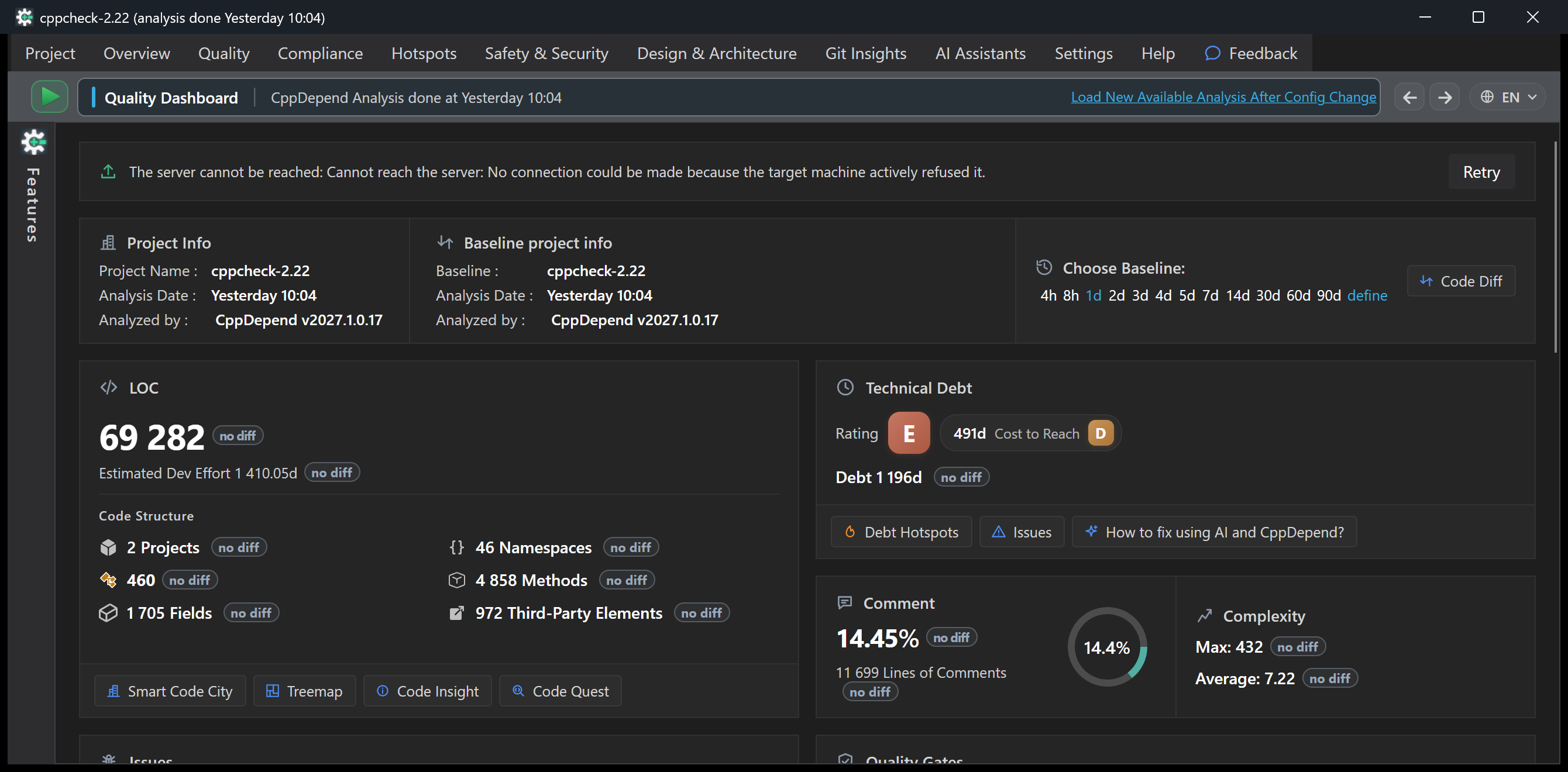
When the analysis ends, the Quality Dashboard opens. Each tile is a door to a detailed view:
| Tile | What it tells you (Cppcheck 2.22) |
|---|---|
| Project Info / Baseline | Which result you are looking at (cppcheck-2.22, analyzed by CppDepend v2027.1.0.17), and the baseline it is compared with. Pick another baseline (4h, 8h, 1d... 90d, or define) or click Code Diff to see what changed. After a first analysis there is no older result: the baseline is the analysis itself (the default setting, in Settings > General, is 30 days), so every tile shows a no diff badge. |
| LOC | 69,282 lines of code (estimated development effort 1,410 days) in 2 projects, 46 namespaces, 460 types, 4,858 methods, 1,705 fields and 972 third-party elements. Shortcuts open Smart Code City, Treemap, Code Insight and Code Quest. |
| Technical Debt | The debt rating (A to E) and the effort to reach the next rating: Cppcheck is rated E, and 491 days of work would bring it to D. Debt Hotspots lists where to start, Issues lists the violations, and How to fix using AI and CppDepend? explains the AI-assisted workflow. |
| Comment / Complexity | Comment ratio (14.45%, 11,699 lines of comments) and cyclomatic complexity: maximum 452, average 7.22 per method. |
| Issues | All rule violations (51,711), split by severity (critical, high...). |
| Quality Gates | The pass/fail checks that decide if a build is good enough to ship: 66.7% pass (3 fail, 1 warn, 8 pass out of 12). Configure opens their settings. |
The badges in the top bar (51,711 issues, 3 failed, 1 warned and 8 passed quality gates) stay visible on every page. If a CppDepend Server is configured but not running, a band at the top of the dashboard says that the server cannot be reached, with a Retry button; it does not affect local analysis.
Where to go next
- Follow dependencies in the Call Graph and the Dependency Matrix.
- Find the large and complex parts of the code with the Code Map.
- Review security findings in Safety & Security.
Thanks for your feedback. Tell us more or request a feature.