
User Guides
ROS 2 Analysis Guide
What the ROS 2 section of CppDepend shows, how to read each page, and what to do about each finding. Illustrated with a demo package (2 nodes, 6 publishers, 4 subscriptions, 3 timers, 1 service, 1 client, 35 findings).
Introduction
A ROS 2 system fails quietly. A topic with the wrong QoS, a message type that differs by one word, a callback that sleeps, a service client waiting for an answer that can never be delivered: none of these produces a compile error, and most produce no run-time error either. Nodes start, and nothing happens.
The ROS 2 section of the Features tree rebuilds the architecture of a C++ (rclcpp) package from its sources, package.xml, CMakeLists.txt, Python launch files and YAML parameter files, and checks it with 32 rules. It answers: who publishes and who listens, do the QoS profiles match, what runs in which callback group on which executor, can a callback block or deadlock, are parameters declared and used, does the build and launch description agree with the code?
Nothing is run and no ROS installation is needed: the analysis is static, like the rest of CppDepend.
ROS2-TOPIC / QOS / SRV / CB / EXEC / LIFE / PARAM / BUILD / LAUNCH.ROS2: Issues panel, report, quality gates.How it works
- Nodes. Every class that derives from
rclcpp::Nodeorrclcpp_lifecycle::LifecycleNodeis a node. A class registered withRCLCPP_COMPONENTS_REGISTER_NODEis marked as a component. The node name is read from the constructor call. - Entities. Publishers, subscriptions, timers, services, clients, action servers and clients and parameters are read from the
create_*anddeclare_parametercalls. Topic names are read from string literals and fromconststrings; a name built at run time is skipped. QoS is read fromrclcpp::QoS(...), from the chained calls (.reliable(),.transient_local()…) and from the predefined profiles. - Callbacks. Method callbacks and lambdas are turned into functions of their own. The call graph then follows the calls: a helper called from a callback counts as part of the callback (for example “calls spin_some (through helper)”).
- Callback groups and executors. Callback groups (MutuallyExclusive or Reentrant),
rclcpp::spin,SingleThreadedExecutorandMultiThreadedExecutorare read from the code ofmain(). - Build and launch.
package.xml(dependencies),CMakeLists.txt(find_package, executables),*.launch.py(Node(...),ComposableNode(...), names, namespaces, remaps) and YAML parameter files. - Rules and result. The 32 rules run on this model. The result is stored next to the analysis result as
<result>.ros2.json; the pages read it, and every finding is also sent to the Issues panel.
The demo project
The screenshots show a small package demo_pkg written to contain one example of almost every mistake. The numbers you will see in the pages:
| Item | Value | Detail |
|---|---|---|
| Nodes | 2 | sensor (class SensorNode) and control_node (class ControlNode) |
| Publishers / subscriptions | 6 / 4 | SensorNode: 4 publishers; ControlNode: 2 publishers and 4 subscriptions |
| Timers, services, clients | 3, 1, 1 | 2 timers in SensorNode, 1 in ControlNode; service /reset; client /add_two_ints |
| Callbacks | 8 | timers, subscriptions and the service callback |
| Executor | 1 | MultiThreadedExecutor created in main |
| Findings | 35 | 18 High, 4 Medium, 13 Other |
1 · ROS 2 Overview
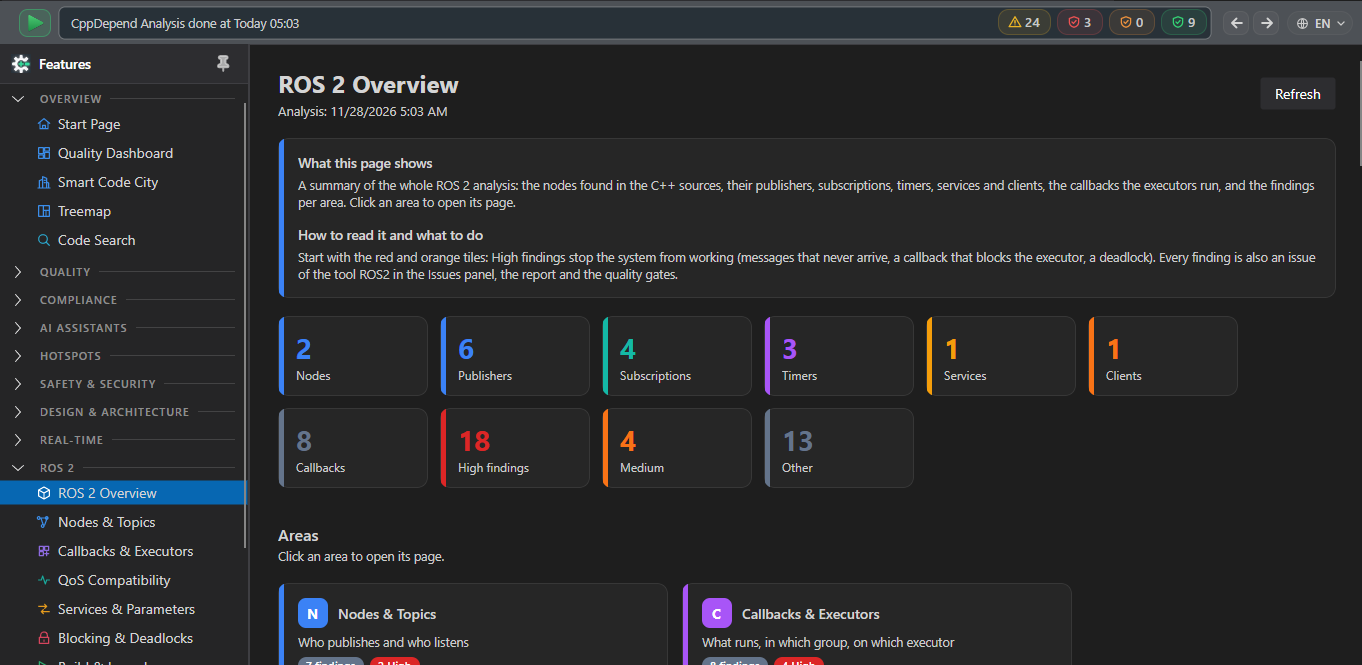
What is on the screen
- “What this page shows” card: the explanation of the page. Every page of the section starts with one.
- Tiles, in two rows: Nodes, Publishers, Subscriptions, Timers, Services, Clients, Callbacks, then the findings as High (red), Medium (orange) and Other (grey).
- Areas: one card per page below (Nodes & Topics, Callbacks & Executors, and so on) with its number of findings and how many are High. A click opens the page.
- Under the areas: the baseline card, the standards evidence card and the complete list of findings grouped by rule.
- Refresh (top right) reloads the result of the last analysis.
How to read it
Start with the red tile. A High finding means the system cannot work as written: messages that never arrive, a callback that stops the executor, a deadlock. A green tile means nothing of that class was found. The area cards tell you which page to open first: in the demo, Nodes & Topics has 7 findings (2 High) and Callbacks & Executors has 8 (4 High).
What to do
Open the area with the most High findings. Once the picture is clear, use Set baseline (see Baseline) so that later analyses show only what is new.
Rules of this page
No rules of its own: it summarises the other pages.
In the demo project
- 2 nodes, 6 publishers and 4 subscriptions: the topics are not all connected (see page 2).
- 18 High findings come mostly from QoS and type mismatches, blocking callbacks, the deadlock, missing
rclcpp::initand the lost publisher handle.
2 · Nodes & Topics
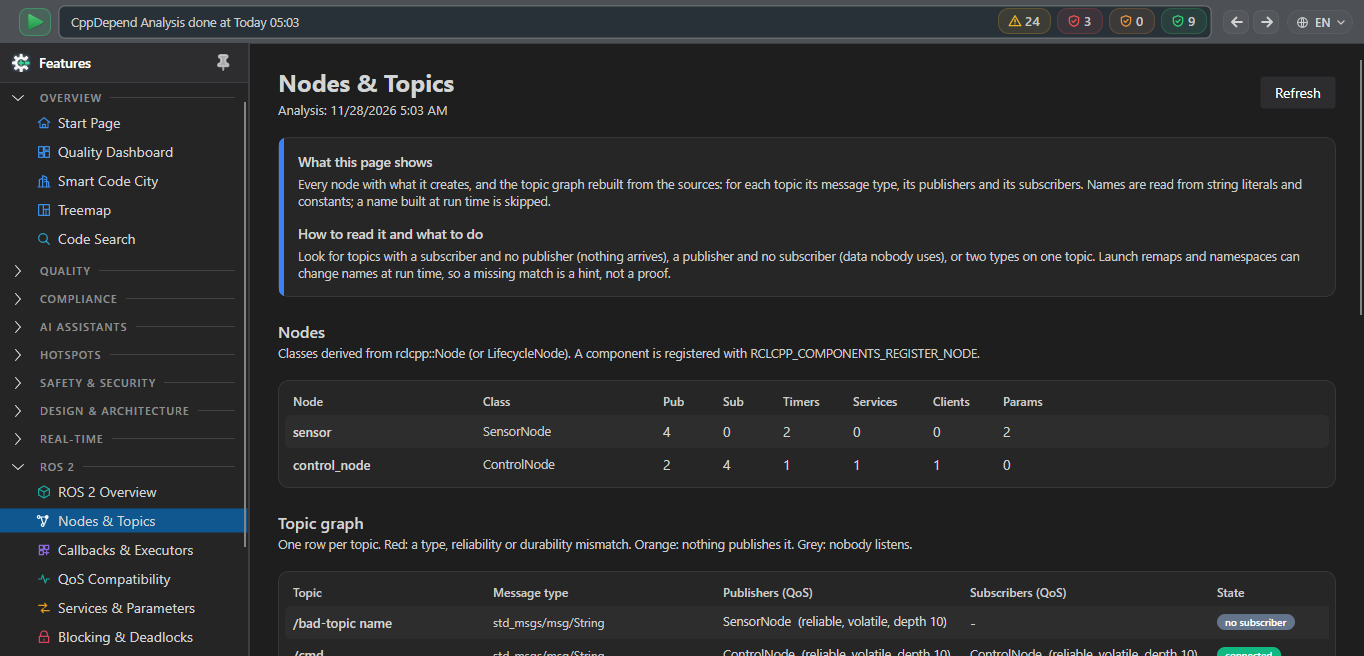
What is on the screen
- Nodes: one row per node with its class and the number of publishers (Pub), subscriptions (Sub), timers, services, clients and parameters. A node registered as a component is marked.
- Topic graph: one row per topic with the message type, the publishers and the subscribers (each with its QoS: reliability, durability, history and depth) and a State badge.
| State badge | Meaning |
|---|---|
| connected | At least one publisher and one subscriber, same type, compatible QoS. |
| no subscriber | Grey: published, nobody listens. |
| no publisher | Orange: subscribed, nothing is published. |
| mismatch | Red: a type, reliability or durability mismatch. The two sides never connect. |
How to read it
Look for topics that cannot work: a subscriber with no publisher (nothing arrives), two different types on one topic, a QoS mismatch. A publisher with no subscriber is often fine (rviz, rosbag, another package), but it is also what a typo looks like: /scan vs /scann gives one orange and one grey row.
What to do
- Compare the names of the orange and grey rows: a pair that differs by one character is a typo.
- Check the namespace of the node in the launch file: a relative name
scanbecomes/ns/scan. - Use one constant for each topic name and type, shared by both nodes.
Rules of this page
| Rule | What it detects | How to fix | Standards |
|---|---|---|---|
ROS2-TOPIC-01 | Subscription without publisher | Check the topic name and namespace, or start the node that publishes it. With a launch remap the names may no longer match. | |
ROS2-TOPIC-02 | Publisher without subscriber | Fine for topics read by tools such as rviz or rosbag; otherwise remove the publisher or add the subscriber. | |
ROS2-TOPIC-03 | Topic type mismatch | Publisher and subscriber must use the same message type: they never connect otherwise. | |
ROS2-TOPIC-04 | Invalid topic, service or action name | Use letters, digits and underscores separated by '/'; a segment cannot start with a digit. | |
ROS2-TOPIC-05 | Node subscribes to its own topic | Check that the callback does not publish the message again (infinite loop). |
In the demo project
/bad-topic name(std_msgs/msg/String) is published by SensorNode and has no subscriber; its name also contains a hyphen and a space (ROS2-TOPIC-04)./scan: SensorNode publishesstd_msgs/msg/Float32, ControlNode subscribes withstd_msgs/msg/String(ROS2-TOPIC-03)./nobody_publishesis subscribed and not published (ROS2-TOPIC-01);/lost_handle,/bad-topic nameand/dynare published and not subscribed (ROS2-TOPIC-02).- ControlNode publishes and subscribes to
/cmdand receives its own messages (ROS2-TOPIC-05); the row shows connected.
3 · Callbacks & Executors
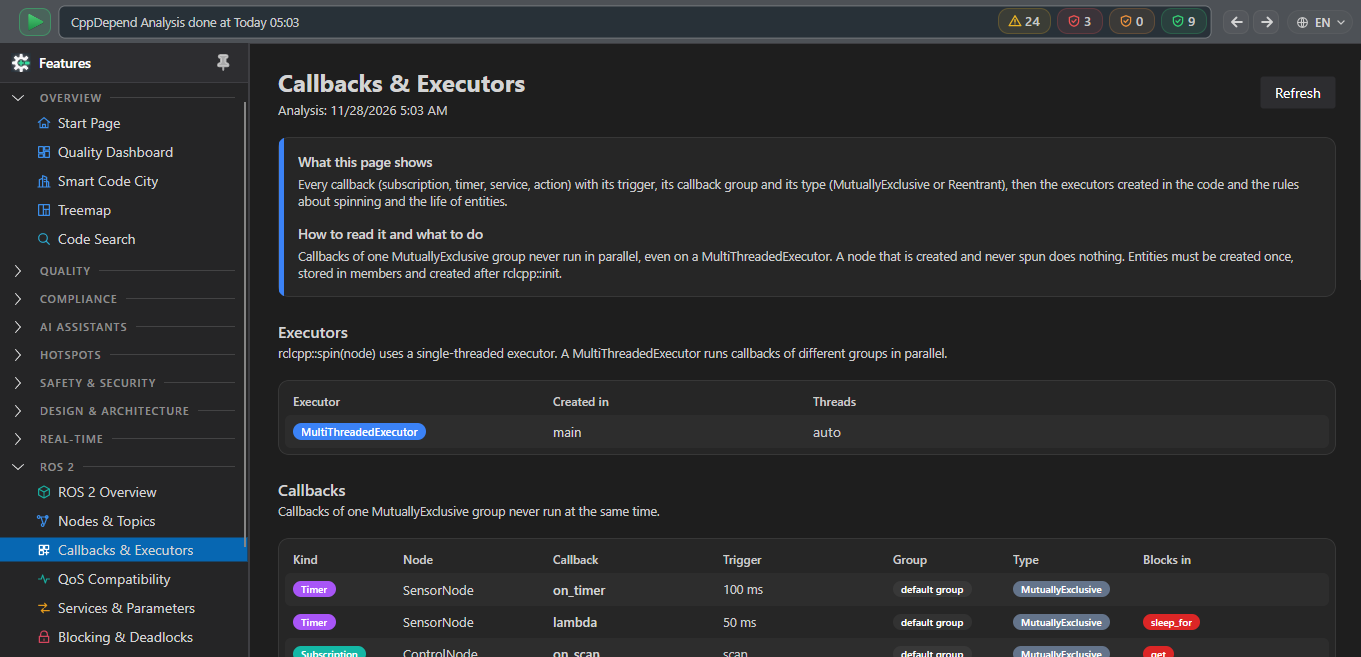
What is on the screen
- Executors: each executor created in the code, where it is created (function) and its number of threads (auto = hardware concurrency).
rclcpp::spin(node)uses a single-threaded executor. - Callbacks: every subscription, timer, service and action callback with:
- Kind (Timer, Subscription, Service…) and Node;
- Callback name (lambda for an anonymous function);
- Trigger: the period of a timer or the topic or service name;
- Group: the callback group (default group when none is given);
- Type: MutuallyExclusive (grey) or Reentrant (green);
- Blocks in: the blocking call found in the callback (red), empty when none.
- Below: the findings about spinning and the life of entities.
How to read it
The rule to keep in mind: callbacks of one MutuallyExclusive group never run at the same time, even on a MultiThreadedExecutor. By default every callback of a node is in the same default group, so a multi-threaded executor gives no parallelism unless you create groups. A Reentrant group allows the callbacks of that group to run in parallel, including a callback with itself, so its shared data needs protection.
A red “Blocks in” cell means that while that callback runs, every other callback of its group (or, on a single-threaded executor, of the whole process) waits.
What to do
- Give independent work its own group:
auto g = create_callback_group(rclcpp::CallbackGroupType::Reentrant); rclcpp::SubscriptionOptions o; o.callback_group = g; sub_ = create_subscription<std_msgs::msg::String>("cmd", 10, cb, o); - Create entities once, in the constructor, and keep them in members.
- Call
rclcpp::initfirst andrclcpp::shutdownlast inmain(); spin frommain()only.
Rules of this page
| Rule | What it detects | How to fix | Standards |
|---|---|---|---|
ROS2-EXEC-01 | Spin inside a node constructor | Create the node, then spin it from main() or from an executor. | |
ROS2-EXEC-02 | Node created but never spun | Call rclcpp::spin(node) or add the node to an executor and spin it. | |
ROS2-EXEC-03 | Timer callback longer than its period | Shorten the callback, increase the period, or move the work to another thread. | |
ROS2-EXEC-04 | Second spin never reached | Add all the nodes to one executor and spin it once. | |
ROS2-EXEC-05 | Multi-threaded executor with a single callback group | Create Reentrant or separate MutuallyExclusive groups for the callbacks that may run in parallel. | |
ROS2-LIFE-01 | rclcpp::init missing | Call rclcpp::init(argc, argv) first in main(). | |
ROS2-LIFE-02 | Created entity is destroyed at once | Keep the returned shared pointer in a member variable. | |
ROS2-LIFE-03 | Entity created inside a callback | Create publishers, subscriptions and timers once, in the constructor. | CWE-401 (Missing release of memory) |
ROS2-LIFE-04 | rclcpp::shutdown missing | Call rclcpp::shutdown() before leaving main(). |
In the demo project
- One
MultiThreadedExecutorcreated inmain; but SensorNode’s callbacks are all in the default group (ROS2-EXEC-05). - The 50 ms timer of SensorNode sleeps 200 ms: it can never keep its rate (ROS2-EXEC-03).
- The ControlNode constructor calls spin (ROS2-EXEC-01);
main()spins twice, so the second spin is reached only after Ctrl-C (ROS2-EXEC-04). main()never callsrclcpp::init(ROS2-LIFE-01, creating a node will throw) norrclcpp::shutdown(ROS2-LIFE-04).- The publisher
lost_handleis not stored and is destroyed at once (ROS2-LIFE-02); the publisherdynis created in a callback at every call (ROS2-LIFE-03).
4 · QoS Compatibility
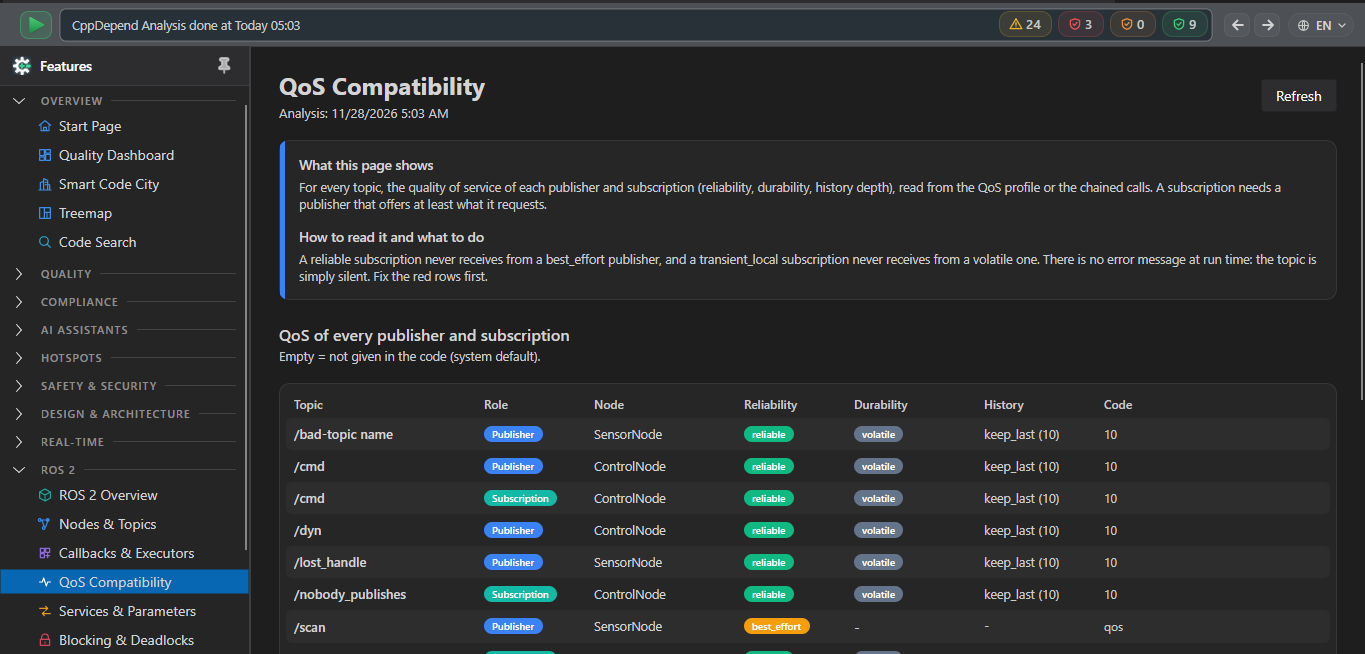
What is on the screen
One table for the whole system: Topic, Role (Publisher or Subscription), Node, Reliability, Durability, History and Code (how the QoS was written: a depth such as 10, a profile name, or the variable that holds it, such as qos). An empty cell means the code does not set it: the system default applies. Best-effort is orange, reliable is green.
How to read it
Compatibility rules of DDS, in one table:
| Publisher offers | Subscription requests | Result |
|---|---|---|
| reliable | reliable or best_effort | connected |
| best_effort | best_effort | connected |
| best_effort | reliable | never connects (ROS2-QOS-01) |
| transient_local | transient_local or volatile | connected |
| volatile | transient_local | never connects (ROS2-QOS-02) |
There is no error message at run time: the topic is simply silent. ros2 topic info -v shows the same incompatibility, but only after you start the system.
What to do
- Make both sides use the same profile. Define it once:
// in a shared header inline rclcpp::QoS ScanQoS() { return rclcpp::SensorDataQoS(); } // publisher and subscription create_publisher<sensor_msgs::msg::LaserScan>("scan", ScanQoS()); - Use
KeepLast(N)unless every message must be kept (ROS2-QOS-03). - When the code builds the QoS in a variable (Code column shows a name), the analysis reads the chained calls; if it cannot, the cells stay empty and no mismatch is reported.
Rules of this page
| Rule | What it detects | How to fix | Standards |
|---|---|---|---|
ROS2-QOS-01 | QoS reliability mismatch | A reliable subscription cannot receive from a best_effort publisher: make both reliable or both best_effort. | |
ROS2-QOS-02 | QoS durability mismatch | A transient_local subscription needs a transient_local publisher: set the same durability on both. | |
ROS2-QOS-03 | KeepAll history (unbounded memory) | Use KeepLast(N) unless every message must be kept; memory grows when the other side is slow. | CWE-770 (Allocation without limits) |
In the demo project
/scan: SensorNode publishesbest_effort, ControlNode requests reliable: no message is delivered (ROS2-QOS-01). The Code column showsqos, a variable./status: the subscription requeststransient_local, the publisher isvolatile(ROS2-QOS-02).- The other topics use the default: reliable, volatile, keep_last (10).
5 · Services & Parameters
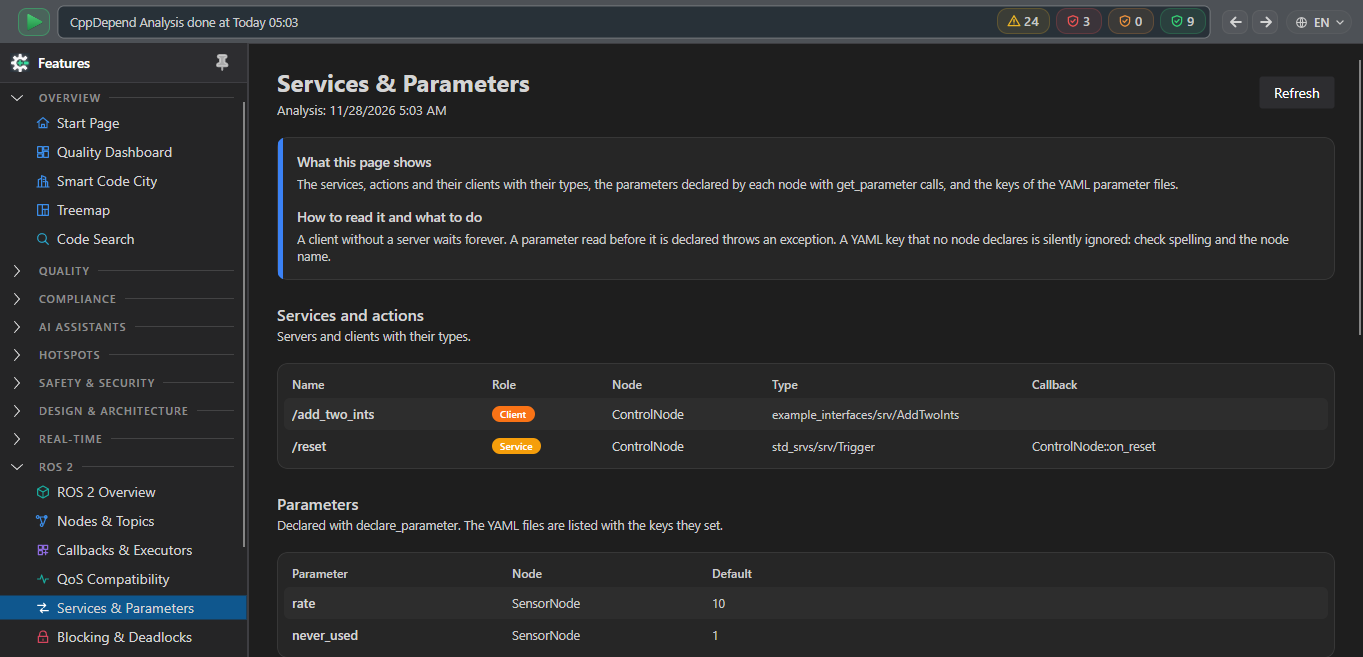
What is on the screen
- Services and actions: Name, Role (Service/server, Client, Action server, Action client), Node, Type (
package/srv/Name) and, for a server, the Callback that answers. - Parameters: each
declare_parameterwith its node and default value. - Below: the YAML parameter files with the keys they set, and the findings.
How to read it
A client without a server waits forever (or until its timeout). A parameter read before it is declared throws ParameterNotDeclaredException. A YAML key that no node declares is ignored silently: the usual causes are a misspelt key and a wrong node name in the file.
What to do
- Check the service name and namespace, and that its package is built and launched. A server in another package is normal: the message says “may be in another package”.
- Declare every parameter in the constructor:
declare_parameter("rate", 10); ... int rate = get_parameter("rate").as_int(); - Remove declared parameters nobody reads, and YAML keys nobody declares.
Rules of this page
| Rule | What it detects | How to fix | Standards |
|---|---|---|---|
ROS2-PARAM-01 | Parameter read but not declared | Call declare_parameter(name, default) in the constructor before get_parameter. | |
ROS2-PARAM-02 | Parameter declared but never read | Read it with get_parameter, or remove the declaration. | |
ROS2-PARAM-03 | Parameter file key not declared | Declare the parameter in the node, or remove the key from the file. | |
ROS2-SRV-01 | Service client without server | Check the service name, or start the node that provides it. | |
ROS2-SRV-02 | Service type mismatch | Client and server must use the same .srv type. | |
ROS2-SRV-03 | Service server without client | Fine for services called from the command line; otherwise remove it. |
In the demo project
- The client
/add_two_ints(example_interfaces/srv/AddTwoInts) has no server in the sources (ROS2-SRV-01). - The service
/reset(std_srvs/srv/Trigger, callback ControlNode::on_reset) has no client (ROS2-SRV-03). missing_paramis read but not declared (ROS2-PARAM-01);rateandnever_usedare declared and never read (ROS2-PARAM-02).params.yamlsetsgainandunknown_option, which no node declares (ROS2-PARAM-03).
6 · Blocking & Deadlocks
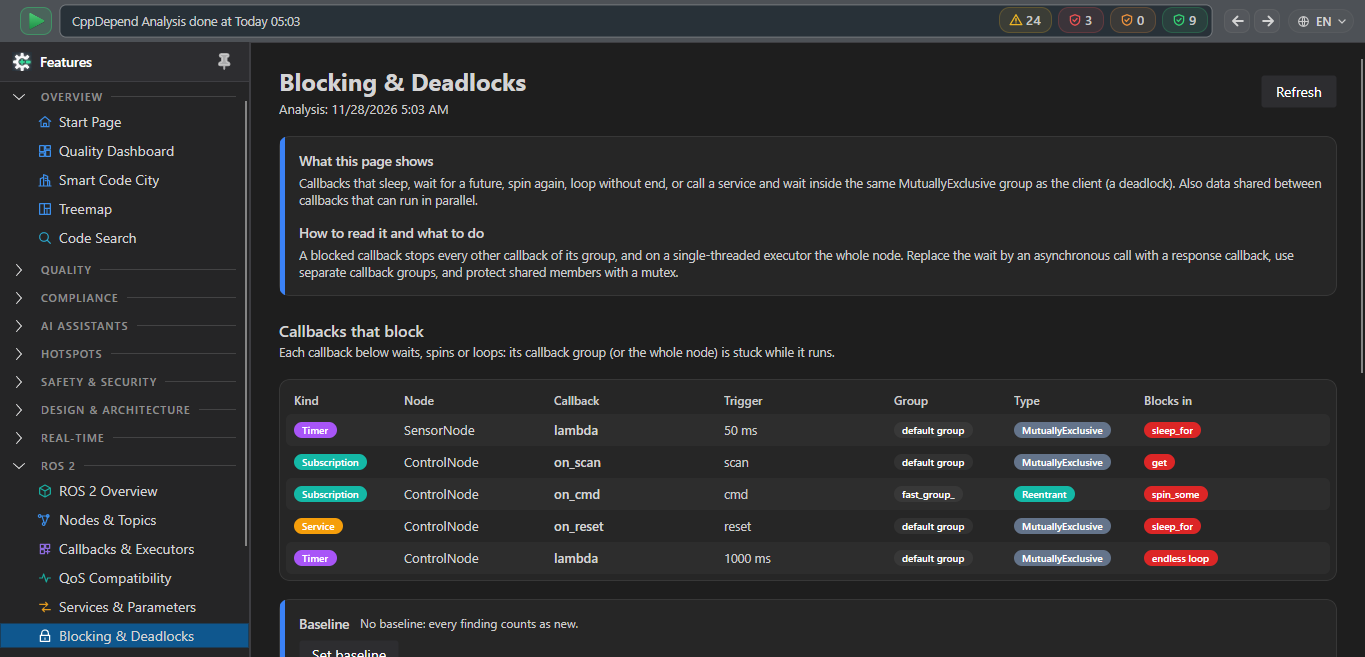
What is on the screen
- Callbacks that block: only the callbacks that wait, spin or loop, with Kind, Node, Callback, Trigger, Group, Type and the blocking call in red. Recognised:
sleep_for,sleep_until,future.get()/wait(),spin_until_future_complete,spin_some,spin,wait_for_service, an endless loop (while (true)withoutbreakorreturn). - The Baseline card (see Baseline): in the screenshot “No baseline: every finding counts as new” and the Set baseline button.
- The findings, including data shared between callbacks.
How to read it
While a callback blocks, every other callback of the same MutuallyExclusive group waits, and on a single-threaded executor the whole node does. The worst case is the deadlock: a callback sends a service request with a client of its own group, then waits for the answer; the answer is delivered by a callback of that same group, which cannot start because the first one has not returned.
What to do
- Replace the wait by an asynchronous call with a response callback:
client_->async_send_request(req, [this](rclcpp::Client<AddTwoInts>::SharedFuture f) { RCLCPP_INFO(get_logger(), "sum %ld", f.get()->sum); }); - If a synchronous call is unavoidable: put the client in its own (or a Reentrant) group and use a
MultiThreadedExecutor. - Replace
sleep_forby a timer; run an endless loop in its own thread, or do one step per timer call. - Protect a member written by one callback and read by another with a mutex or
std::atomic.
Rules of this page
| Rule | What it detects | How to fix | Standards |
|---|---|---|---|
ROS2-CB-01 | Blocking call in a callback | Never sleep or wait in a callback: use a timer, an asynchronous call with a response callback, or another thread. | |
ROS2-CB-02 | Spin inside a callback | Do not spin from a callback: the executor is already spinning. Use callbacks and futures instead. | |
ROS2-CB-03 | Synchronous service call deadlock | Put the client in its own callback group (or a Reentrant one) and use a MultiThreadedExecutor, or use async_send_request with a response callback. | CWE-833 (Deadlock) |
ROS2-CB-04 | Endless loop in a callback | Do one step per call and let a timer call it again, or run the loop in its own thread. | CWE-835 (Infinite loop) |
ROS2-CB-05 | Unprotected data shared between callbacks | Protect the member with a mutex (std::lock_guard) or use std::atomic, or put the callbacks in one MutuallyExclusive group. | CWE-362 (Race condition), CWE-820 (Missing synchronization) |
In the demo project
- 5 blocking callbacks: the lambda timer of SensorNode (
sleep_for),on_scan(get),on_cmd(spin_some, Reentrant groupfast_group_),on_reset(sleep_for) and the 1000 ms lambda timer of ControlNode (endless loop). on_scanwaits for/add_two_intswith a client of its own MutuallyExclusive group: deadlock (ROS2-CB-03).on_cmdreachesspin_somethrough a helper (ROS2-CB-02).counter_is written by the timer and read byon_cmdwithout protection (ROS2-CB-05).
7 · Build & Launch
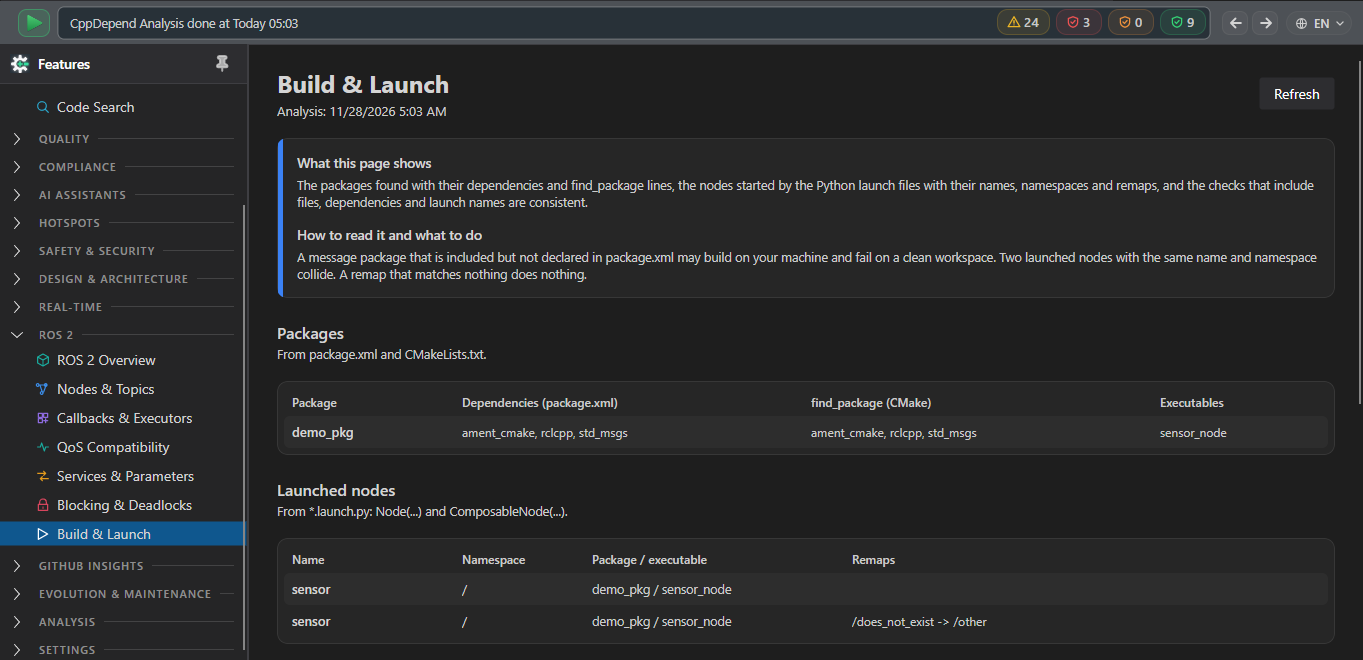
What is on the screen
- Packages (from
package.xmlandCMakeLists.txt): the dependencies declared inpackage.xml, thefind_packagelines, and the executables. - Launched nodes (from
*.launch.py,Node(...)andComposableNode(...)): name, namespace, package / executable and the remaps (old -> new). - Below: the findings of the consistency checks, and the YAML files used by the launch.
How to read it
A message package that is included but not declared in package.xml builds on your machine (it is installed) and fails in a clean workspace or a CI container, or builds in the wrong order. Two launched nodes with the same name and namespace collide: their topics and parameters mix. A remap that matches nothing does nothing.
What to do
- For every
#include <pkg/...>add<depend>pkg</depend>topackage.xml, andfind_package(pkg REQUIRED)withament_target_dependenciesin CMake. - Give each launched node a unique
nameornamespace. - Check the left side of a remap against the name used in the code (or the full name after the namespace).
Rules of this page
| Rule | What it detects | How to fix | Standards |
|---|---|---|---|
ROS2-BUILD-01 | Included package missing from package.xml | Add a <depend> line for the package in package.xml. | |
ROS2-BUILD-02 | Included package missing from CMake find_package | Add find_package(<package> REQUIRED) and list it in ament_target_dependencies. | |
ROS2-LAUNCH-01 | Launch remap matches nothing | Check the name on the left of the remap: it must match a topic or service name used by the node. | |
ROS2-LAUNCH-02 | Duplicate node name in launch | Give each node a unique name or namespace. |
In the demo project
- Package
demo_pkg: dependencies ament_cmake, rclcpp, std_msgs, the same infind_package; executablesensor_node. nodes.cppincludesstd_srvsandexample_interfacesheaders thatpackage.xmldoes not declare (ROS2-BUILD-01, twice).- The launch file starts two nodes called
sensorin namespace/(ROS2-LAUNCH-02); the second remaps/does_not_exist -> /other, which matches nothing (ROS2-LAUNCH-01).
Reading a finding
Findings are listed on the Overview and on the page of their area, grouped by rule in expanders. Each finding shows:
- Severity colour: red High, orange Medium, grey Other.
- Message: names the node, the callback or entity and the cause (“the subscription callback on_scan of ControlNode (scan) blocks in fut.get()…”).
- Location
file:line: click to copy. - Open button: opens the source file at that line (in the editor chosen in the options; in the browser through VS Code).
- Standards chips for the rules that have a real counterpart (see below).
- New / in baseline badge once a baseline exists.
For findings in package.xml, CMakeLists.txt, a launch file or a YAML file, the Open button opens that file.
Baseline & new findings
For CI gates you usually care about what is new. The Baseline card (visible on every findings page, as in the Blocking & Deadlocks screenshot, where it says “No baseline: every finding counts as new”) takes the current findings as the reference.
- Set baseline / Update baseline: stores a fingerprint of every finding (rule + file name + function + message without numbers). Moving code does not make a finding new.
- Clear baseline: forgets the reference.
- Show only new findings here: filters the page.
- Only new findings in the Issues panel and quality gates: from the next analysis, findings already in the baseline are not sent to the Issues panel, the report and the gates. A gate on “no High issue of tool ROS2” then means “no new High issue”.
- The findings fixed since the baseline are listed when some disappeared.
The baseline file <project>.findings-baseline.json is shared with the RTOS analysis (one section per tool). If the project file is unknown the card says so: analyse from a saved project. Without the GUI (CI): make-baseline.py <project> <analysis-result> [--only-new].
Standards evidence
Most ROS 2 rules are design rules of the framework and have no equivalent in a coding standard. Only the rules with a real counterpart carry standards chips, and the Overview ends with a Standards evidence card (green = checked, no finding; red = findings).
| Rule | Reference |
|---|---|
ROS2-CB-03 synchronous service call deadlock | CWE-833 Deadlock |
ROS2-CB-04 endless loop in a callback | CWE-835 Loop with unreachable exit condition |
ROS2-CB-05 unprotected shared data | CWE-362 Race condition; CWE-820 Missing synchronization |
ROS2-LIFE-03 entity created in a callback | CWE-401 Missing release of memory |
ROS2-QOS-03 KeepAll history | CWE-770 Allocation without limits |
Issues & quality gates
Findings are imported issues of the tool ROS2. They appear in the Issues panel, in the HTML report and in the quality gates; the issue type is the rule id (ROS2-CB-03…). With Only new findings enabled, baseline findings are left out of all three.
// all High issues of the ROS 2 analysis
from i in ImportedIssues where i.Tool == "ROS2" && i.Severity == Severity.High select i
Typical gates: no High finding of tool ROS2; no ROS2-CB-03 (deadlock); no ROS2-QOS-01 or ROS2-TOPIC-03 (a connection that can never work).
Result files
| File | Content |
|---|---|
<result>.ros2.json | Everything the pages show: nodes, topics, QoS, callbacks, executors, services, parameters, packages, launch, findings with fingerprints and standards. |
<project>.findings-baseline.json | The baseline (RTOS and ROS 2). |
Limits
- Static analysis of C++ (
rclcpp). Python nodes (rclpy) are not analysed. - Topic, service and parameter names built at run time are skipped. Namespaces and remaps from the launch files are not applied to the graph: findings affected by them say so (“the launch files use namespaces or remaps”).
- Only Python launch files (
*.launch.py) are read; XML and YAML launch files are not. - Custom message definitions (
.msg,.srv) are not checked; a type is compared by its name. - A topic or service used with another package (or a rosbag) looks unconnected: severity of those findings is deliberately low.
- Callback groups and executors are tracked by name in the source; groups passed through several layers of functions can be missed.
Troubleshooting
| Symptom | Cause and remedy |
|---|---|
| “No ROS 2 result yet” | Run the analysis, then Refresh. Results of an older version need a new analysis. |
| The section is empty | No class derives from rclcpp::Node in the analysed sources: check that the package sources are part of the project. |
| A node is missing | Node created without a class (std::make_shared<rclcpp::Node>("x") in main) or a class defined in a macro or generated code. |
| A topic shows no publisher but you know it exists | Published by another package, or the name is built at run time. |
| QoS cells are empty | The QoS comes from a variable or a function the analysis cannot follow: the system default is assumed and no mismatch is reported. |
| Build & Launch is empty | No package.xml or *.launch.py under the project folders. |
| Baseline cannot be saved | Project file unknown: analyse from a saved project. |
All rules
32 rules.
| Rule | What it detects | How to fix | Standards |
|---|---|---|---|
ROS2-BUILD-01 | Included package missing from package.xml | Add a <depend> line for the package in package.xml. | |
ROS2-BUILD-02 | Included package missing from CMake find_package | Add find_package(<package> REQUIRED) and list it in ament_target_dependencies. | |
ROS2-CB-01 | Blocking call in a callback | Never sleep or wait in a callback: use a timer, an asynchronous call with a response callback, or another thread. | |
ROS2-CB-02 | Spin inside a callback | Do not spin from a callback: the executor is already spinning. Use callbacks and futures instead. | |
ROS2-CB-03 | Synchronous service call deadlock | Put the client in its own callback group (or a Reentrant one) and use a MultiThreadedExecutor, or use async_send_request with a response callback. | CWE-833 (Deadlock) |
ROS2-CB-04 | Endless loop in a callback | Do one step per call and let a timer call it again, or run the loop in its own thread. | CWE-835 (Infinite loop) |
ROS2-CB-05 | Unprotected data shared between callbacks | Protect the member with a mutex (std::lock_guard) or use std::atomic, or put the callbacks in one MutuallyExclusive group. | CWE-362 (Race condition), CWE-820 (Missing synchronization) |
ROS2-EXEC-01 | Spin inside a node constructor | Create the node, then spin it from main() or from an executor. | |
ROS2-EXEC-02 | Node created but never spun | Call rclcpp::spin(node) or add the node to an executor and spin it. | |
ROS2-EXEC-03 | Timer callback longer than its period | Shorten the callback, increase the period, or move the work to another thread. | |
ROS2-EXEC-04 | Second spin never reached | Add all the nodes to one executor and spin it once. | |
ROS2-EXEC-05 | Multi-threaded executor with a single callback group | Create Reentrant or separate MutuallyExclusive groups for the callbacks that may run in parallel. | |
ROS2-LAUNCH-01 | Launch remap matches nothing | Check the name on the left of the remap: it must match a topic or service name used by the node. | |
ROS2-LAUNCH-02 | Duplicate node name in launch | Give each node a unique name or namespace. | |
ROS2-LIFE-01 | rclcpp::init missing | Call rclcpp::init(argc, argv) first in main(). | |
ROS2-LIFE-02 | Created entity is destroyed at once | Keep the returned shared pointer in a member variable. | |
ROS2-LIFE-03 | Entity created inside a callback | Create publishers, subscriptions and timers once, in the constructor. | CWE-401 (Missing release of memory) |
ROS2-LIFE-04 | rclcpp::shutdown missing | Call rclcpp::shutdown() before leaving main(). | |
ROS2-PARAM-01 | Parameter read but not declared | Call declare_parameter(name, default) in the constructor before get_parameter. | |
ROS2-PARAM-02 | Parameter declared but never read | Read it with get_parameter, or remove the declaration. | |
ROS2-PARAM-03 | Parameter file key not declared | Declare the parameter in the node, or remove the key from the file. | |
ROS2-QOS-01 | QoS reliability mismatch | A reliable subscription cannot receive from a best_effort publisher: make both reliable or both best_effort. | |
ROS2-QOS-02 | QoS durability mismatch | A transient_local subscription needs a transient_local publisher: set the same durability on both. | |
ROS2-QOS-03 | KeepAll history (unbounded memory) | Use KeepLast(N) unless every message must be kept; memory grows when the other side is slow. | CWE-770 (Allocation without limits) |
ROS2-SRV-01 | Service client without server | Check the service name, or start the node that provides it. | |
ROS2-SRV-02 | Service type mismatch | Client and server must use the same .srv type. | |
ROS2-SRV-03 | Service server without client | Fine for services called from the command line; otherwise remove it. | |
ROS2-TOPIC-01 | Subscription without publisher | Check the topic name and namespace, or start the node that publishes it. With a launch remap the names may no longer match. | |
ROS2-TOPIC-02 | Publisher without subscriber | Fine for topics read by tools such as rviz or rosbag; otherwise remove the publisher or add the subscriber. | |
ROS2-TOPIC-03 | Topic type mismatch | Publisher and subscriber must use the same message type: they never connect otherwise. | |
ROS2-TOPIC-04 | Invalid topic, service or action name | Use letters, digits and underscores separated by '/'; a segment cannot start with a digit. | |
ROS2-TOPIC-05 | Node subscribes to its own topic | Check that the callback does not publish the message again (infinite loop). |
Thanks for your feedback. Tell us more or request a feature.